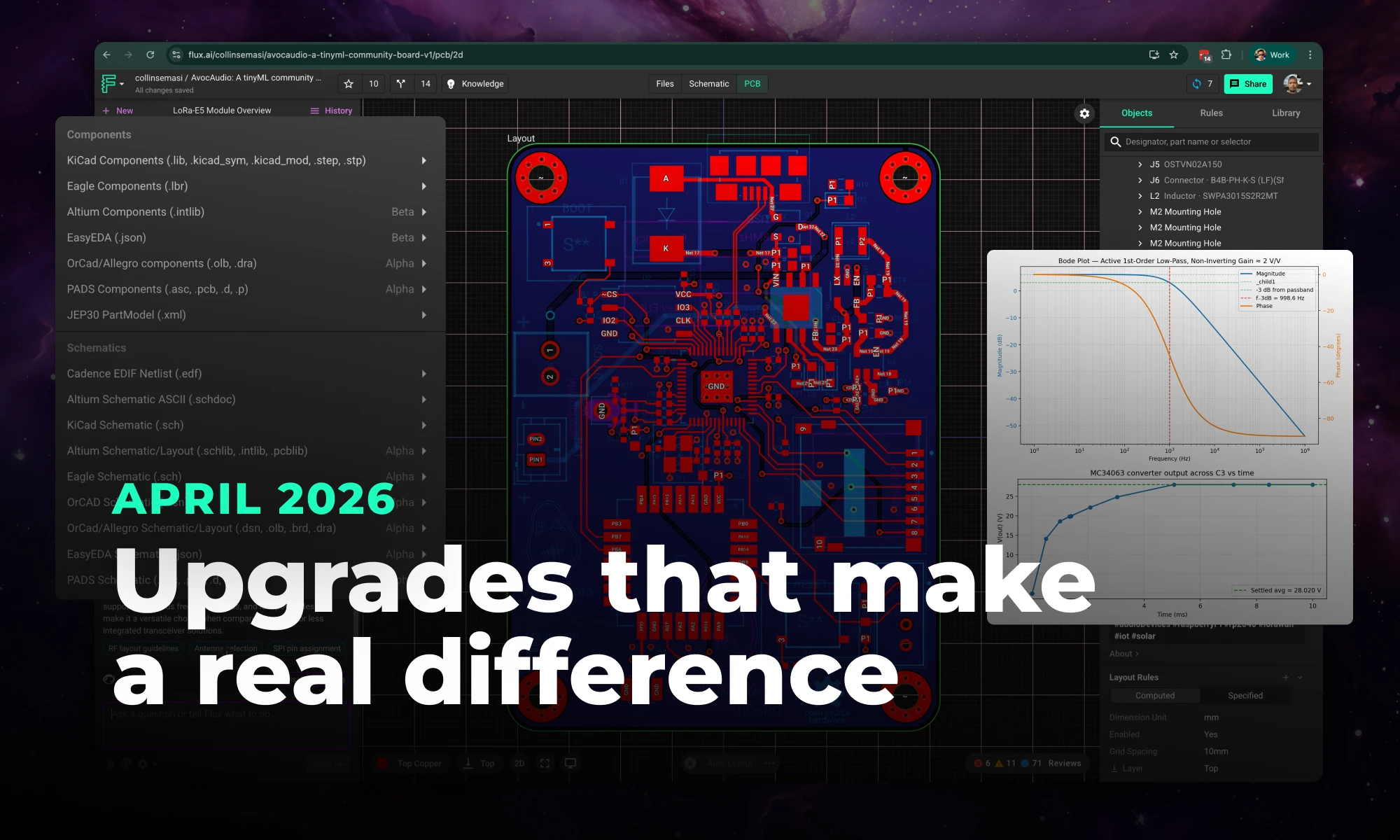
Flux's April 2026 release brings a faster editor, true 1:1 scale, new design imports (Eagle & PADS), smarter AI, and easier part creation.
In this blog post, we explore how Flux.ai effectively uses Web Workers and ImmerJS to enhance data replication in our web-based EDA tool. We discuss our challenges with data transfer, our exploration of SharedArrayBuffer, and our ultimate solution using ImmerJS patches.
Web Workers are an established browser technology for running Javascript tasks in a background thread. They're the gold standard for executing long-running, CPU-intensive tasks in the browser. At Flux.ai, we successfully harnessed Web Workers, paired with ImmerJS patches, to minimize data transfer and deliver an ultra-fast user experience. This post will take you through our journey of using Web Workers and ImmerJS for data replication in our web-based EDA tool.
Flux.ai, an innovative web-based EDA tool, needs to compute the layout of thousands of electronic components simultaneously for its unique PCB layouting system. This process must adhere to user-defined rules. Our initial prototype revealed that layouting could take several seconds, leading us to explore the capabilities of Web Workers to parallelize this process and unblock the UI.
At bottom, the web worker API is extremely simple. A single method, postMessage, sends data to a web woker, and the same postMessage method is used to send data back to the main thread. We use a popular abstraction layer on top of postMessage, Comlink, developed several years ago by Google, that makes it possible to call one of your functions in a web worker as if it existed in the main thread. Newer, better or similar abstractions may exist. We did learn in using Comlink that it can easily blow up your JavaScript bundle size.
The trouble with using a web worker in a pure RPC style is that you most likely have a lot of data to pass through postMessage which is as slow as JSON.stringify, as a rule of thumb. This was definitely true in our case. We calculated that it would take 100ms at our desired level of scale just to transfer the layouting data each way, eating into the benefit of a parallel web worker.
A potential solution to the data transfer problem could be using SharedArrayBuffer, recommended for use with web workers. However, SharedArrayBuffer "represents a generic raw binary data buffer" meaning that a) it is of fixed size and b) it does not accept JS objects, strings, or other typical application data. Our investigations led us to conclude that the performance benefits were offset by the encoding and decoding costs in SharedArrayBuffer. One hope for the future is a Stage 3 ECMAScript proposal for growable ArrayBuffers.
We decided instead to populate our web worker with all the data on initial load of a Flux document (while the user is already waiting) and update it with changes as they happened. An added benefit of this approach is that the functions designed to run inside the web worker can also be run in the main thread with the flip of a global variable. You might want to do this for Jest tests, for example, which do not support web workers by default.
We got our changes in document data from ImmerJS, something we were already using as part of Redux Toolkit. Immer is an extremely popular library that enables copy-on-write for built-in data types via a Proxy. A lesser-known feature of Immer is Patches. The function produceWithPatches will return a sequence of patches that represent the changes to the original input.
We made a function that wraps produceWithPatches and assigns the patches back into the document for use downstream.
With the patches in hand, we could then complete our data flow from main thread to web worker and back again. The main thread calls the worker functions from middleware after every global state change. In Flux, we use redux-observable middleware.

In the code, the relevant functions look like this, assuming you are using Comlink.
The result of our use of Web Workers and ImmerJS patches was a significant reduction in workload on every document change and the ability for users to continue interacting with the application during a large re-layout - a priceless benefit in our web-based EDA tool.
For extra speed in our web worker, we forked the Immer applyPatches function. The original version was too slow for our needs. So, we adapted applyPatches to skip the draft step and mutate the target object in-place, resulting in a 10X speedup.
In conclusion, Web Workers and ImmerJS have proven to be powerful tools for efficient data replication in Javascript, particularly in the context of our web-based EDA tool, Flux.ai. They offer a potent combination for handling complex, CPU-intensive tasks, and improving user experience through faster data transfer and processing.
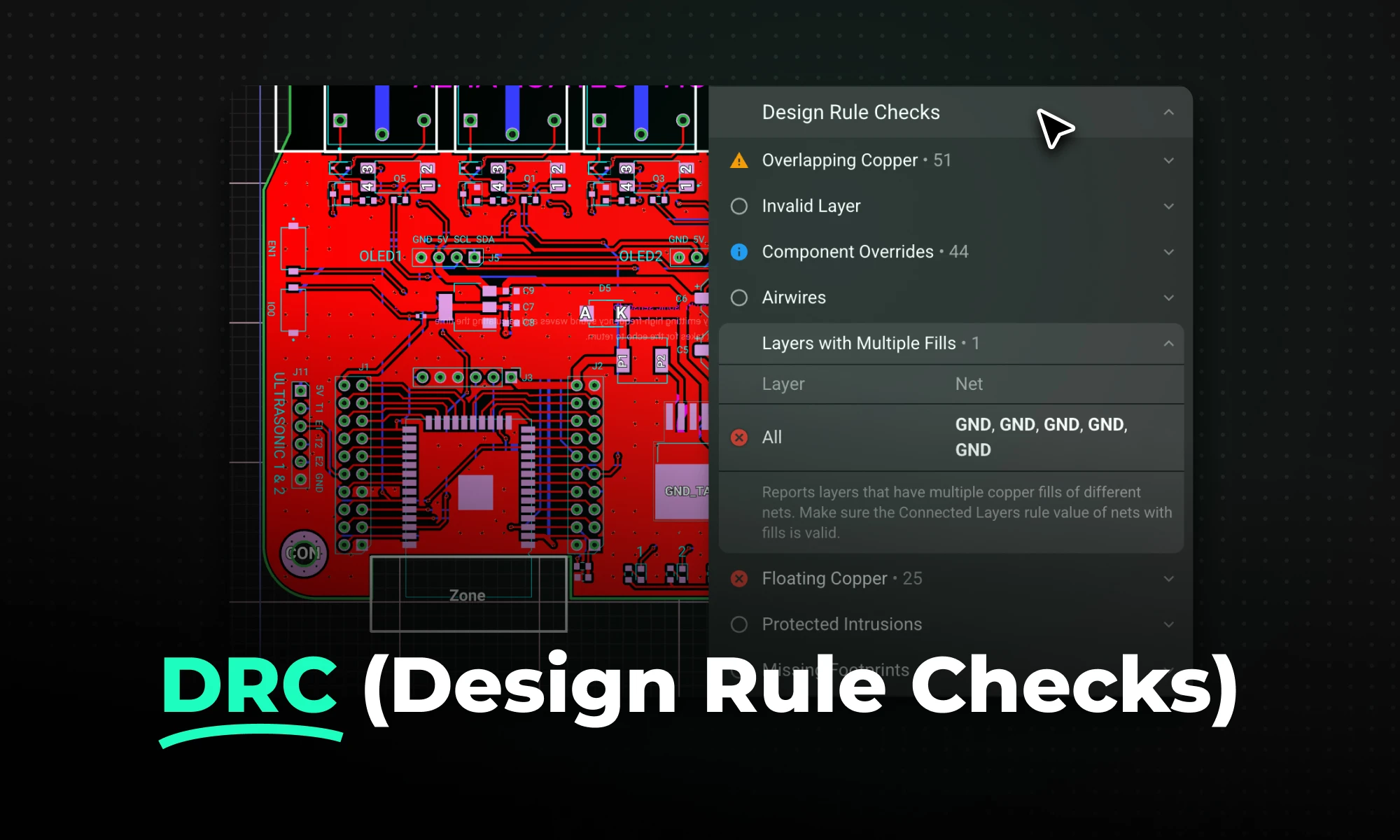
DRC is an automated process that checks your PCB layout against manufacturing and electrical constraints, catching errors like trace spacing and drill sizes before fabrication. Modern tools run this in real-time during design, while older ones batch-check at the end, often producing overwhelming error lists.
Design Rule Checking (DRC) is an automated verification process within Electronic Design Automation (EDA) software that ensures a circuit board layout complies with a predefined set of geometrical and electrical constraints.
Before a board is sent to a manufacturer, it must pass a PCB design rule check (DRC), which ensures the design complies with the manufacturer’s physical limitations in etching, drilling, and routing. For example, a standard fabrication house might have a minimum manufacturing tolerance of a 4-mil trace width and a 4-mil spacing gap. If you design a board with 3-mil traces, the manufacturer physically cannot produce it reliably.
By configuring your PCB manufacturing design rules upfront, DRC constantly scans the layout to catch errors, ensuring that elements like trace widths, copper clearances, and via geometries are safely within manufacturable limits. Catching a clearance violation in software costs nothing; finding out about it after ordering a batch of 500 boards is a costly disaster.
To effectively design a layout, engineers must configure various categories of PCB design rules. These constraints are typically derived from industry standards (like IPC-2221) and the specific capabilities of your chosen manufacturer.
The most common rule categories include:
Before beginning your layout or running a final check, verify you have configured constraints for:
Historically, PCB layout rule checks were handled as an afterthought. Today, modern workflows have shifted how these checks are executed.
In legacy desktop EDA tools, engineers typically route large sections of the board—or even finish the entire layout—before manually clicking a "Run DRC" button. This is known as Batch DRC.
The problem with batch DRC: Running a batch DRC at the end of a design phase often results in a massive, overwhelming list of hundreds of errors. Fixing a trace spacing issue found via a batch check might require you to rip up and reroute a massive section of a dense board, wasting hours of engineering time.
Modern PCB design platforms employ Real-Time DRC (or online DRC). In such a workflow, the software's rules engine runs constantly in the background.
The advantage of real-time DRC: Errors are detected during the layout process. If you attempt to draw a trace too close to a via, the software instantly flags the violation visually or actively prevents you from placing the invalid segment. This immediate feedback prevents errors from cascading, drastically reducing design iteration time and eliminating the dreaded "end-of-project error log."
Even with meticulous planning, engineers frequently encounter design rule check (DRC) violations during PCB layout. These errors typically occur when the physical layout conflicts with electrical or manufacturing constraints defined in the design rules. Recognizing the most common violations helps engineers identify and resolve problems quickly before manufacturing. Such common violations include trace clearance issues, overlapping copper features, incorrect trace widths, via aspect ratio problems, and component spacing conflicts.
The ultimate goal of a design rule check PCB workflow is bridging the gap between digital theory and physical manufacturing. By rigorously enforcing rules, DRC ensures:
(For deeper insights on planning highly reliable boards, explore our multilayer PCB design tutorial.)
Traditional EDA tools often treat design validation as a slow, batch-processed hurdle at the end of a project. Modern, cloud-native platforms like Flux flip this script by weaving validation directly into the active drafting process. By shifting from reactive troubleshooting to proactive guidance, modern tools improve the DRC workflow in several key ways.
Ultimately, this combination of real-time feedback and collaboration reduces the risk of costly manufacturing errors. By ensuring every routing decision complies with fabrication limits the moment it is made, modern platforms prevent unmanufacturable designs from ever reaching the fab house, eliminating unnecessary board re-spins and maintaining tight project schedules.
Whether you're migrating from popular EDA applications or starting fresh, mastering high speed PCB design has never been more intuitive. Flux enables teams to design, simulate, and route with real-time AI assistance, so you can spin your next high-speed board with total confidence.
Key Takeaways
The most common misconception: a board only becomes "high-speed" once the system clock crosses some ultra-high threshold. That's wrong, and it's expensive to learn the hard way.
High-speed design becomes necessary when the signal's rise time approaches a critical threshold where transmission line effects become significant — specifically, when the signal rise time is less than four times the propagation delay. At that point, your copper traces stop acting as simple wires and start behaving as transmission lines. A transmission line is a distributed waveguide that directs high-frequency alternating currents; if you route or terminate it improperly, it functions as an accidental antenna, radiating electromagnetic interference across your entire board. Because of this, you must actively control characteristic impedance, mitigate reflections, and secure the return path.
Two practical rules of thumb help identify when you're in this territory:
Critically, it is the rise time of the device, not the clock frequency, that determines whether a design is high-speed. A fast device will create signal transitions that propagate far more aggressively than the clock rate alone suggests. Evaluate your design based on the parts, not the clock frequency.
Modern electronics are saturated with interfaces that easily exceed these thresholds. Typical high-speed signals engineers must route today include:
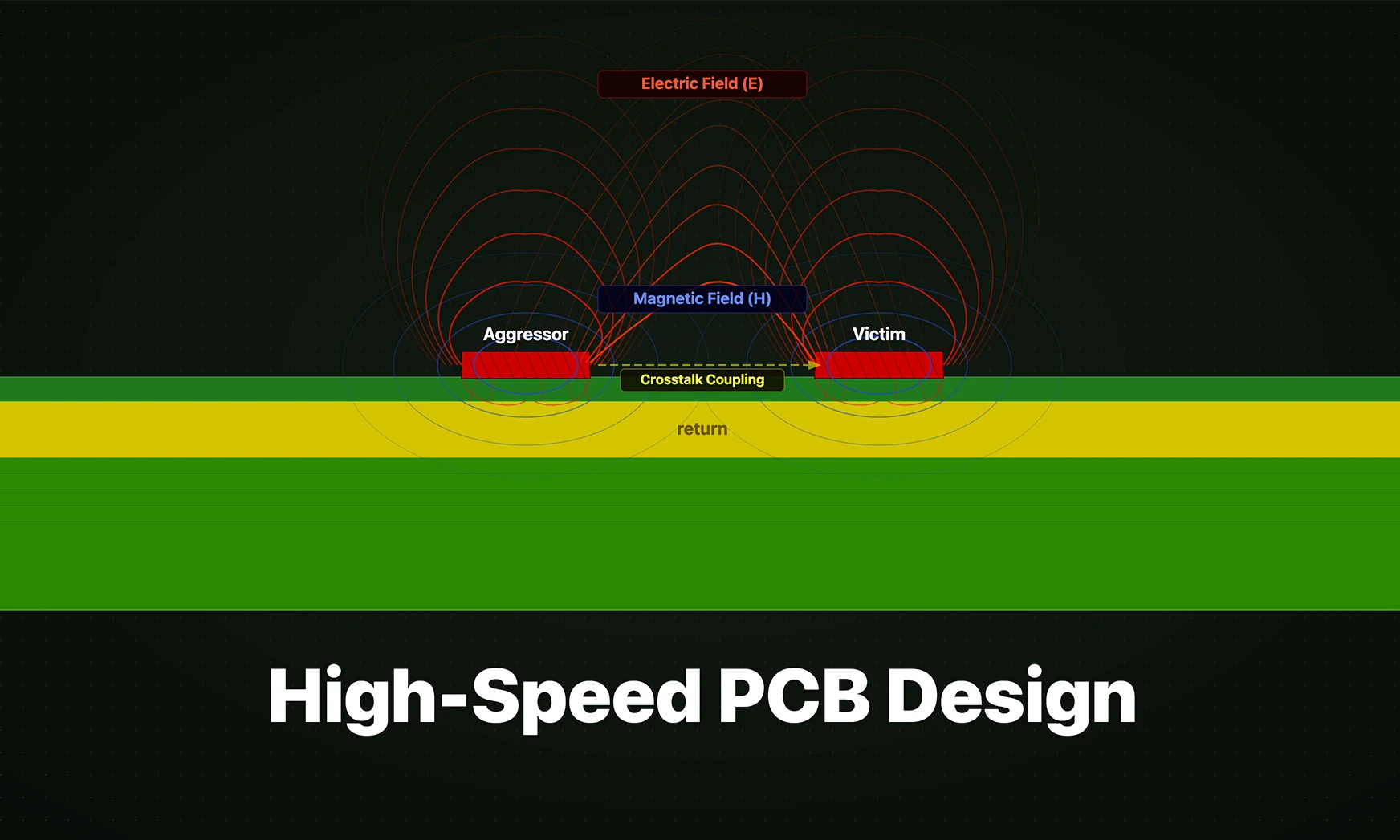
As signal speeds increase, physical board characteristics that were once negligible become dominant: traces behave as transmission lines where signals propagate as waves, and faster edge rates intensify electromagnetic coupling between adjacent traces.
{{underline}}
Signal integrity is the measure of an electrical signal's quality as it travels from driver to receiver. When layout rules are ignored, high-speed edge rates trigger physical phenomena that compound rapidly.
Poor layout practices lead directly to four primary failure modes:
Return path management is where many engineers underestimate the physics of high-frequency loop inductance. At high frequencies, the return current takes the path of least inductance, which is directly underneath the forward current trace, because this path represents the smallest loop area. This is a fundamental departure from DC behavior, where current takes the path of least resistance.
Splits or holes in ground planes create uneven areas that increase impedance. These breaks force the return current to take detours, expanding loop areas and significantly increasing inductance and causing high-speed traces to act like antennas that radiate electromagnetic waves. This is the failure mode most engineers don't discover until they're staring at an EMC test failure.
Route high-frequency return currents along the path of least inductance. Implement solid ground planes under signal traces to minimize loop area and inductance. Avoid ground plane discontinuities such as slots, cutouts, or overlapping clearance holes to prevent current loops and noise.
{{underline}}
High-speed design doesn't start during routing, it starts in the stackup manager. Get the stackup wrong, and no amount of careful trace routing will save you.
Your stackup dictates the distance between signal layers and their reference planes, which directly sets your characteristic impedance and EMI behavior. Every critical signal layer must be routed adjacent to a solid, unbroken ground or power plane. Routing two high-speed signal layers back-to-back without a reference plane between them creates "broadside coupling" — a severe crosstalk mechanism that's nearly impossible to fix after the fact.
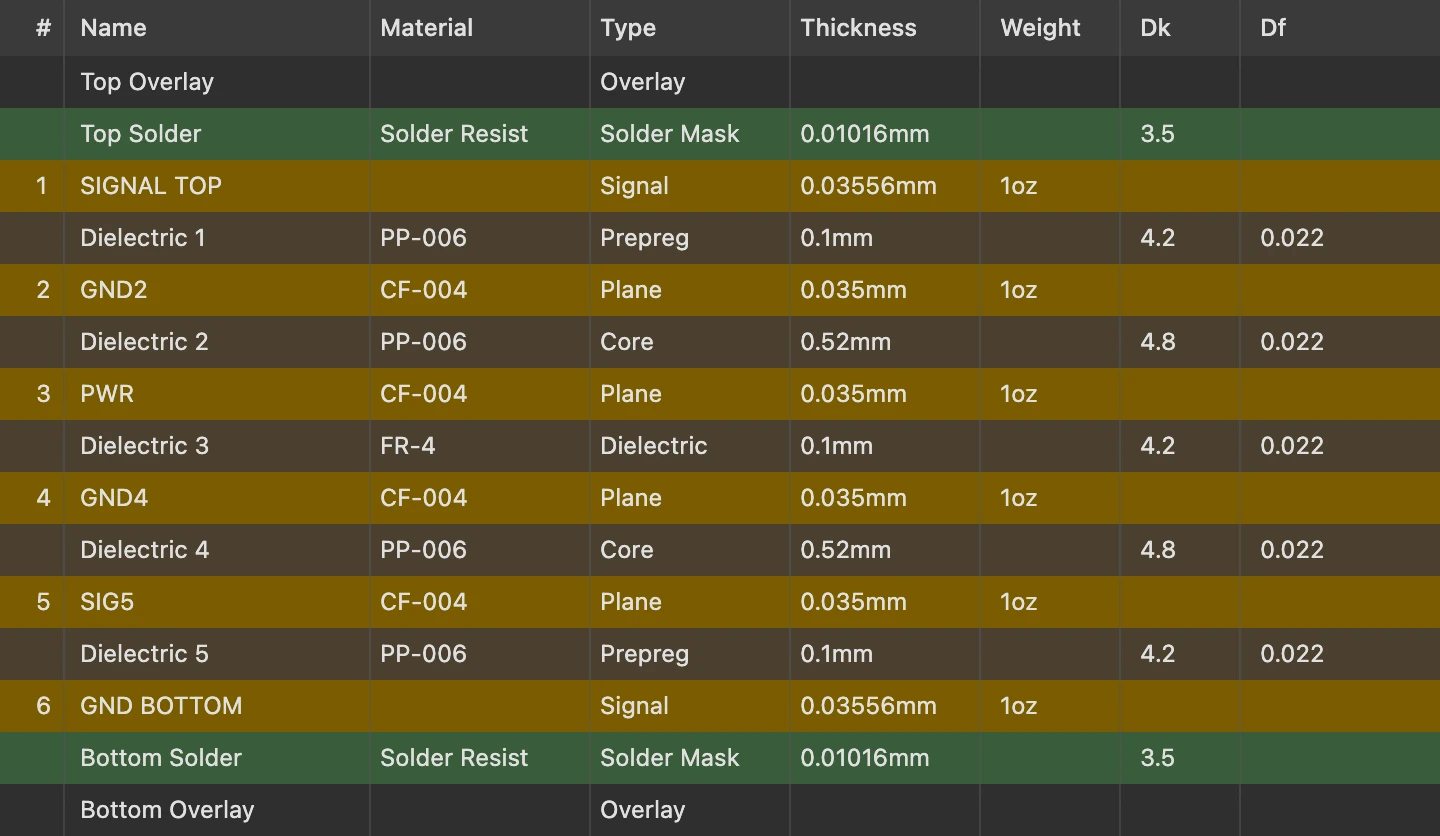
A preferred method of PCB design is the multi-layer PCB, which embeds the signal trace between a power and a ground plane. For standard digital logic, engineers target 50Ω characteristic impedance for single-ended signals and 90Ω or 100Ω for differential pairs.
A high-frequency signal propagating through a long PCB trace is severely affected by a loss tangent of the dielectric material. A large loss tangent means higher dielectric absorption, and dielectric absorption increases attenuation at higher frequencies. Standard FR-4 is fine up to a few gigahertz. Beyond that, its loss tangent becomes the limiting factor.
*Megtron 6 Dk varies significantly with glass style: 1035 glass (65% resin) gives Dk 3.37, while 2116 glass (54% resin) gives Dk 3.61. Specify construction when quoting.
RO4350B provides a stable Dk of 3.48 from 500 MHz to over 40 GHz with minimal variation versus frequency, which makes it the go-to choice for RF and radar work where impedance consistency across a wide bandwidth is non-negotiable.
For most high-speed digital designs below 10 Gbps, high-performance FR-4 or mid-range specialized materials offer a good balance. For higher speeds or RF applications, premium materials become necessary despite their higher cost.
{{underline}}
With the stackup locked, the routing phase demands strict adherence to geometric rules. Deviations that look harmless on screen show up immediately on a vector network analyzer (VNA) or oscilloscope.
Differential pair routing is the most common technique for high-speed serial interfaces. Because differential signals rely on equal and opposite voltages to cancel common-mode noise, both traces must be routed symmetrically, matched in length, and kept in parallel with consistent spacing throughout. Any asymmetry converts differential signals into common-mode noise, which your receiver cannot reject.
To prevent crosstalk between signals, apply the 3W Rule: the center-to-center spacing between adjacent traces should be at least three times the trace width. For 90°-bend corners, the geometry creates a localized increase in effective trace width, causing a drop in impedance and a reflection. Replace hard corners with 135° bends or smooth arcs throughout all high-speed runs.
{{underline}}
Even experienced engineers make routing decisions that look clean on screen and fail in the lab. These are the specific layout errors worth memorizing before you spin your first high-speed prototype.
Routing over a plane gap is the most damaging single error. Empirical testing shows that traces crossing gaps in ground planes produce harmonics approximately 5 dBmV higher near the gap compared to traces over solid ground planes — and these gaps allow harmonics to appear even on unpowered traces, suggesting unintended coupling. The fix is simple: keep reference planes solid under every high-speed trace.
Other common pitfalls:
Traditional desktop EDA tools were designed for an era when schematic and layout were separate disciplines handled by separate people. A hardware engineer would finish the schematic, hand a netlist to a layout specialist, and wait — then review a PDF and email redlines back. For a DDR5 routing scheme with hundreds of length-matched signals, that workflow compounds every mistake.
Cloud-native platforms like Flux change the model. Collaborative PCB layout means entire engineering teams can view, edit, and troubleshoot a board simultaneously in the browser. This means no zipped project files, no version conflicts when a colleague needs to review a complex memory bus topology.
The more consequential shift is in design rule enforcement. Modern EDA platforms integrate automated design rule checks (DRC) that run continuously against your defined constraints — impedance targets, 3W spacing rules, differential pair length-matching tolerances — rather than as a batch step at the end. AI-assisted routing suggestions extend this further, flagging potential SI violations before they're committed to layout. The result is a tighter loop between constraint definition and physical implementation, which is exactly what high-speed design demands.
Whether you are exploring “What is a PCB?” for the first time or moving into advanced hardware engineering, modern tools make the process easier than ever. With Flux's AI-assisted platform, you can skip the steep learning curve of popular ECAD applications and design collaboratively directly in your browser. Once your board is routed and ready for fabrication, Flux's built-in supply chain features connect you directly with worldwide distributors to source parts instantly. Sign up for free today and start building!
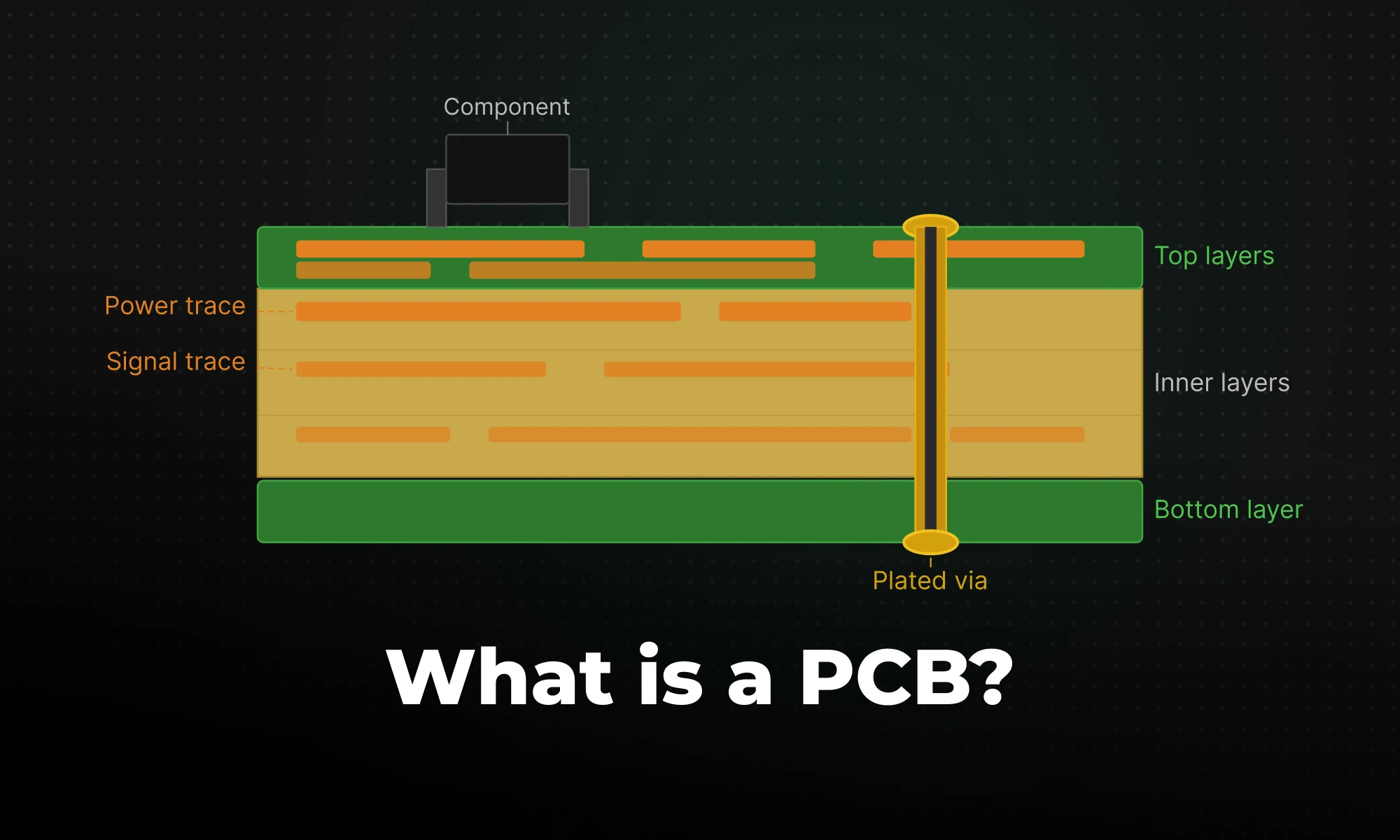
A Printed Circuit Board (PCB) is a rigid or flexible structure that mechanically supports and electrically connects electronic components using conductive pathways typically etched from copper. The PCB includes a laminated sandwich of conductive and insulating materials. During manufacturing, factories glue thin sheets of raw copper, known as copper foil, to a non-conductive base layer. They then chemically etch away the excess foil. This process leaves behind specific copper patterns: traces (which act as flat wires) and planes (which are large, solid areas of copper used to distribute power or ground).
A standard rigid PCB has four primary layers:
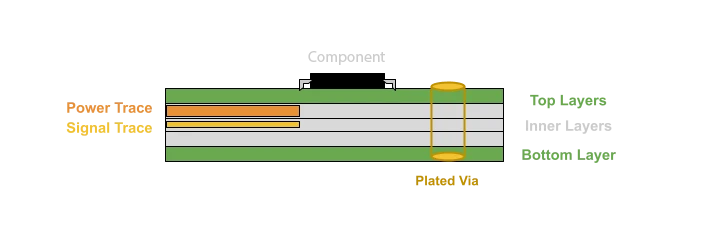
A printed circuit board acts as the electrical nervous system of a device. Instead of messy bundles of loose wires, the board uses flat copper lines to physically link the pins of different components together. Power and signals must travel across these physical pathways from power supplies to processors, and from sensors to memory, without degrading. Three structural features handle all this electrical traffic:
Traces are the etched copper pathways that carry current from one component to another. When routing these lines, designers manage two main variables: trace width and copper thickness. Trace width dictates how much current the path can safely handle. A power trace delivering 5 amps needs to be substantially wider than a simple data trace toggling at 3.3 volts. Copper thickness is measured in ounces (oz) per square foot, with 1 oz or 2 oz copper being common standards. If you size a power trace too narrow or use copper that is too thin, the electrical resistance increases. This generates excess heat and causes a voltage drop that can reset your processor mid-operation.
Pads are small, exposed copper areas, free of the green solder mask, where parts attach to the board. This is where you solder component leads (the long metal wire legs found on traditional through-hole parts) or surface-mount terminals (the flat metal contacts built onto the bodies of modern, low-profile chips). Every resistor, integrated circuit, and connector lands on a pad.
Vias solve the problem of routing signals across multiple layers. Vias are metal-lined drilled holes that enable electrical interconnections between conductive layers, essentially a copper-plated tunnel connecting a trace on layer 1 to a trace on layer 4, or any other layer combination.
A bare board with etched copper pathways does nothing on its own; it is essentially a blank canvas waiting for parts. It only becomes functional once you solder active and passive components onto those exposed pads. In manufacturing terminology, the bare board is the PCB; once populated with parts, it becomes a Printed Circuit Board Assembly (PCBA).
The components you choose dictate what the circuit does:
Designing a printed circuit board follows a sequential engineering workflow. Whether a student is building a first prototype or a hardware startup is pushing a new consumer device to mass production, the core development cycle remains essentially the same.
As circuits grow more complex, routing all connections on a single copper layer becomes geometrically impossible. The solution is adding layers. PCBs can be single-sided (one copper layer), double-sided (two copper layers on both sides of one substrate layer), or multi-layer (stacked layers of substrate with copper sandwiched between).
Beyond layer count, boards split into rigid (standard FR4) and flexible (FPCB). Flexible PCBs are made from flexible materials like polyimide, allowing them to bend and fold to fit into compact and irregular spaces. They show up in folding smartphones, wearable devices, and camera hinges–anywhere a rigid board physically can't go.
Three problems account for the majority of real-world board failures:
Signal interference (EMI/EMC) occurs when high-speed digital signals radiate electromagnetic fields that couple into adjacent traces, corrupting data. The fix isn't complicated in principle — proper trace spacing, ground planes, and controlled impedance routing — but it requires deliberate attention during layout. Many beginners overlook this entirely. They often only realize there is an issue when their first physical prototype mysteriously drops data or refuses to boot.
Power distribution is equally unforgiving. Modern microprocessors draw large bursts of current in microsecond windows. Traces that are too narrow create resistive voltage drops that cause processor resets or erratic behavior. The standard solution is to dedicate full internal layers of a multilayer board to power and ground — called power planes — rather than routing power as individual traces.
Manufacturing constraints (DFM) are where many first-time designers get burned. Drawing a functionally perfect schematic is only half the battle. Inside your layout software, you might sketch a 1-mil (0.0254mm) trace. That is an extremely thin line, roughly the width of a human hair, and standard factories simply cannot etch something that small. This gap between digital design and physical reality requires Design for Manufacturability (DFM) principles.
Industry standards like IPC-2221 dictate exactly how to handle material selection (such as picking a high-temperature substrate for a hot environment), thermal management (ensuring high-power chips can dissipate heat safely through the copper), and physical tolerances. Following these rules ensures your digital layout matches what a physical fabrication facility—often called a fab house—can actually build. Always check your specific manufacturer's capability guidelines before you route a single trace.
Historically, PCB design meant expensive, desktop-bound EDA software. These legacy programs had steep learning curves that easily overwhelmed beginners. Furthermore, collaboration was practically non-existent. Teams passed zipped files of board layouts back and forth over email. This made it nearly impossible to work together on a class project or a startup prototype without creating confusing, conflicting versions.
The industry has moved on. Platforms like Flux bring the entire design workflow into a cloud-native, collaborative environment, making it much easier for new engineers to get started.
For a hardware startup or a student building their first board, the difference between AI native PCB design software and a legacy desktop package isn't just convenience, it's the difference between shipping and stalling.
Mastering multilayer PCB design is key for complex electronics. Use strategic stackup (Signal-Ground-Power-Signal), perpendicular routing, and solid ground/power planes to ensure signal integrity, reduce EMI, and support high-density components for applications like IoT and robotics.
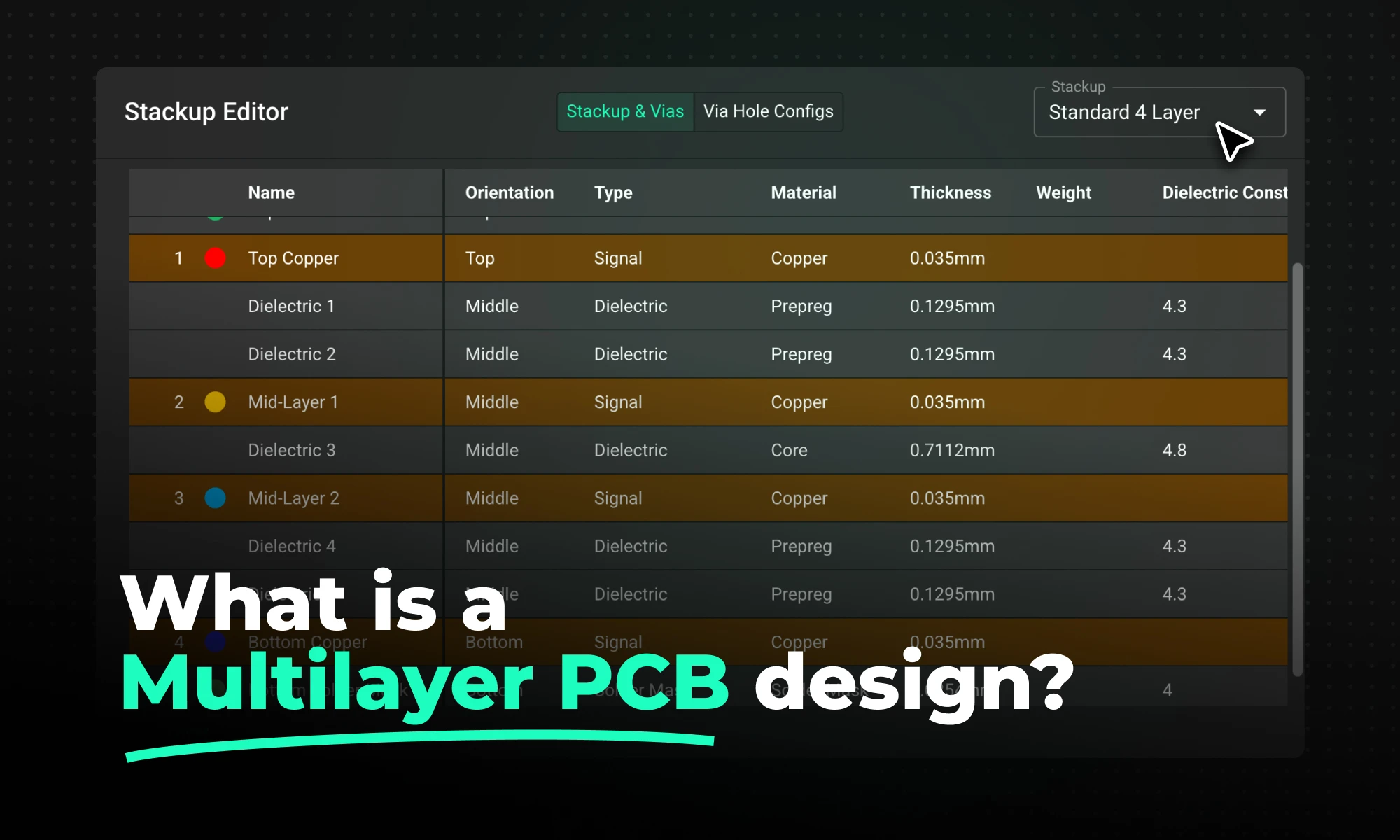
Multilayer PCB design is the design of boards with three or more copper layers separated by dielectric materials and laminated under heat and pressure, enabling internal routing of power and high-speed signals that single- and double-layer boards cannot provide for modern digital electronics.
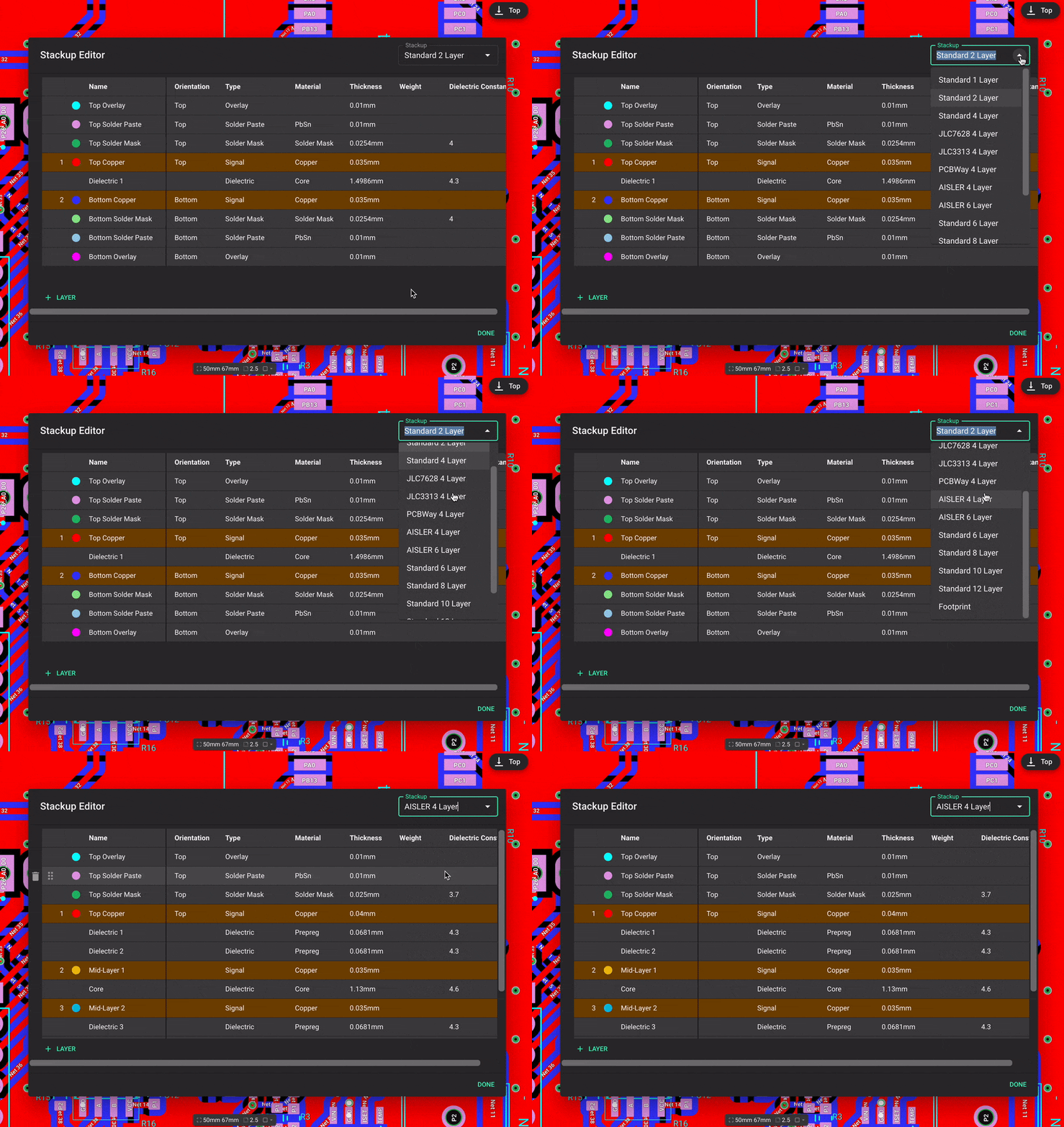
In modern hardware, common layer counts include:
The shift toward multilayer boards is driven by the physical constraints of modern components and the laws of physics at high frequencies. The primary benefits include:
Because of these advantages, multilayer architectures are mandatory for applications like IoT devices, robotics, and embedded systems.
The foundation of any high-performance board is its PCB layer stackup (the order and spacing of conductive copper and insulating dielectric layers in a PCB). Stackup planning involves determining the order of signal layers, ground planes, and power planes, as well as the thickness and dielectric constant of the materials between them.
Proper multilayer PCB stackup design dictates how electromagnetic fields propagate through your board.
Once your stackup is defined, the routing phase (process of connecting components with copper traces according to the schematic) begins. Executing a clean layout requires strict adherence to PCB routing best practices to avoid cross-coupling and timing errors.
Even experienced engineers can run into issues during complex layouts. Avoid these common pitfalls:
Historically, multilayer PCB layout was performed on rigid, desktop-based EDA software that kept engineers siloed and required tedious manual constraint programming. Today, cloud-native, modern platforms like Flux are fundamentally shifting how hardware teams collaborate.
By bringing PCB design into the browser, modern tools offer a "multiplayer" environment where electrical engineers, layout designers, and mechanical engineers can view and edit the same board simultaneously.
Platforms like Flux also integrate AI directly into the workflow. Instead of manually cross-referencing datasheets for an 8-layer stackup or struggling to untangle a BGA breakout, hardware teams can leverage AI-assisted routing suggestions and an AI Copilot to check for PCB signal integrity risks, automate part selection, and run real-time design rule checks (DRCs). This drastically reduces the mental overhead of multilayer design, allowing engineers to iterate faster and catch errors before fabrication.
CO2 sensors monitor air quality, helping prevent cognitive decline from high CO2 levels. They use various technologies for accuracy in different settings. These sensors are vital for health, efficiency, and safety.
Imagine sitting in a classroom for hours. The air feels stale. You struggle to focus. What you might not realize is that carbon dioxide levels have likely doubled since you entered the room. This invisible gas affects your cognitive function, and a CO2 sensor is the only reliable way to detect these changes before they impact your health and performance.
A CO2 sensor is a device that measures carbon dioxide concentration in air, typically expressed in parts per million (ppm). These sensors convert the presence of CO2 molecules into electrical signals that can be read and interpreted.
Accurate CO2 measurement matters for three main reasons:
Several technologies power modern CO2 sensors, each with distinct operating principles and applications. Let's examine how they work and where they excel.
CO2 levels above 1000 ppm can reduce cognitive function by 15%. At 2500 ppm, that reduction jumps to 50%. These aren't just numbers—they translate to real productivity losses in offices, schools, and homes.
Beyond health concerns, CO2 sensors enable demand-controlled ventilation systems that can cut HVAC energy costs by 5-15%. They also help facilities meet indoor air quality standards required by building codes and health regulations.
CO2 readings serve as a proxy for overall air quality and ventilation effectiveness. When CO2 rises, it suggests other pollutants may be accumulating too.
NDIR sensors work on a simple principle: CO2 absorbs infrared light at a specific wavelength (4.26 microns). The sensor shines infrared light through a sample chamber. The more CO2 present, the less light reaches the detector.
Key components include:
NDIR sensors offer excellent accuracy (±30 ppm) and longevity (10+ years) but tend to be larger and more expensive than alternatives.
Photoacoustic sensors use a clever approach: when CO2 absorbs infrared light, it heats up and expands slightly, creating pressure waves. A sensitive microphone detects these tiny sound waves, which correlate to CO2 concentration.
The system includes:
These sensors can be very sensitive and work well in challenging environments, but their complexity makes them less common in consumer applications.
Chemical sensors detect CO2 through reactions that change electrical properties of materials. For example, metal oxide semiconductors change resistance when exposed to CO2.
While generally more affordable and compact than NDIR sensors, chemical sensors typically offer lower accuracy (±100 ppm) and require more frequent calibration. They're common in lower-cost applications where approximate readings are sufficient.
A complete CO2 sensor system extends beyond the detection element to include:
Modern sensors often include microcontrollers that handle calibration, error correction, and data formatting. Flux's sensor component library includes many CO2 sensors with these integrated features.
Several factors can impact sensor readings:
Quality sensors incorporate compensation for these variables, but understanding these limitations helps in selecting and positioning sensors appropriately.
In buildings, CO2 sensors trigger ventilation systems when levels rise, bringing in fresh air only when needed. This approach can reduce energy consumption while maintaining air quality.
Smart building systems use CO2 data to optimize occupancy patterns and ventilation schedules. Some advanced systems even predict CO2 trends based on historical patterns.
Plants consume CO2 during photosynthesis. In greenhouses, maintaining optimal CO2 levels (often 1000-1500 ppm) can increase crop yields by 20-30%.
CO2 sensors control enrichment systems that release additional carbon dioxide during daylight hours. Flux's greenhouse control system demonstrates how these sensors integrate with environmental controls.
In industrial settings, CO2 sensors detect leaks from process equipment or storage tanks. They trigger alarms when levels exceed safety thresholds (typically 5,000+ ppm).
Environmental monitoring networks use CO2 sensors to track emissions and verify compliance with regulations. These applications often require higher precision and reliability.
Research applications demand the highest accuracy, often ±1-5 ppm. These sensors undergo rigorous calibration against certified reference gases.
Labs use CO2 sensors to monitor incubators, controlled environment chambers, and experimental setups where precise gas composition matters.
When selecting a CO2 sensor, consider:
For reliable operation, place sensors away from direct air currents, heat sources, and areas where people might breathe directly on them. Regular calibration—at least annually for critical applications—maintains accuracy.
The CO2 sensor market is evolving rapidly. Watch for:
Integration with environmental data logging systems will make CO2 data more actionable through analytics and automation.
CO2 sensors have evolved from specialized scientific instruments to essential components in smart buildings, agriculture, and safety systems. As costs decrease and capabilities improve, expect to see these devices becoming as common as smoke detectors—silent guardians of the air we breathe.
Ready to experience the benefits of CO2 monitoring firsthand? Get started for free with Flux today and take the first step towards smarter, healthier environments. Don’t wait—join the growing community embracing innovative air quality solutions now!