


Flux + Fable 5.2 (Preview)

Flux is your AI hardware engineer, and we added Fable 5.2 to Copilot.
Bring a sensor interface and its housing into one design conversation. Share the signal requirements, installation drawing, and manufacturing constraints. Ask Copilot to plan the electrical connections and mechanical fit around the same specification. Use a concrete task from your project to explore the preview with your team. Fable 5.2 is a two-week preview. The preview ends on November 23, 2026.
Try It Now
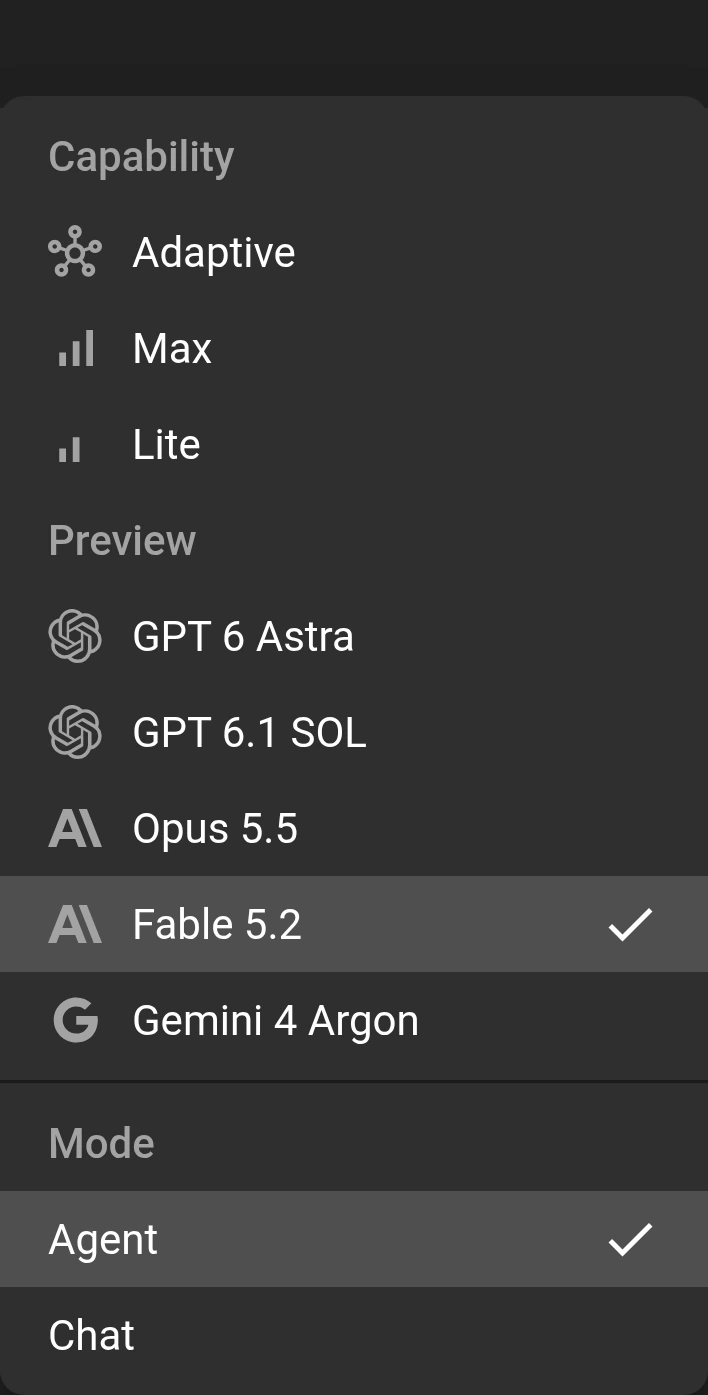
Open any project in Flux and launch Copilot. Open the model menu in the composer, find the Preview group, and select “Fable 5.2”. Give it a task from your device specification. Start with the sensor interface or the mounting bracket, and include the constraints that connect them:
“Plan the analog input stage for an industrial sensor interface. Use the source impedance, signal range, and sampling requirements I provide.”
“Plan the sensor housing and mounting bracket. Use the installation envelope, cable entry, and service clearance I provide.”
What’s New and Better
Fable 5.2 is an option in the Preview group. The model menu describes it as “Anthropic's newest model.” Bring that model choice into a workflow built around your hardware project:
- Start with the sensor interface and the requirements that govern it.
- Plan the mounting bracket around the board, connectors, and assembly needs.
- Review the proposed changes against electrical and mechanical constraints.
- Continue the design conversation with the project context in view.
Flux has live context on your design, down to parts, pins, nets, properties, constraints, and stackups. Its automated workflows support stepwise actions, constraint-aware edits, and iterative design changes in your project. You can bring the board and its enclosure into the same conversation instead of treating them as separate designs. A knowledge base of industry best practices and embedded design and process checks adds context for the work. Share your team's requirements so the design plan addresses the device you need to build.
Try It on a Real Design
Try this microphone-preamplifier prompt as a concrete analog design task. Supply the relevant datasheets and ask Copilot for a plan before requesting edits.
Design a low-noise microphone preamplifier for an electret condenser mic feeding a 24-bit ADC. You must calculate the bias network, gain-setting resistors, coupling capacitors, input high-pass cutoff, output anti-aliasing RC, and decoupling layout. Follow the op-amp and microphone capsule datasheets, ADC input requirements, and industry best practices. It will be integrated into a design. Supply: 3.3V analog rail. Mic bias: 2.0 V through resistor, current ~0.5 mA. Target gain: 20 dB to 40 dB switchable. Bandwidth: 20 Hz to 20 kHz. Input noise target: as low as practical. Include pop-suppression considerations and star-grounding strategy.
Then connect the circuit to the mechanical design. Ask for a housing and mounting plan that uses the board outline, component heights, microphone opening, cable entry, and service access. Include the manufacturing tolerances and enclosure bonding requirements in the same plan.
Getting the most from Fable 5.2 in Flux
- Supply the source documents. Share the sensor datasheets, installation drawing, and mechanical requirements.
- Set a review point. Review the input-stage plan and mounting concept before requesting edits.
- Connect electronics and mechanics. Include the board-to-housing fit and the installation requirements in your review.
- Plan before you act. Review the change plan against your requirements before requesting edits.
What’s Next
Keep the next step tied to your device requirements. Continue from the sensor interface to the mounting bracket, then review how the two fit together:
- Resolve the remaining power and signal interface decisions.
- Set the enclosure envelope, mounting locations, and connector access.
- Plan the cable paths and the order of assembly.
- Review the complete device with your engineering team.
Open Flux, select “Fable 5.2” from the Preview group in the composer model menu, and bring your next design question into the project. Start with one specific change and carry its electrical and mechanical requirements through the plan.
More in AI & Prompt Engineering for Hardware

What Makes a Perfect PCB Design Prompt

Prompting Guide: Working with Flux from Idea to Schematic

AI Design Reviews

5 Pro Tips for Better Routing with AI Auto-Layout

Top 20+ Flux Copilot Prompts for Hardware Design

6 Amazing Flux Copilot Prompts for Hardware Design in 2026

Top 20+ Flux Copilot Prompts (Refreshed)

6 Prompting Tips to Get the Most Out of Copilot

Top 9 Most Asked Questions in Flux

Flux Copilot Can Adapt To Your Objectives

Design Circuits with Natural Language: Copilot Upgrade

Teach Copilot How You Work with Knowledge

The First AI Hardware Engineer

AI Shortcuts for PCB Design

Less Clicking, More Building: The New AI-First UI

Introducing the AI Design Review Tab

Introducing AI Auto-Layout

AI Auto-Layout Just Got Smarter

AI Auto-Layout Winter Update

Ditch Datasheets with this Flux Copilot Upgrade

Flux Copilot Can Now See

AI for Firmware Development: How to Code Firmware Faster

Research Components Faster with AI

Streamline Component Research with AI

Instant Hardware Analysis with AI: Meet Copilot's Code Interpreter

AI for Electronics Testing and Debugging

AI for Functional Testing

AI-Driven PCB Cost Optimization

Simulate Circuits with a Prompt

Meet Files: AI-Native Project Documentation (2026 Update)

Flux Copilot: Under the Hood

How AI Is Changing PCB Design: Workflows, Teams, and Tools

Flux Copilot Just Got Smarter

The Future of Flux Copilot

AI-Powered Architecture Design

Flux Copilot - The First AI Powered Hardware Design Assistant

Generative AI for Hardware Design

AI Research & Planning

Smarter Copilot, Cleaner Layouts, Fewer Bugs

Introducing Copilot Knowledge Base for Flux Engineers

Flux + GPT-5 (Beta)

Flux + GPT 6 Astra

Flux + GPT 6.1 SOL

Flux + Opus 5.5

Flux + Gemini 4 Argon

Design hardware in the fast lane with Flux's new steerable agent
Let’s start building.

Let’s build your idea together. All you need to do is describe what you want to make, or what problem you want to solve. Flux will work with you to make it a reality.
