


Try Flux for free

The Internet of Things (IoT) is changing how we live and work by connecting everyday objects and devices to the internet, allowing them to exchange data. From smart home gadgets to wearables, industrial sensors, and automotive systems, IoT devices rely on hardware and software to sense, process, and communicate information.
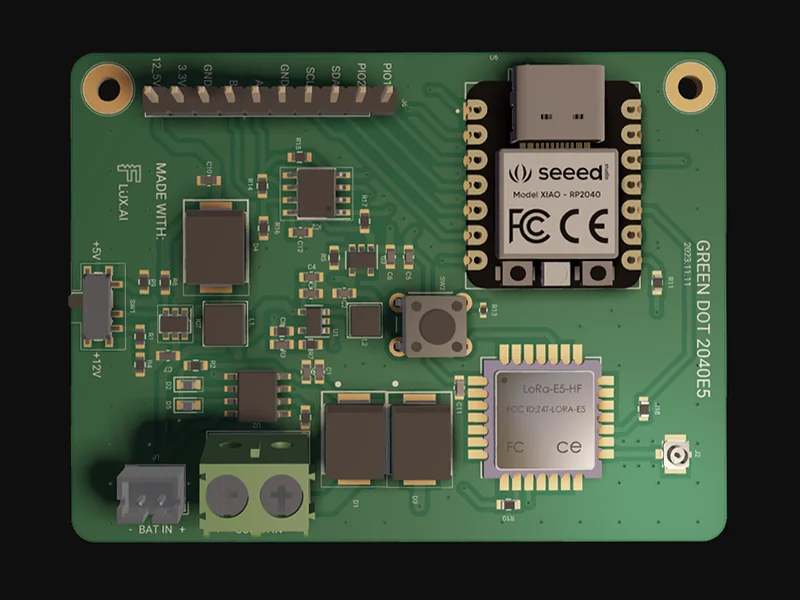
At the core of every IoT device is a printed circuit board (PCB), which houses the components that make these smart functions possible. Designing a PCB for an IoT device is a key part of the process, requiring careful thought about the device’s features, environment, power needs, and manufacturability.
In this guide, we’ll walk you through how to kickstart your IoT project and explain why using Flux makes the process smoother and more efficient for building these systems. With Flux, you’ll benefit from features that simplify PCB design, making it easier to create professional IoT devices from start to finish.
The first step in designing your IoT device is to clearly define its requirements and specifications based on its intended use and capabilities. Key factors to consider include:
By carefully defining these parameters, you'll set a solid foundation for your IoT project.
The next step is to choose the key components that will power and control your IoT device. These typically include:
Microcontroller (MCU) or Microprocessor: The MCU or processor acts as the brain of your device, handling data processing and controlling peripherals. Popular options include Microchip's AVR, ARM-based MCUs, STMicro STM32, and Espressif's ESP32.
Communication modules: Most IoT devices require wireless communication for data transmission, using protocols like Wi-Fi, Bluetooth, LoRa, NB-IoT, or Sigfox. Look for modules that combine the transceiver chip, antenna, and other necessary components into a single package.
Sensors: Sensors are essential for gathering environmental data such as temperature, motion, humidity, or proximity. Choose sensors that provide the required accuracy and resolution for your specific application.
Peripherals and user interface: Your device may also need additional components like displays, buttons, speakers, or LEDs for user interaction. You might also require connectivity peripherals such as USB or Ethernet ports for wired communication.
Power supply: Determine the power requirements for your device, whether it will be battery-operated or powered by an external adapter. Select the appropriate voltage regulators and power management components, such as supervisory circuits, to ensure stable operation.
Choosing the right components will set the stage for a functional, efficient, and cost-effective IoT device.
In Flux, all you have to do is create a new project and everything is ready to go! What’s more - all public projects, parts, and modules can be forked and built upon with the click of a button.
Ready to dive in? We’ve prepared resources to help you get started quickly:
Flux has ready-made templates to jumpstart your design. Whether you’re working on smart home devices or industrial automation, these templates provide a solid foundation.
{{iot_templates="/p/content-library"}}
Explore a collection of reusable IoT reference designs to help you kickstart your project. Just clone or fork the design you need, and you’ll be ready to customize and build your IoT solution quickly and easily, with everything you need at your fingertips.
{{iot_reference-designs="/p/content-library"}}
To get inspired or see how others have built their IoT projects, check out our example projects for IoT. These showcase a variety of IoT designs, such as smart lighting systems, connected sensors, and home automation devices. By exploring these examples, you can understand how different elements come together and even reuse parts of the design for your own project.
{{iot_projects="/p/content-library"}}
Watch our in-depth video tutorials that guide you through the process of designing IoT PCBs, from component selection to final layout. Perfect for beginners and experts alike!
{{iot-tutorial-video="/p/content-library"}}
Join our Slack community of PCB designers and IoT enthusiasts. Share ideas, ask questions, and get feedback on your designs in real-time.
Access detailed articles and documentation that cover everything from advanced IoT design techniques to troubleshooting tips.
Flux empowers you to design professional IoT PCBs without the hassle. With intuitive tools, expert guidance, and a community to back you up, building your next IoT project has never been easier. Create your free account today and start designing.


