ESP32 x86 PC Peripherals List

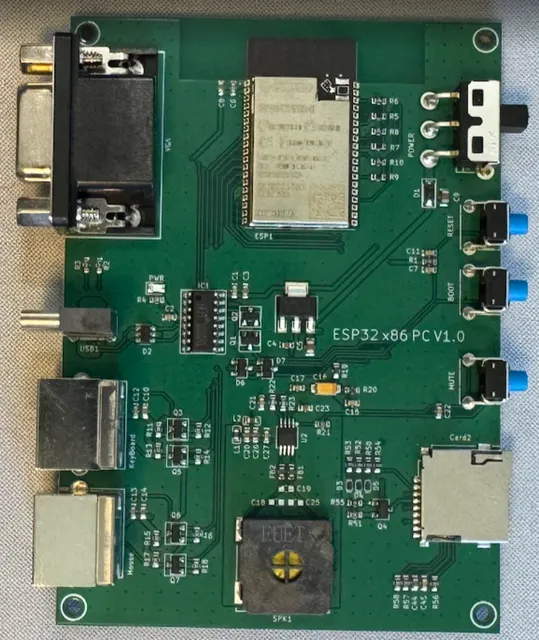
Add text labels on this photo of the PCB that I designed in current project for each connector, power switch, buttons, speaker, SD card connector, and power LED indicator
And create document with photo with the labels and list with labeled components with descriptions
Image
Thought for 11 sec
I’ll annotate the provided PCB photo and create a project document containing the labeled image plus a concise component list.
Worked for 1 min 53 sec
Done — I created the project document “ESP32 x86 PC — Labeled PCB Photo” with the annotated PCB photo and a table of labeled components/descriptions.
Document slug:
esp32-x86-pc-labeled-pcb-photoReview docs and layout
Check document rendering
Run ERC DRC
Review layout manufacturability
Export documentation PDF
Refine this doc
Ask about this doc
README
ESP32 x86 PC Emulator

I built an IBM PC from 1985 onto a circuit board the size of a postcard. It boots DOS. It runs the games. And it fought me every step of the way.
Image
Table
| Boot menu | Running MS-DOS | Hardware |
|---|---|---|
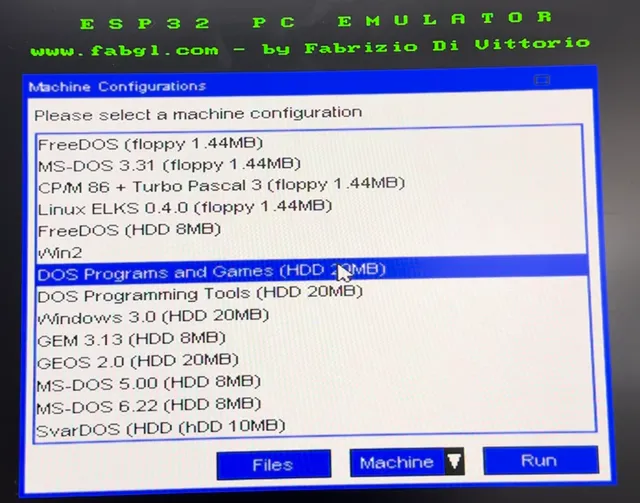 Image | 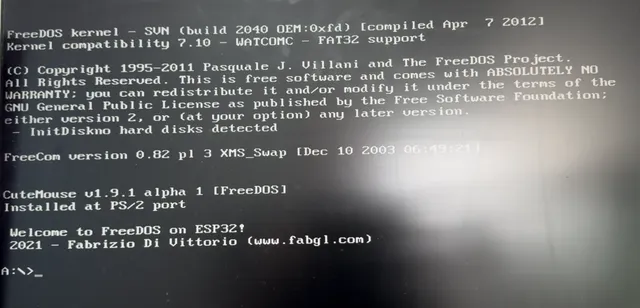 Image | 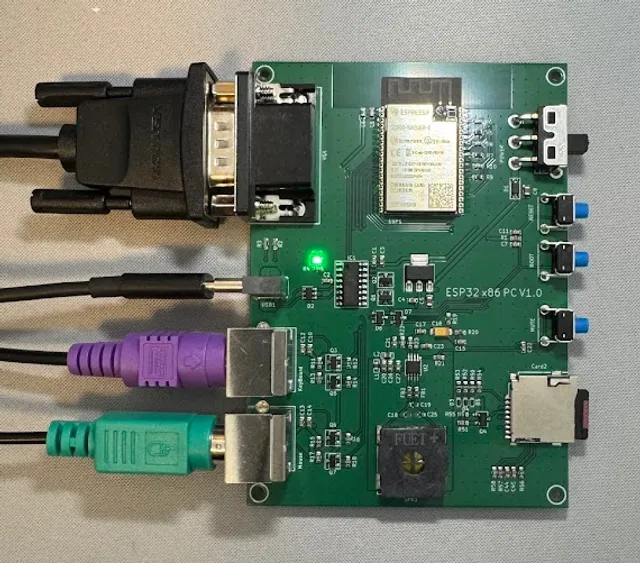 Image |
📖 Complete Guides
Table
| Page | What you'll find |
|---|---|
| Flashing Guide | Get the firmware onto your board, start to finish |
| Software & Tools | Every tool and download, per OS — and where to find DOS software |
| Component & Connector Mapping | A labeled photo and a tour of every part |
| The Build Log | The reboot loops, the crashes, the 3 AM victories. The whole story. |
| More Demo Videos | Watch it come to life |
It shouldn't work. But it does.
Here is what happens when you press the power switch.
A single chip — one ESP32, the kind that usually blinks an LED or reads a temperature sensor — wakes up and splits itself in two. One half starts screaming a video signal down a VGA cable forty times a second, drawing every scanline by hand because there is no graphics card to do it. The other half becomes a 1985 Intel processor, fetching and executing 8086 machine code that was never meant to run on anything but silicon from the the Cold War era.
Between them they conjure an interrupt controller, a timer chip, a keyboard controller, a real-time clock, two serial ports — every piece of an original IBM PC, summoned into existence in software, all at once, in real time.
And then, against every reasonable expectation, a DOS prompt appears on the monitor.
No host computer. No emulator window. No safety net. Just a board you can hold in your hand, being a computer that predates the people who'll build the next one.
What it is, in plain terms
It's a working IBM PC/XT compatible, complete on one custom PCB:
- A real 8086, emulated cycle by cycle — runs unmodified DOS, Windows 3.0, CP/M, and thousands of period programs, with 1 MB of RAM
- VGA out to a genuine monitor — CGA and Hercules graphics, painted in software through a resistor DAC
- PS/2 keyboard and mouse — via an emulated 8042 controller; DOS can't tell the difference from real hardware
- An SD card that holds your disks — floppy and hard disk images become drives A: through D:
- WiFi that downloads its own operating systems — then switches itself off so the emulator keeps every cycle
- A speaker that beeps like 1985 — emulated PC timer → DAC → onboard amplifier
- One USB-C cable for everything: power, flashing, debug
Why build the hard version?
You already have a faster way to run DOS. Your phone could emulate a hundred of these without noticing.
That's exactly the point. A software emulator hides on top of a modern machine doing the heavy lifting. This board has nowhere to hide. Every cycle is counted, every kilobyte of internal RAM is spoken for, and the VGA signal has to be perfect or the monitor shows static. There's no operating system to catch you when you fall.
Pulling that off — VGA generation and CPU emulation and storage and networking, all dancing on two little cores — is one of the most satisfying engineering problems the ESP32 can throw at you. I learned more getting this stable than from any project before it.
And "getting it stable" is a story in itself. It did not go smoothly. The build log is the unedited version: the boot loop that wouldn't die, the crash that struck at random, the strapping pin that quietly sabotaged everything.
The software library
Everything from the golden XT age (8086/8088, CGA/Hercules, 640 KB):
- FreeDOS, MS-DOS 3.31 – 6.22, SvarDOS
- Windows 2.0, GEM 3.13, GEOS 2.0
- Linux ELKS, CP/M-86 + Turbo Pascal 3
- Games and tools by the hundred: Prince of Persia, Commander Keen, Sid Meier's Pirates!, Norton Commander, WordStar
Want to load your own? Software & Tools walks you through it.
Under the hood
Designed in Flux.ai around the ESP32-WROVER-E:
- VGA — RGB resistor DACs + HSync/VSync on IO18/19/21/22/23/15
- 2× PS/2 — BSS138 level shifting on the 5 V clock/data lines
- microSD — card-detect, isolated SDIO_3V3 rail, ferrite + ESD protection
- USB-C — VBUS in with CC resistors, data to the bridge
- CH340C — auto-program circuit on EN/GPIO0 — no button dance to flash
- Audio — DAC (IO25) → NS4150B Class-D amp → speaker, with mute
- Power — AMS1117-3.3, with split +5V / +3V3 / SDIO_3V3 / AU_GND rails
The Board Layout page labels every one of these on a real photo.
Where it could go
The hard part is done. The fun part is wide open:
- Go AT-class — chase FabGL's 80186 support into a newer software era
- Give it a sound card — an OPL2 FM synth through the amp that's already onboard
- Native USB — an ESP32-S3 with USB host instead of PS/2
- Build the wedge — drop it into a keyboard case, 1983-style
- Make it pocketable — swap VGA for an LCD, add a battery, take DOS anywhere
Credit where it's due
The emulation engine — VGA driver, i8086 core, device models — is FabGL by Fabrizio Di Vittorio (GPL v3). This project is the custom hardware and the reworked firmware around that engine. Disk images come from the FabGL library, FreeDOS, and the Internet Archive.
Status
Hardware works. Firmware is stable. It boots FreeDOS, MS-DOS 3.31–6.22, Windows 3.0, GEM, GEOS, ELKS, and CP/M-86 from the SD card. Keyboard, mouse, VGA, speaker, and one-time WiFi download all do their jobs.
What it needs next: a proper enclosure, that OPL2 sound experiment, real benchmark numbers against a 4.77 MHz XT, and a curated disk image of the era's best.
Press the switch. Watch it shouldn't-but-does. Then go play some Pirates!
ESP32 x86 PC Emulator
📖 Complete Guides
It shouldn't work. But it does.
What it is, in plain terms
Why build the hard version?
The software library
Under the hood
Where it could go
[Fork it and join the ride](https://www.flux.ai/projects/forkProject?documentUid=e19bd520-8573-489e-aad9-bbea0979131c&origin=Menu&organizationUid=)
Credit where it's due
Status