ESP32 x86 PC Peripherals List

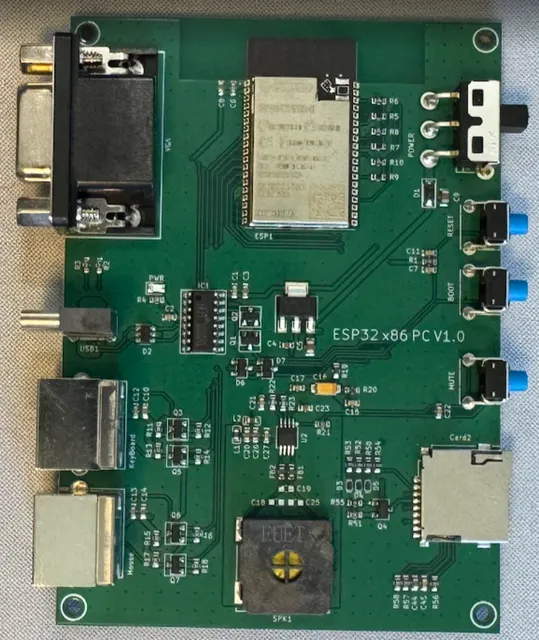
Add text labels on this photo of the PCB that I designed in current project for each connector, power switch, buttons, speaker, SD card connector, and power LED indicator
And create document with photo with the labels and list with labeled components with descriptions
Image
Thought for 11 sec
I’ll annotate the provided PCB photo and create a project document containing the labeled image plus a concise component list.
Worked for 1 min 53 sec
Done — I created the project document “ESP32 x86 PC — Labeled PCB Photo” with the annotated PCB photo and a table of labeled components/descriptions.
Document slug:
esp32-x86-pc-labeled-pcb-photoReview docs and layout
Check document rendering
Run ERC DRC
Review layout manufacturability
Export documentation PDF
Refine this doc
Ask about this doc
Build Log: Everything That Broke
Every project page shows you the finished thing working. This one shows you what it cost to get there. If you're building your own version — or just wondering whether hardware is "really that hard" — this is the honest account.
The board came back from fabrication and, of course, nothing booted cleanly the first time. Here's each wall I hit, why it happened, and how I got past it. The fixes are all in the firmware in this project.
1. The reboot loop that wouldn't die
What I saw: First boot went beautifully. The emulator asked me to join WiFi, I clicked through the menu with a PS/2 mouse, typed my password, watched it download disk images to the SD card, then a progress bar filled — "Date and Time updated. Restarting…" — and the board rebooted. Good. Except it came back to the same message. And rebooted again. And again. Forever.
The hunt: The firmware syncs the clock from an NTP server on first boot, saves the time, and restarts once to fully shut WiFi down before launching the emulator. On that restart it's supposed to detect "I've already done this" and skip straight past. It never did.
The cause: The original design stored the timestamp in a special
__NOINIT_ATTR region of RAM — memory that's meant to survive a soft reset. On this board, with PSRAM being initialized manually, that region was not surviving the restart. So every boot looked like the very first one: no saved time → connect WiFi → sync NTP → restart → repeat.The fix: Stop trusting volatile RAM to remember anything across a reboot. I moved the "NTP already done" flag and the saved timestamp into NVS flash (the ESP32's
Preferences store), which physically persists through any reset, crash, or power cut. Second boot now reads the flag from flash, sees the work is done, and walks right past the NTP step.Lesson: "Survives a soft reset" and "survives my soft reset on my board" are not the same promise. When something absolutely must persist, put it in flash.
2. The crash that struck at a random moment
What I saw: With the loop broken, a new failure took its place. Partway through "Getting date-time from SNTP…" the board would panic and reboot —
Guru Meditation Error: LoadProhibited. Sometimes at 16%. Sometimes 50%. Sometimes 75%. Never the same place twice.The hunt: A crash at a random point is a different animal from a crash at a fixed point. Fixed means a bad line of code. Random means a race — two things running at once, occasionally colliding. The faulting address pointed at a null read, deep in the timing of the NTP code.
The cause: The SNTP sync was being kicked off from inside the on-screen progress dialog's task. That dialog shares the stage with FabGL's real-time display driver — the thing generating VGA every 1/60th of a second. Starting the network time stack from within that tightly-timed display task was stepping on the display controller's toes, and now and then the timing lined up just wrong and the whole thing fell over.
The fix: Pull the SNTP startup out of the dialog. Initialize the time sync first, in calm open code, and let the progress dialog do nothing but watch and report percentage. Also moved the restart call out of the dialog's callback so the ESP32 reliably tags it as a clean software reset.
Lesson: On a two-core microcontroller with a real-time job running, where you start a task matters as much as what it does. Keep heavy, blocking work away from the code that's painting the screen.
3. The SD card that worked — until it didn't
What I saw: Early on, the SD card mounted fine. Then after some refactoring it started failing at cold power-on with
sdmmc_init_sd_if_cond … returned 0x108 — a timeout. The card simply wasn't answering.The cause: Two things conspired. First, a refactor had quietly dropped the explicit SPI-bus pre-initialization the card needed before mounting. Second — the nastier one — the SD card's data line was wired to a pin that doubles as a boot strapping pin. At power-on the ESP32 reads that pin to decide flash voltage; with an SD card hanging off it, the card was pulling the line and corrupting that decision, so boot itself became unreliable with a card inserted.
The fix: Restore the SPI bus setup before the mount, and — the real solution — move the offending signal off the strapping pin in the next board revision (it now lives on a safe GPIO). The design constraint went straight into my "rules for next time" list.
Lesson: Read the strapping-pin table before routing, not after the board comes back. A pin that's free to use at runtime may not be free to use at boot.
4. Smaller skirmishes
- PSRAM, handled by hand. The emulator needs PSRAM but deliberately leaves it disabled in the IDE, then brings it up at runtime — enabling it the normal way drags in a compiler workaround that slows the CPU too much for smooth emulation. Counterintuitive, but it's the right call.
- The malformed comment that compiled. An old block of SD code was "commented out" with
/*/ … */— which, it turns out, opens and closes immediately, so the code inside was actually live. A reminder that the compiler reads exactly what you wrote, not what you meant. - Watchdogs underfoot. Long blocking operations during setup tripped the task watchdog until I gave the loops explicit yields. On a cooperative real-time system, you have to let the other tasks breathe.
Still open: Windows 3.0 shows no video
What I see: Windows 2.x boots and runs on the emulator without complaint. Windows 3.0, launched the same way from the same kind of disk image, gives me a black screen — no video at all. The board doesn't crash or reboot; it just goes dark and nothing appears.
Where it stands: Unsolved, and I'm documenting it honestly rather than guessing in public. I haven't yet tried launching Windows 3.0 with explicit mode switches, which is the obvious next experiment.
What I'd try next, and why: The fact that Windows 2.x is happy but 3.0 goes dark points at graphics, not at the CPU or memory. Windows 2.x is content to drive plain CGA/Hercules, exactly what this emulator provides. Windows 3.0 is more ambitious about display modes and about how it runs — so the leading suspects are:
- A video mode the adapter can't produce. Windows 3.0 may be probing for or selecting a display mode beyond the emulated CGA/Hercules capability, and getting a blank signal as a result.
- The run mode. Windows 3.0 can start in real mode (
win /r) or standard mode; on XT-class hardware real mode is the relevant one. Forcingwin /ris the first thing to test. - The installed display driver. A Windows 3.0 image configured for a CGA or Hercules driver specifically (rather than EGA/VGA) may behave very differently. Reinstalling or reconfiguring the display driver inside Windows Setup is worth a try.
If you've gotten Windows 3.0 to display on FabGL-based hardware, I'd genuinely like to hear how — drop a note on the project.
What the scars taught me
If there's a thread running through all of it, it's this: a microcontroller pretending to be a whole computer has no slack. No host OS to absorb your mistakes, no spare cores, no spare milliseconds. Memory has to persist where you promise it will, tasks have to start where they won't collide, and the hardware has to behave at the instant of power-on — not just once it's running.
Every one of these bugs was invisible in the schematic and obvious in hindsight. That's hardware. The board on the bench booting to
C:\> is quietly carrying every one of these fixes.Building your own spin on this? If you hit something new, document it and send it back — the next person's build log should be shorter than mine.
1. The reboot loop that wouldn't die
2. The crash that struck at a random moment
3. The SD card that worked — until it didn't
4. Smaller skirmishes
Still open: Windows 3.0 shows no video
What the scars taught me