ESP32 x86 PC Peripherals List

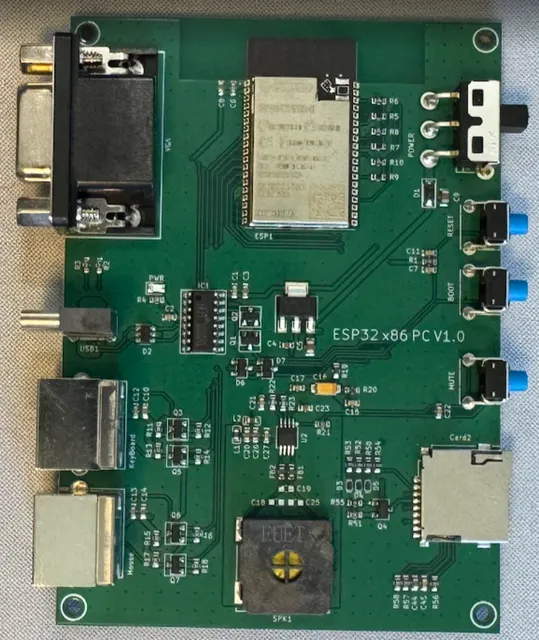
Add text labels on this photo of the PCB that I designed in current project for each connector, power switch, buttons, speaker, SD card connector, and power LED indicator
And create document with photo with the labels and list with labeled components with descriptions
Image
Thought for 11 sec
I’ll annotate the provided PCB photo and create a project document containing the labeled image plus a concise component list.
Worked for 1 min 53 sec
Done — I created the project document “ESP32 x86 PC — Labeled PCB Photo” with the annotated PCB photo and a table of labeled components/descriptions.
Document slug:
esp32-x86-pc-labeled-pcb-photoReview docs and layout
Check document rendering
Run ERC DRC
Review layout manufacturability
Export documentation PDF
Refine this doc
Ask about this doc
Software & Tools
Everything you need to flash, run, and manage the ESP32 x86 PC Emulator, organized by purpose and operating system. Electronics design tooling is not listed here — that's Flux.ai, where you're already reading this.
Required — for flashing the firmware
These are needed to compile and upload the firmware to the board.
Table
| Tool | Purpose | Download |
|---|---|---|
| Arduino IDE | Compiles and uploads the firmware | arduino.cc/en/software |
| Arduino-ESP32 core 2.0.17 | ESP32 board support (install via Boards Manager — see Flashing guide) | github.com/espressif/arduino-esp32 |
| FabGL library | The emulator core (install via Library Manager) | github.com/fdivitto/FabGL |
USB-UART driver (CH340C)
The board uses a CH340C USB-to-serial chip. Most modern systems detect it automatically, but if no port appears, install the official driver from WCH:
Table
| OS | Download |
|---|---|
| Windows | wch.cn/downloads/CH341SER_EXE.html |
| macOS | wch.cn/downloads/CH341SER_MAC_ZIP.html |
| Linux | Built into the kernel — no download needed |
Required — for the SD card
The board boots from a FAT32-formatted microSD card.
Table
| OS | Tool | Notes / Download |
|---|---|---|
| Windows | Built-in formatter, or SD Card Formatter | For cards larger than 32GB, use the official SD Memory Card Formatter to force a single FAT32 partition |
| macOS | Disk Utility | Built in — choose MS-DOS (FAT) |
| Linux | mkfs.fat | sudo mkfs.fat -F 32 /dev/sdX (part of dosfstools) |
Optional — disk image editors (add your own software to
.img files)To copy DOS programs and games into an existing floppy or hard disk image, mount the
.img file on your computer, drag files in, then copy the image back to the SD card.Windows
Table
| Tool | Best for | Download |
|---|---|---|
| OSFMount | Mounting HDD .img files (with partitions) as a drive letter, read/write | osforensics.com/tools/mount-disk-images.html |
| WinImage | Floppy .img files — inject/extract files, create blank images | winimage.com |
| AIM Toolkit | Mounting all image types as drives (successor to ImDisk Toolkit) | sourceforge.net/projects/aim-toolkit |
macOS
Table
| Tool | Best for | Notes |
|---|---|---|
| hdiutil | Mounting raw .img files | Built into macOS: hdiutil attach -imagekey diskimage-class=CRawDiskImage file.img |
| FUSE for macOS + fuse-fat | Read/write FAT access to mounted images | macfuse.github.io |
Linux
Table
| Tool | Best for | Notes |
|---|---|---|
| mount (loop device) | Mounting .img files directly | Built in: sudo mount -o loop,offset= file.img /mnt/point |
| mtools | Reading/writing FAT images without mounting | mcopy -i file.img game.exe ::/ — part of the mtools package |
| GNOME Disks | Graphical mounting and partition viewing | Usually preinstalled on desktop distros |
Where to get operating systems & software
All legal and free.
Table
| Source | What's there |
|---|---|
| FabGL download library | Ready-to-use OS images (FreeDOS, MS-DOS, Windows 3.0, GEM, GEOS, CP/M-86, ELKS) — downloaded automatically on first boot |
| FreeDOS | Free, open DOS — full OS plus bundled utilities and tools |
| SvarDOS | Lightweight free DOS distribution with an online package repository |
| Internet Archive — MS-DOS Software | Thousands of preserved DOS games and applications |
| Internet Archive — MS-DOS Games | Curated classic game collection |
A note on compatibility
This is an XT-class machine (8086/8088 CPU, CGA/Hercules graphics, 640KB RAM). Stick to 1981–1991 era software for the best results. Programs requiring a 286/386+ CPU, EGA/VGA graphics, or more than 640KB of memory will not run.
A good first install: Norton Commander — a dual-pane file manager that makes navigating DOS far easier than typing commands.
Required — for flashing the firmware
USB-UART driver (CH340C)
Required — for the SD card
Optional — disk image editors (add your own software to `.img` files)
Windows
macOS
Linux
Where to get operating systems & software
A note on compatibility