Chat
Welcome to Flux
Treat Flux like your intern. Tell it what you'd like to build and it'll get to work. You can also ask it questions, brainstorm ideas, and teach it your preferences. Learn More
Explain this part
Write a part description
Describe each pin
Operating conditions
Electrical max ratings
Part Specifications
Application circuits
Verify Part Details
Recommend similar parts
Check availability & lifecycle
Ready.
programacion arduino con modulo sim800L para llamadas

programacion arduino con modulo sim800L para llamadas
2y
Someone is typing...
4
como conecto el Modulo SIM800L con arduino uno
@copilot como conecto el Modulo SIM800L con arduino uno
2y
El módulo SIM800L se puede conectar a un Arduino Uno siguiendo estos pasos básicos:
-
VCC: Conecta este pin a una fuente de alimentación de 3.7-4.2V. El módulo SIM800L requiere una fuente de alimentación que pueda entregar hasta 2A durante las ráfagas de transmisión. No conectes este pin directamente a un pin de 5V del Arduino ya que podría dañar el módulo.
-
GND: Conecta este pin al pin de tierra (GND) en el Arduino.
-
TXD: Este es el pin de transmisión del SIM800L. Conéctalo al pin de recepción (RX) del Arduino, que es el pin digital 0.
-
RXD: Este es el pin de recepción del SIM800L. Conéctalo al pin de transmisión (TX) del Arduino, que es el pin digital 1.
-
RST (Reset): Este pin puede ser conectado a un pin digital en el Arduino (como el pin digital 7), permitiéndote resetear el módulo SIM800L programáticamente.
Recuerda que la conexión TX/RX entre el módulo SIM800L y el Arduino Uno debe ser una conexión cruzada, es decir, TX con RX y RX con TX.
Además, es importante mencionar que el Arduino Uno opera a 5V y el SIM800L opera a 3.3V, por lo que tendrás que usar un convertidor de nivel lógico para evitar dañar el módulo SIM800L.
Estos son solo los puntos básicos de la conexión. Dependiendo de las características específicas de tu módulo SIM800L, es posible que tengas que conectar otros pines. Por ejemplo, algunos módulos tienen un pin para la conexión de una antena externa, un pin para la conexión de un micrófono y un altavoz, etc.
2y
Someone is typing...
2
how do I use Flux?

2y
Using Flux, the browser-based electronics CAD program for designing electrical schematics and laying out PCBs, is quite intuitive once you get the hang of the basics. Here's a step-by-step guide to get you started:
-
Accessing Flux: The first step is to navigate to the Flux.ai website and log in or sign up if you haven't already.
-
Starting Your First Project: Once logged in, you can start a new project by selecting the option to create a new schematic or PCB layout. This is your workspace where you will design your circuit or PCB.
-
Placing Components:
- In the schematic editor, use the library of components to find the parts you need for your design.
- Drag and drop these components onto your canvas.
-
Making Connections:
- To connect components in your schematic, use the wire tool to draw connections between the appropriate pins of different components.
- Pay attention to the net names to ensure that connections meant to carry the same signal are properly linked.
-
Assigning Footprints:
- After completing your schematic, you'll need to assign physical footprints to your components for the PCB layout phase.
- This step is crucial for ensuring that the physical dimensions and pin layouts match the components you plan to use.
-
Laying Out Your PCB:
- Switch to the PCB layout view.
- Arrange the components on your board, considering optimal placement for signal integrity, power distribution, and mechanical constraints.
- Use the trace routing tools to connect the pins according to your schematic.
-
Running Checks:
- Flux offers various tools to check your design for common errors or issues, such as unconnected nets or overlapping components.
- Use these verification tools to refine your design.
-
Exporting Your Design:
- Once you're satisfied with your design, you can export the necessary files for manufacturing, such as Gerber files for the PCB and a bill of materials (BOM) for the components.
For detailed instructions, Flux provides a range of @tutorials and documentation. Don't hesitate to dive into these resources:
- Help and Tutorials: In-depth tutorials about how to use Flux, including your first project and specific features[1].
- YouTube: Video example projects and tutorials all in Flux[2].
- Slack Community: Join the community for direct support from the Flux team and other users[3].
For any additional help or specific questions, the Flux community and live support are great resources[4].
2y
Someone is typing...
5
How to add other components like GPS module

2y
To add a GPS module and integrate it with your SIM800L GSM RF M5Stack Platform Evaluation Expansion Board, you'd typically look for a module that supports serial communication via UART (Universal Asynchronous Receiver/Transmitter) since the SIM800L module communicates over UART for sending and receiving SMS or data over the GSM network.
Steps to Add a GPS Module:
-
Choosing a GPS Module:
- A commonly used GPS module is the NEO-6M or NEO-7M GPS module. These modules usually communicate over UART and are widely supported by various microcontroller platforms.
- Ensure the GPS module operates at compatible logic levels with the SIM800L (typically 3.3V).
-
Wiring the GPS Module to the M5Stack Platform:
- Power Connections: Connect the GPS module's VCC and GND pins to a 3.3V power source and ground, respectively. You can use the
VBATandGNDpins for this purpose.- Connect GPS Module VCC to VBAT.
- Connect GPS Module GND to any GND.
- Serial Communication: Connect the GPS module's TX (transmit) pin to a suitable RX (receive) pin on the M5Stack platform and the RX pin to a TX pin. Assuming GPIO1($P:GPIO1$) and GPIO2($P:GPIO2$) or other available GPIO pins can be configured as UART RX and TX respectively,
- Connect GPS Module TX to $P:GPIO1$ (or another suitable RX pin).
- Connect GPS Module RX to $P:GPIO2$ (or another suitable TX pin).
- Power Connections: Connect the GPS module's VCC and GND pins to a 3.3V power source and ground, respectively. You can use the
-
Software Configuration:
- Initialize UART: In your code, initialize a UART instance using the chosen RX and TX pins.
- Read GPS Data: Write or use existing library code to read data from the GPS module. GPS modules typically send data in NMEA (National Marine Electronics Association) format, which you'll need to parse to extract information like latitude, longitude, time, etc.
-
Integration:
- If you plan to send GPS data over GSM using the SIM800L, you'll need to format the read GPS data into a suitable format (e.g., a JSON string or a simple comma-separated string) and send it as an SMS or over a data connection using the AT commands supported by the SIM800L.
- GPIO1 and GPIO2 pins are available for use and compatible for UART communication. Adjust pin numbers based on actual availability and configuration in your project.
- The M5Stack Platform and the GPS module operate on compatible voltage levels. If not, level shifters might be required.
This is a general guideline. The actual implementation might vary depending on the specifics of the GPS module and the M5Stack Platform capabilities. Always refer to the datasheets of your components for accurate information regarding pinouts and communication protocols.
2y
Someone is typing...
6
NC
SCL
GND
GND
TXD
KBR0
GND
GND
GND
GND
GND
GND
KBR1
SIM_VDD
KBR2
GND
SIM_RST
RESET
GND
ISINK1
GND
GND
GND
KBR4
GND
SDA
GND
GND
GND
GND
GND
GND
GND
GND
SIM_CLK
GND
ISINK0
SIM_DET
KBC1
ADC
KBR3
PWM
FM_ANT
USB_DP
RF_SYNC
GSM_ANT
SIM_DATA
VBUS
GND
GND
GND
RTS
GND
NC
GND
RXD
GND
KBC0
USB_DN
Reviews

- Wirelessly connects nets on schematic. Used to organize schematics and separate functional blocks. To wirelessly connect net portals, give them same designator. #portaljharwinbarrozo43.0M
- Wirelessly connects power nets on schematic. Identical to the net portal, but with a power symbol. Used to organize schematics and separate functional blocks. To wirelessly connect power net portals, give them the same designator. #portal #powerjharwinbarrozo11.4M
- A generic fixed resistor ideal for rapid circuit topology development. Its footprint automatically adapts based on the selected package case code—supporting 0402, 0603, 0805, 1203, and many other standard SMD packages, as well as axial horizontal and vertical configurations. Save precious design time by seamlessly add more information to this part (value, footprint, etc.) as it becomes available. Standard resistor values: 1.0 ohm, 10 ohm, 100 ohm, 1.0k ohm, 10k ohm, 100k ohm, 1.0M ohm 1.1 ohm, 11 ohm, 110 ohm, 1.1k ohm, 11k ohm, 110k ohm, 1.1M ohm 1.2 ohm, 12 ohm, 120 ohm, 1.2k ohm, 12k ohm, 120k ohm, 1.2M ohm 1.3 ohm, 13 ohm, 130 ohm, 1.3k ohm, 13k ohm, 130k ohm, 1.3M ohm 1.5 ohm, 15 ohm, 150 ohm, 1.5k ohm, 15k ohm, 150k ohm, 1.5M ohm 1.6 ohm, 16 ohm, 160 ohm, 1.6k ohm, 16k ohm, 160k ohm, 1.6M ohm 1.8 ohm, 18 ohm, 180 ohm, 1.8K ohm, 18k ohm, 180k ohm, 1.8M ohm 2.0 ohm, 20 ohm, 200 ohm, 2.0k ohm, 20k ohm, 200k ohm, 2.0M ohm 2.2 ohm, 22 ohm, 220 ohm, 2.2k ohm, 22k ohm, 220k ohm, 2.2M ohm 2.4 ohm, 24 ohm, 240 ohm, 2.4k ohm, 24k ohm, 240k ohm, 2.4M ohm 2.7 ohm, 27 ohm, 270 ohm, 2.7k ohm, 27k ohm, 270k ohm, 2.7M ohm 3.0 ohm, 30 ohm, 300 ohm, 3.0K ohm, 30K ohm, 300K ohm, 3.0M ohm 3.3 ohm, 33 ohm, 330 ohm, 3.3k ohm, 33k ohm, 330k ohm, 3.3M ohm 3.6 ohm, 36 ohm, 360 ohm, 3.6k ohm, 36k ohm, 360k ohm, 3.6M ohm 3.9 ohm, 39 ohm, 390 ohm, 3.9k ohm, 39k ohm, 390k ohm, 3.9M ohm 4.3 ohm, 43 ohm, 430 ohm, 4.3k ohm, 43K ohm, 430K ohm, 4.3M ohm 4.7 ohm, 47 ohm, 470 ohm, 4.7k ohm, 47k ohm, 470k ohm, 4.7M ohm 5.1 ohm, 51 ohm, 510 ohm, 5.1k ohm, 51k ohm, 510k ohm, 5.1M ohm 5.6 ohm, 56 ohm, 560 ohm, 5.6k ohm, 56k ohm, 560k ohm, 5.6M ohm 6.2 ohm, 62 ohm, 620 ohm, 6.2k ohm, 62K ohm, 620K ohm, 6.2M ohm 6.8 ohm, 68 ohm, 680 ohm, 6.8k ohm, 68k ohm, 680k ohm, 6.8M ohm 7.5 ohm, 75 ohm, 750 ohm, 7.5k ohm, 75k ohm, 750k ohm, 7.5M ohm 8.2 ohm, 82 ohm, 820 ohm, 8.2k ohm, 82k ohm, 820k ohm, 8.2M ohm 9.1 ohm, 91 ohm, 910 ohm, 9.1k ohm, 91k ohm, 910k ohm, 9.1M ohm #generics #CommonPartsLibraryjharwinbarrozo1.5M
- A generic fixed capacitor ideal for rapid circuit topology development. You can choose between polarized and non-polarized types, its symbol and the footprint will automatically adapt based on your selection. Supported options include standard SMD sizes for ceramic capacitors (e.g., 0402, 0603, 0805), SMD sizes for aluminum electrolytic capacitors, and through-hole footprints for polarized capacitors. Save precious design time by seamlessly add more information to this part (value, footprint, etc.) as it becomes available. Standard capacitor values: 1.0pF, 10pF, 100pF, 1000pF, 0.01uF, 0.1uF, 1.0uF, 10uF, 100uF, 1000uF, 10000uF 1.1pF, 11pF, 110pF, 1100pF 1.2pF, 12pF, 120pF, 1200pF 1.3pF, 13pF, 130pF, 1300pF 1.5pF, 15pF, 150pF, 1500pF, 0.015uF, 0.15uF, 1.5uF, 15uF, 150uF, 1500uF 1.6pF, 16pF, 160pF, 1600pF 1.8pF, 18pF, 180pF, 1800pF 2.0pF, 20pF, 200pF, 2000pF 2.2pF, 22pF, 220pF, 2200pF, 0.022uF, 0.22uF, 2.2uF, 22uF, 220uF, 2200uF 2.4pF, 24pF, 240pF, 2400pF 2.7pF, 27pF, 270pF, 2700pF 3.0pF, 30pF, 300pF, 3000pF 3.3pF, 33pF, 330pF, 3300pF, 0.033uF, 0.33uF, 3.3uF, 33uF, 330uF, 3300uF 3.6pF, 36pF, 360pF, 3600pF 3.9pF, 39pF, 390pF, 3900pF 4.3pF, 43pF, 430pF, 4300pF 4.7pF, 47pF, 470pF, 4700pF, 0.047uF, 0.47uF, 4.7uF, 47uF, 470uF, 4700uF 5.1pF, 51pF, 510pF, 5100pF 5.6pF, 56pF, 560pF, 5600pF 6.2pF, 62pF, 620pF, 6200pF 6.8pF, 68pF, 680pF, 6800pF, 0.068uF, 0.68uF, 6.8uF, 68uF, 680uF, 6800uF 7.5pF, 75pF, 750pF, 7500pF 8.2pF, 82pF, 820pF, 8200pF 9.1pF, 91pF, 910pF, 9100pF #generics #CommonPartsLibraryjharwinbarrozo1.5M
- A generic fixed inductor suitable for rapid circuit topology development. The footprint automatically adapts based on the selected package, supporting standard SMD sizes (e.g., 0402, 0603, 0805) as well as well-known inductor packages such as SDR1806, PA4320, SRN6028, and SRR1260. Standard inductor values: 1.0 nH, 10 nH, 100 nH, 1.0 µH, 10 µH, 100 µH, 1.0 mH 1.2 nH, 12 nH, 120 nH, 1.2 µH, 12 µH, 120 µH, 1.2 mH 1.5 nH, 15 nH, 150 nH, 1.5 µH, 15 µH, 150 µH, 1.5 mH 1.8 nH, 18 nH, 180 nH, 1.8 µH, 18 µH, 180 µH, 1.8 mH 2.2 nH, 22 nH, 220 nH, 2.2 µH, 22 µH, 220 µH, 2.2 mH 2.7 nH, 27 nH, 270 nH, 2.7 µH, 27 µH, 270 µH, 2.7 mH 3.3 nH, 33 nH, 330 nH, 3.3 µH, 33 µH, 330 µH, 3.3 mH 3.9 nH, 39 nH, 390 nH, 3.9 µH, 39 µH, 390 µH, 3.9 mH 4.7 nH, 47 nH, 470 nH, 4.7 µH, 47 µH, 470 µH, 4.7 mH 5.6 nH, 56 nH, 560 nH, 5.6 µH, 56 µH, 560 µH, 5.6 mH 6.8 nH, 68 nH, 680 nH, 6.8 µH, 68 µH, 680 µH, 6.8 mH 8.2 nH, 82 nH, 820 nH, 8.2 µH, 82 µH, 820 µH, 8.2 mH #generics #CommonPartsLibraryjharwinbarrozo15.7k
- An electrical connector acting as reusable interface to a conductor and creating a point where external circuits can be connected.Terminal
- 47 kOhms ±5% 0.125W, 1/8W Chip Resistor 0805 (2012 Metric) Automotive AEC-Q200 Thick Film #forLedBlinkjharwinbarrozo1.2M
- 10uF Capacitor Aluminum Polymer 20% 16V SMD 5x5.3mm #forLedBlink #commonpartslibrary #capacitor #aluminumpolymer #radialcanjharwinbarrozo1.2M
- Yellow 595nm LED Indication - Discrete 1.7V 1206 (3216 Metric) #forLedBlinkjharwinbarrozo1.1M


SIM800L
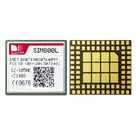
SIM800L GSM RF M5Stack Platform Evaluation Expansion Board #commonpartslibrary
#developmentboard
#expansionboard
Properties
Integrated Circuit
M5Stack Technology Co., Ltd.
SIM800L
IC
Pricing & Availability
Distributor | Qty 1 |
|---|
Controls
Welcome 👋
Flux accelerates your PCB design with AI.
Create your account to start using this component and bring your ideas to life.
jeffersinho0
copilot