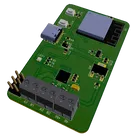
Smart Blind Control System Overview

0:43

Here’s a block-by-block rundown of the “Smart Blind Control System” reference design and how it all fits together:
1. Power Management
  • USB Type-C input via J2 provides a 5 V rail.
  • Reverse-protection diode D1 guards against accidental back-feeding or polarity errors on VBUS.
  • A 3.3 V LDO regulator U3 steps the USB 5 V down to power the ESP32 logic and the stepper driver’s internal logic.
  • A separate 5 V LDO U4 cleans up VBUS for the board’s 5 V logic/servo supply.
  • Decoupling capacitors on each rail keep both the microcontroller and motor-driver stable under load.
2. Microcontroller & User Interface
  • The brains is an ESP32-S3 mini module U1, which:
    • Runs your firmware (Wi-Fi/Bluetooth/USB) to receive commands.
    • Drives all stepper and servo control signals.
  • Three push-buttons let you manually BOOT, RESET, or put the ESP32 into Sleep mode (SW1, SW2, plus a “SLEEP” net button).
  • An on-board RGB status LED LED1 (with its series resistors) indicates power, mode, errors, or network status.
3. Stepper-Motor Drive
  • A standard A4988 stepper driver U2 receives STEP, DIR, and ENABLE signals from the ESP32 to spin a blind-shaft stepper.
  • Current-sense resistors and filter caps around the driver set the motor current limit and suppress switching noise.
  • Two screw-terminal blocks (J3 & J4) connect your stepper motor coils directly to the driver’s outputs.
4. Servo Control
  • Two 3-pin headers (J1 & J5) allow you to plug in standard hobby servos—ideal for tilting slats or slaving secondary actuators—powered by the board’s regulated 5 V.
5. USB & Firmware Programming
  • USB D+/D– lines from the Type-C port [J2] route straight to the ESP32’s USB-UART interface, letting you flash new firmware or communicate via serial.
  • CC-pin pulldown networks on CC1/CC2 auto-negotiate current draw so the board appears as a “device” to any USB host.

Overall Workflow:
  1. Power: Plug in a USB-C cable → board generates both 5 V and 3.3 V rails.
  2. Firmware: ESP32 boots from flash; you can reflash via USB or OTA over Wi-Fi/Bluetooth.
  3. Control Signals: Your app or home-automation hub issues blind-position commands.
  4. Motion: ESP32 toggles [U2] step/dir lines to raise/lower blinds; toggles servo outputs on [J1]/[J5] to tilt slats.
  5. Feedback: Status LED [LED1] shows errors or network status; buttons let you override or enter sleep mode.
This turnkey reference design lets you drop in any standard stepper motor and servos for a fully automated, Wi-Fi/Bluetooth-connected blinds controller.
CC pulldown values
ESP32 decoupling caps
Motor supply bulk cap
Set A4988 current
278 days

ENABLE
STEP
EN
CC2
MS2
MS1
DIR
M2_2
LED_G
USB_D-
ENABLE
USB_D-
LED_R
USB_D+
M1_2
STEP
MS3
SLEEP
LED_G
LED_B
MS2
EN
BOOT
M1_1
DIR
EN
USB_D+
MS1
BOOT
CC1
SERVO1
SLEEP
CC1
LED_R
RESET
USB_D-
SERVO2
MS3
M2_1
LED_B
RESET
USB_D+
CC2
C11
Capacitance
10uF
VBUS
3V3
R7
Resistance
390 Ω
U2
3V3
R3
Resistance
10KΩ
R5
Resistance
Resistance
Resistance
5.1kΩ
VCC
+5V
C2
Capacitance
0.1uF
+5V
R8
Resistance
Resistance
Resistance
5.1kΩ
C3
Capacitance
22uF
3V3
3V3
C10
Capacitance
1uF
C1
Capacitance
0.1uF
C4
Capacitance
0.1uF
R6
Resistance
390 Ω
C9
Capacitance
1uF
C6
Capacitance
1uF
3V3
R1
Resistance
0.05 Ω
R2
Resistance
0.05 Ω
R4
Resistance
390 Ω
C5
Capacitance
1uF
U1
LED1
U3
С1
Capacitance
10µF
SW2
SW1
J2
D1


  • Ground
    A common return path for electric current. Commonly known as ground.
  • Net Portal
    Wirelessly connects nets on schematic. Used to organize schematics and separate functional blocks. To wirelessly connect net portals, give them same designator. #portal
  • Power Net Portal
    Wirelessly connects power nets on schematic. Identical to the net portal, but with a power symbol. Used to organize schematics and separate functional blocks. To wirelessly connect power net portals, give them the same designator. #portal #power
  • Generic Resistor
    A generic fixed resistor ideal for rapid circuit topology development. Its footprint automatically adapts based on the selected package case code—supporting 0402, 0603, 0805, 1203, and many other standard SMD packages, as well as axial horizontal and vertical configurations. Save precious design time by seamlessly add more information to this part (value, footprint, etc.) as it becomes available. Standard resistor values: 1.0 ohm, 10 ohm, 100 ohm, 1.0k ohm, 10k ohm, 100k ohm, 1.0M ohm 1.1 ohm, 11 ohm, 110 ohm, 1.1k ohm, 11k ohm, 110k ohm, 1.1M ohm 1.2 ohm, 12 ohm, 120 ohm, 1.2k ohm, 12k ohm, 120k ohm, 1.2M ohm 1.3 ohm, 13 ohm, 130 ohm, 1.3k ohm, 13k ohm, 130k ohm, 1.3M ohm 1.5 ohm, 15 ohm, 150 ohm, 1.5k ohm, 15k ohm, 150k ohm, 1.5M ohm 1.6 ohm, 16 ohm, 160 ohm, 1.6k ohm, 16k ohm, 160k ohm, 1.6M ohm 1.8 ohm, 18 ohm, 180 ohm, 1.8K ohm, 18k ohm, 180k ohm, 1.8M ohm 2.0 ohm, 20 ohm, 200 ohm, 2.0k ohm, 20k ohm, 200k ohm, 2.0M ohm 2.2 ohm, 22 ohm, 220 ohm, 2.2k ohm, 22k ohm, 220k ohm, 2.2M ohm 2.4 ohm, 24 ohm, 240 ohm, 2.4k ohm, 24k ohm, 240k ohm, 2.4M ohm 2.7 ohm, 27 ohm, 270 ohm, 2.7k ohm, 27k ohm, 270k ohm, 2.7M ohm 3.0 ohm, 30 ohm, 300 ohm, 3.0K ohm, 30K ohm, 300K ohm, 3.0M ohm 3.3 ohm, 33 ohm, 330 ohm, 3.3k ohm, 33k ohm, 330k ohm, 3.3M ohm 3.6 ohm, 36 ohm, 360 ohm, 3.6k ohm, 36k ohm, 360k ohm, 3.6M ohm 3.9 ohm, 39 ohm, 390 ohm, 3.9k ohm, 39k ohm, 390k ohm, 3.9M ohm 4.3 ohm, 43 ohm, 430 ohm, 4.3k ohm, 43K ohm, 430K ohm, 4.3M ohm 4.7 ohm, 47 ohm, 470 ohm, 4.7k ohm, 47k ohm, 470k ohm, 4.7M ohm 5.1 ohm, 51 ohm, 510 ohm, 5.1k ohm, 51k ohm, 510k ohm, 5.1M ohm 5.6 ohm, 56 ohm, 560 ohm, 5.6k ohm, 56k ohm, 560k ohm, 5.6M ohm 6.2 ohm, 62 ohm, 620 ohm, 6.2k ohm, 62K ohm, 620K ohm, 6.2M ohm 6.8 ohm, 68 ohm, 680 ohm, 6.8k ohm, 68k ohm, 680k ohm, 6.8M ohm 7.5 ohm, 75 ohm, 750 ohm, 7.5k ohm, 75k ohm, 750k ohm, 7.5M ohm 8.2 ohm, 82 ohm, 820 ohm, 8.2k ohm, 82k ohm, 820k ohm, 8.2M ohm 9.1 ohm, 91 ohm, 910 ohm, 9.1k ohm, 91k ohm, 910k ohm, 9.1M ohm #generics #CommonPartsLibrary
  • Generic Capacitor
    A generic fixed capacitor ideal for rapid circuit topology development. You can choose between polarized and non-polarized types, its symbol and the footprint will automatically adapt based on your selection. Supported options include standard SMD sizes for ceramic capacitors (e.g., 0402, 0603, 0805), SMD sizes for aluminum electrolytic capacitors, and through-hole footprints for polarized capacitors. Save precious design time by seamlessly add more information to this part (value, footprint, etc.) as it becomes available. Standard capacitor values: 1.0pF, 10pF, 100pF, 1000pF, 0.01uF, 0.1uF, 1.0uF, 10uF, 100uF, 1000uF, 10000uF 1.1pF, 11pF, 110pF, 1100pF 1.2pF, 12pF, 120pF, 1200pF 1.3pF, 13pF, 130pF, 1300pF 1.5pF, 15pF, 150pF, 1500pF, 0.015uF, 0.15uF, 1.5uF, 15uF, 150uF, 1500uF 1.6pF, 16pF, 160pF, 1600pF 1.8pF, 18pF, 180pF, 1800pF 2.0pF, 20pF, 200pF, 2000pF 2.2pF, 22pF, 220pF, 2200pF, 0.022uF, 0.22uF, 2.2uF, 22uF, 220uF, 2200uF 2.4pF, 24pF, 240pF, 2400pF 2.7pF, 27pF, 270pF, 2700pF 3.0pF, 30pF, 300pF, 3000pF 3.3pF, 33pF, 330pF, 3300pF, 0.033uF, 0.33uF, 3.3uF, 33uF, 330uF, 3300uF 3.6pF, 36pF, 360pF, 3600pF 3.9pF, 39pF, 390pF, 3900pF 4.3pF, 43pF, 430pF, 4300pF 4.7pF, 47pF, 470pF, 4700pF, 0.047uF, 0.47uF, 4.7uF, 47uF, 470uF, 4700uF 5.1pF, 51pF, 510pF, 5100pF 5.6pF, 56pF, 560pF, 5600pF 6.2pF, 62pF, 620pF, 6200pF 6.8pF, 68pF, 680pF, 6800pF, 0.068uF, 0.68uF, 6.8uF, 68uF, 680uF, 6800uF 7.5pF, 75pF, 750pF, 7500pF 8.2pF, 82pF, 820pF, 8200pF 9.1pF, 91pF, 910pF, 9100pF #generics #CommonPartsLibrary
  • Generic Inductor
    A generic fixed inductor suitable for rapid circuit topology development. The footprint automatically adapts based on the selected package, supporting standard SMD sizes (e.g., 0402, 0603, 0805) as well as well-known inductor packages such as SDR1806, PA4320, SRN6028, and SRR1260. Standard inductor values: 1.0 nH, 10 nH, 100 nH, 1.0 µH, 10 µH, 100 µH, 1.0 mH 1.2 nH, 12 nH, 120 nH, 1.2 µH, 12 µH, 120 µH, 1.2 mH 1.5 nH, 15 nH, 150 nH, 1.5 µH, 15 µH, 150 µH, 1.5 mH 1.8 nH, 18 nH, 180 nH, 1.8 µH, 18 µH, 180 µH, 1.8 mH 2.2 nH, 22 nH, 220 nH, 2.2 µH, 22 µH, 220 µH, 2.2 mH 2.7 nH, 27 nH, 270 nH, 2.7 µH, 27 µH, 270 µH, 2.7 mH 3.3 nH, 33 nH, 330 nH, 3.3 µH, 33 µH, 330 µH, 3.3 mH 3.9 nH, 39 nH, 390 nH, 3.9 µH, 39 µH, 390 µH, 3.9 mH 4.7 nH, 47 nH, 470 nH, 4.7 µH, 47 µH, 470 µH, 4.7 mH 5.6 nH, 56 nH, 560 nH, 5.6 µH, 56 µH, 560 µH, 5.6 mH 6.8 nH, 68 nH, 680 nH, 6.8 µH, 68 µH, 680 µH, 6.8 mH 8.2 nH, 82 nH, 820 nH, 8.2 µH, 82 µH, 820 µH, 8.2 mH #generics #CommonPartsLibrary
  • Terminal
    Terminal
    An electrical connector acting as reusable interface to a conductor and creating a point where external circuits can be connected.
  • RMCF0805JT47K0
    47 kOhms ±5% 0.125W, 1/8W Chip Resistor 0805 (2012 Metric) Automotive AEC-Q200 Thick Film #forLedBlink
  • 875105359001
    10uF Capacitor Aluminum Polymer 20% 16V SMD 5x5.3mm #forLedBlink #commonpartslibrary #capacitor #aluminumpolymer #radialcan
  • CTL1206FYW1T
    Yellow 595nm LED Indication - Discrete 1.7V 1206 (3216 Metric) #forLedBlink

Smart Blind Control System Reference Design

Smart Blind Control System Reference Design thumbnail
This is a smart blind control system reference design designed to automate the operation of window blinds. It utilizes an ESP32 microcontroller for managing control signals and an A4988 stepper motor driver to control blinds' movement. It also includes USB interfacing and LED feedback. #referenceDesign #edge-computing #edgeComputing #espressif #template #blind #DC #motor #servo #esp32 #reference-design

Pricing & Availability

Distributor

Qty 1

Digi-Key

$5.48–$8.57

LCSC

$5.71–$5.81

Mouser

$8.51

Controls