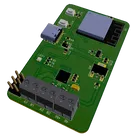
Smart Blind Control System Overview
Thought for 43 sec
Here’s a block-by-block rundown of the “Smart Blind Control System” reference design and how it all fits together:
1. Power Management
- USB Type-C input via J2 provides a 5 V rail.
- Reverse-protection diode D1 guards against accidental back-feeding or polarity errors on VBUS.
- A 3.3 V LDO regulator U3 steps the USB 5 V down to power the ESP32 logic and the stepper driver’s internal logic.
- A separate 5 V LDO U4 cleans up VBUS for the board’s 5 V logic/servo supply.
- Decoupling capacitors on each rail keep both the microcontroller and motor-driver stable under load.
- The brains is an ESP32-S3 mini module U1, which:
- Runs your firmware (Wi-Fi/Bluetooth/USB) to receive commands.
- Drives all stepper and servo control signals.
- Three push-buttons let you manually BOOT, RESET, or put the ESP32 into Sleep mode (SW1, SW2, plus a “SLEEP” net button).
- An on-board RGB status LED LED1 (with its series resistors) indicates power, mode, errors, or network status.
- A standard A4988 stepper driver U2 receives STEP, DIR, and ENABLE signals from the ESP32 to spin a blind-shaft stepper.
- Current-sense resistors and filter caps around the driver set the motor current limit and suppress switching noise.
- Two screw-terminal blocks (J3 & J4) connect your stepper motor coils directly to the driver’s outputs.
- Two 3-pin headers (J1 & J5) allow you to plug in standard hobby servos—ideal for tilting slats or slaving secondary actuators—powered by the board’s regulated 5 V.
- USB D+/D– lines from the Type-C port [J2] route straight to the ESP32’s USB-UART interface, letting you flash new firmware or communicate via serial.
- CC-pin pulldown networks on CC1/CC2 auto-negotiate current draw so the board appears as a “device” to any USB host.
Overall Workflow:
- Power: Plug in a USB-C cable → board generates both 5 V and 3.3 V rails.
- Firmware: ESP32 boots from flash; you can reflash via USB or OTA over Wi-Fi/Bluetooth.
- Control Signals: Your app or home-automation hub issues blind-position commands.
- Motion: ESP32 toggles [U2] step/dir lines to raise/lower blinds; toggles servo outputs on [J1]/[J5] to tilt slats.
- Feedback: Status LED [LED1] shows errors or network status; buttons let you override or enter sleep mode.
This turnkey reference design lets you drop in any standard stepper motor and servos for a fully automated, Wi-Fi/Bluetooth-connected blinds controller.
CC pulldown values
ESP32 decoupling caps
Motor supply bulk cap
Set A4988 current