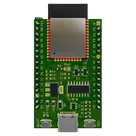
Routing PCB Traces in Flux
Thought for 21 sec
I couldn’t find relevant documentation for direct PCB trace-routing instructions in Flux. That probably means this specific workflow is not currently documented as a supported feature in Flux.

tell me all ok,
solve error
Thought for 2 sec
I can’t inspect or fix the project right now because AI execution is unavailable due to no available ACUs, so I’m unable to run checks, route traces, or resolve errors in the design.
What I can see from the project context:
- Project: ESP32-WROOM-32E Reference Design
- It includes ESP32-WROOM-32E, USB-C, CH340C USB-serial, AMS1117-3.3, headers, protection parts, and passives.
- Recent work updated wiring across multiple commits, so remaining issues may be ERC/DRC, unrouted nets, or connection mistakes.
What remains to do when ACUs are available:
- Run schematic/design review to identify exact errors.
- Fix ERC issues such as missing power, floating pins, or incorrect net connections.
- Check PCB airwires and route remaining nets.
- Run DRC after routing to confirm the board is clean.
Once ACUs are available, ask me to “run review and fix errors” and I can inspect, repair, and verify the design.
Review and fix
Check key pins
List errors
Find ERC/DRC