Chat
Welcome to Flux
Treat Flux like your intern. Tell it what you'd like to build and it'll get to work. You can also ask it questions, brainstorm ideas, and teach it your preferences. Learn More
Explain this part
Write a part description
Describe each pin
Operating conditions
Electrical max ratings
Part Specifications
Application circuits
Verify Part Details
Recommend similar parts
Check availability & lifecycle
create a detailed step by step plan table for this project to verify its functio...

2y
Creating a detailed step-by-step verification plan for the MCP73831-2DCI/MC Lithium-Ion/Polymer battery charger IC involves several key stages. This plan assumes you have the necessary equipment, such as a power supply, multimeter, lithium-ion/polymer battery, and a load for testing. Each step should be carefully documented, and safety precautions related to handling lithium-ion/polymer batteries should always be observed.
Step 1: Preparation
- Gather all required components and equipment.
- Review the MCP73831-2DCI/MC datasheet for understanding pin configurations and electrical characteristics.
- Ensure the Lithium-Ion/Polymer battery to be charged is within the voltage and current specifications supported by the MCP73831.
- Connect the input power supply (VDD) terminals to VDD_1 (U:Pin 1) and VDD_2 (U:Pin 2). Note: Assume a standard input voltage of 5V for USB-powered applications.
- Connect the ground of the power supply to VSS (U:Pin 6).
- Connect the positive terminal of the battery to VBAT_1 (U:Pin 3) and VBAT_2 (U:Pin 4).
- Connect the negative terminal of the battery directly to VSS (U:Pin 6).
- Connect a resistor and LED in series to the STAT (U:Pin 5) pin for charging status indication. The other end of the resistor-LED chain should connect to VSS (U:Pin 6). This serves as a visual indication when the battery is charging or fully charged.
- Calculate the value of the programming resistor ($R_{PROG}$) required to set the desired charge current as per the datasheet formula. $I_{CHG} = 1000V / R_{PROG}$. Assume a typical charge current value if not specified.
- Connect the calculated $R_{PROG}$ to PROG (U:Pin 8) and VSS (U:Pin 6).
- Double-check all connections for correctness.
- Power on your setup and verify the input voltage is stable at 5V using a multimeter.
- Charge Current Verification: Measure the current flowing to the battery immediately after power-on. Verify it matches the expected current determined by the $R_{PROG}$ value.
- Status Indicator Check: Confirm that the LED indicator functions correctly (e.g., turns on or off as per the charging status).
- Final Voltage Verification: Once the battery is fully charged, confirm the final voltage across the battery matches the expected charge voltage from the datasheet.
- No Battery Connected: Verify the IC enters a safe state when no battery is connected, as indicated by the status pin behavior.
- Overvoltage Protection: Verify no overvoltage condition occurs at the battery terminals.
- Temperature Monitoring: Monitor the temperature of the IC and battery during the charge cycle to ensure no overheating occurs.
- Document all measurements, observations, and any discrepancies noticed during the testing.
- Safely disconnect the power supply and battery following the testing.
This verification plan will help ensure that the MCP73831-2DCI/MC charger circuit functions correctly and safely charges a Lithium-Ion/Polymer battery.
2y
Someone is typing...
4
make an typical application with this IC
2y
Based on the MCP73831-2DCI/MC Lithium Ion/Polymer Charger IC you're working with, I'll guide you through setting up a typical application circuit using this charger IC. The MCP73831/2 ICs are compact, single-cell, fully integrated linear charge management controllers suitable for space-limited applications. They provide a simple yet effective way to charge Li-Ion/Li-Polymer batteries.
Assuming you're using typical values and components for a standard charging circuit, here are the connections you need to make for a basic application:
Required External Components
- R_PROG: A resistor to set the charge current. Common values range from 1kΩ to 10kΩ, depending on the desired charging current.
- C_IN: A ceramic input capacitor (typically 4.7μF to 10μF).
- C_BAT: A ceramic capacitor on the battery line (typically 1μF).
- Battery: A single-cell Li-Ion/Li-Polymer battery.
-
Input Supply (VDD) Connections:
- Connect both VDD_1:1 and VDD_2:2 to the positive terminal of your input power source (4.5V to 6V).
-
Battery Connection:
- Connect both VBAT_1:3 and VBAT_2:4 to the positive terminal of the Li-Ion/Li-Polymer battery.
-
Ground (VSS) Connection:
- Connect VSS:6 to the ground of your power source and the negative terminal of the battery.
-
Charge Current Programming (PROG) Connection:
- Connect PROG:8 to one terminal of R_PROG.
- The other terminal of R_PROG should be connected to ground (VSS). The value of R_PROG determines the charge current according to the formula $I_{CHG} = \frac{1000V}{R_{PROG}}$
-
Status Output (STAT) Connection:
- Connect STAT:5 to an LED through a resistor (to limit current) to ground, or to a microcontroller GPIO pin if you wish to monitor the charge status programmatically.
-
Expose Pad (EP) Connection:
- Connect EP:9 to ground. This pad is generally used for thermal relief and enhancing thermal dissipation.
-
No Connection (NC) Pin:
- Leave NC:7 unconnected as it's not used in this application.
If you want a charge current of 100mA, you can calculate the needed R_PROG value as follows:
$R_{PROG} = \frac{1000V}{I_{CHG}} = \frac{1000V}{100mA} = 10k\Omega$
Schematic Summary
- Connect VDD_1:1 and VDD_2:2 to power source (+).
- Connect VBAT_1:3 and VBAT_2:4 to battery (+).
- Connect VSS:6 to battery (−) and power source (−).
- Connect PROG:8 to one terminal of R_PROG and the other terminal of R_PROG to VSS:6.
- Connect STAT:5 to a status LED/resistor or microcontroller GPIO (optional).
- Connect EP:9 to VSS:6.
- Leave NC:7 unconnected.
Make sure to adjust the component values like R_PROG according to the specific requirements of your project, such as the desired charge current. This setup provides a basic framework for a charging circuit, and additional features or configurations may vary depending on your application needs.
2y
Someone is typing...
2
EP
VDD_2
VBAT_2
NC
VDD_1
VBAT_1
STAT
VSS
PROG
Reviews
 A generic fixed inductor suitable for rapid circuit topology development. The footprint automatically adapts based on the selected package, supporting standard SMD sizes (e.g., 0402, 0603, 0805) as well as well-known inductor packages such as SDR1806, PA4320, SRN6028, and SRR1260. Standard inductor values: 1.0 nH, 10 nH, 100 nH, 1.0 µH, 10 µH, 100 µH, 1.0 mH 1.2 nH, 12 nH, 120 nH, 1.2 µH, 12 µH, 120 µH, 1.2 mH 1.5 nH, 15 nH, 150 nH, 1.5 µH, 15 µH, 150 µH, 1.5 mH 1.8 nH, 18 nH, 180 nH, 1.8 µH, 18 µH, 180 µH, 1.8 mH 2.2 nH, 22 nH, 220 nH, 2.2 µH, 22 µH, 220 µH, 2.2 mH 2.7 nH, 27 nH, 270 nH, 2.7 µH, 27 µH, 270 µH, 2.7 mH 3.3 nH, 33 nH, 330 nH, 3.3 µH, 33 µH, 330 µH, 3.3 mH 3.9 nH, 39 nH, 390 nH, 3.9 µH, 39 µH, 390 µH, 3.9 mH 4.7 nH, 47 nH, 470 nH, 4.7 µH, 47 µH, 470 µH, 4.7 mH 5.6 nH, 56 nH, 560 nH, 5.6 µH, 56 µH, 560 µH, 5.6 mH 6.8 nH, 68 nH, 680 nH, 6.8 µH, 68 µH, 680 µH, 6.8 mH 8.2 nH, 82 nH, 820 nH, 8.2 µH, 82 µH, 820 µH, 8.2 mH #generics #CommonPartsLibraryjharwinbarrozo16.6k
- A generic fixed capacitor ideal for rapid circuit topology development. You can choose between polarized and non-polarized types, its symbol and the footprint will automatically adapt based on your selection. Supported options include standard SMD sizes for ceramic capacitors (e.g., 0402, 0603, 0805), SMD sizes for aluminum electrolytic capacitors, and through-hole footprints for polarized capacitors. Save precious design time by seamlessly add more information to this part (value, footprint, etc.) as it becomes available. Standard capacitor values: 1.0pF, 10pF, 100pF, 1000pF, 0.01uF, 0.1uF, 1.0uF, 10uF, 100uF, 1000uF, 10000uF 1.1pF, 11pF, 110pF, 1100pF 1.2pF, 12pF, 120pF, 1200pF 1.3pF, 13pF, 130pF, 1300pF 1.5pF, 15pF, 150pF, 1500pF, 0.015uF, 0.15uF, 1.5uF, 15uF, 150uF, 1500uF 1.6pF, 16pF, 160pF, 1600pF 1.8pF, 18pF, 180pF, 1800pF 2.0pF, 20pF, 200pF, 2000pF 2.2pF, 22pF, 220pF, 2200pF, 0.022uF, 0.22uF, 2.2uF, 22uF, 220uF, 2200uF 2.4pF, 24pF, 240pF, 2400pF 2.7pF, 27pF, 270pF, 2700pF 3.0pF, 30pF, 300pF, 3000pF 3.3pF, 33pF, 330pF, 3300pF, 0.033uF, 0.33uF, 3.3uF, 33uF, 330uF, 3300uF 3.6pF, 36pF, 360pF, 3600pF 3.9pF, 39pF, 390pF, 3900pF 4.3pF, 43pF, 430pF, 4300pF 4.7pF, 47pF, 470pF, 4700pF, 0.047uF, 0.47uF, 4.7uF, 47uF, 470uF, 4700uF 5.1pF, 51pF, 510pF, 5100pF 5.6pF, 56pF, 560pF, 5600pF 6.2pF, 62pF, 620pF, 6200pF 6.8pF, 68pF, 680pF, 6800pF, 0.068uF, 0.68uF, 6.8uF, 68uF, 680uF, 6800uF 7.5pF, 75pF, 750pF, 7500pF 8.2pF, 82pF, 820pF, 8200pF 9.1pF, 91pF, 910pF, 9100pF #generics #CommonPartsLibraryjharwinbarrozo1.5M
- A generic fixed resistor ideal for rapid circuit topology development. Its footprint automatically adapts based on the selected package case code—supporting 0402, 0603, 0805, 1203, and many other standard SMD packages, as well as axial horizontal and vertical configurations. Save precious design time by seamlessly add more information to this part (value, footprint, etc.) as it becomes available. Standard resistor values: 1.0 ohm, 10 ohm, 100 ohm, 1.0k ohm, 10k ohm, 100k ohm, 1.0M ohm 1.1 ohm, 11 ohm, 110 ohm, 1.1k ohm, 11k ohm, 110k ohm, 1.1M ohm 1.2 ohm, 12 ohm, 120 ohm, 1.2k ohm, 12k ohm, 120k ohm, 1.2M ohm 1.3 ohm, 13 ohm, 130 ohm, 1.3k ohm, 13k ohm, 130k ohm, 1.3M ohm 1.5 ohm, 15 ohm, 150 ohm, 1.5k ohm, 15k ohm, 150k ohm, 1.5M ohm 1.6 ohm, 16 ohm, 160 ohm, 1.6k ohm, 16k ohm, 160k ohm, 1.6M ohm 1.8 ohm, 18 ohm, 180 ohm, 1.8K ohm, 18k ohm, 180k ohm, 1.8M ohm 2.0 ohm, 20 ohm, 200 ohm, 2.0k ohm, 20k ohm, 200k ohm, 2.0M ohm 2.2 ohm, 22 ohm, 220 ohm, 2.2k ohm, 22k ohm, 220k ohm, 2.2M ohm 2.4 ohm, 24 ohm, 240 ohm, 2.4k ohm, 24k ohm, 240k ohm, 2.4M ohm 2.7 ohm, 27 ohm, 270 ohm, 2.7k ohm, 27k ohm, 270k ohm, 2.7M ohm 3.0 ohm, 30 ohm, 300 ohm, 3.0K ohm, 30K ohm, 300K ohm, 3.0M ohm 3.3 ohm, 33 ohm, 330 ohm, 3.3k ohm, 33k ohm, 330k ohm, 3.3M ohm 3.6 ohm, 36 ohm, 360 ohm, 3.6k ohm, 36k ohm, 360k ohm, 3.6M ohm 3.9 ohm, 39 ohm, 390 ohm, 3.9k ohm, 39k ohm, 390k ohm, 3.9M ohm 4.3 ohm, 43 ohm, 430 ohm, 4.3k ohm, 43K ohm, 430K ohm, 4.3M ohm 4.7 ohm, 47 ohm, 470 ohm, 4.7k ohm, 47k ohm, 470k ohm, 4.7M ohm 5.1 ohm, 51 ohm, 510 ohm, 5.1k ohm, 51k ohm, 510k ohm, 5.1M ohm 5.6 ohm, 56 ohm, 560 ohm, 5.6k ohm, 56k ohm, 560k ohm, 5.6M ohm 6.2 ohm, 62 ohm, 620 ohm, 6.2k ohm, 62K ohm, 620K ohm, 6.2M ohm 6.8 ohm, 68 ohm, 680 ohm, 6.8k ohm, 68k ohm, 680k ohm, 6.8M ohm 7.5 ohm, 75 ohm, 750 ohm, 7.5k ohm, 75k ohm, 750k ohm, 7.5M ohm 8.2 ohm, 82 ohm, 820 ohm, 8.2k ohm, 82k ohm, 820k ohm, 8.2M ohm 9.1 ohm, 91 ohm, 910 ohm, 9.1k ohm, 91k ohm, 910k ohm, 9.1M ohm #generics #CommonPartsLibraryjharwinbarrozo1.5M
- An electrical connector acting as reusable interface to a conductor and creating a point where external circuits can be connected.Terminal
- General Purpose Thick Film Standard Power and High-Power Chip Resistor 47 kOhms ±5% 0.125W, 1/8W Chip Resistor 0805 (2012 Metric) Automotive AEC-Q200 Thick Film Features: - RMCF – standard power ratings - RMCP – high power ratings - Nickel barrier terminations standard - Power derating from 100% at 70ºC to zero at +155ºC - RoHS compliant, REACH compliant, and halogen free - AEC-Q200 compliantjharwinbarrozo1.2M
- 10 µF 16 V Aluminum - Polymer Capacitors Radial, Can - SMD 30mOhm 2000 Hrs @ 105°C #commonpartslibrary #capacitor #aluminumpolymer #radialcanjharwinbarrozo1.2M
- Battery Holder (Open) Coin, 20.0mm 1 Cell SMD (SMT) Tab bate or batt #forLedBlinkjharwinbarrozo700.5k
- A momentary or non-latching switch which causes a temporary change in the state of an electrical circuit only while the switch is physically actuated. SWITCH TACTILE SPST-NO 0.05A 24Vjharwinbarrozo490.7k
- Straight 3 pin 5mm 3-pin Pitch 5mm 15A 1.5 300V Screw terminal block 01x03 #screwblock #connector #commonPartsLibraryjharwinbarrozo537.9k


MCP73831-2DCI/MC
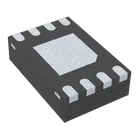
Charger IC Lithium Ion/Polymer 8-DFN (2x3) #commonpartslibrary
#integratedcircuit
#powermanagement
#batterycharger
Properties
Integrated Circuit
Microchip Technology
MCP73831-2DCI/MC
U
Pricing & Availability
DPN | Stock | Qty 1 |
|---|---|---|
1 | 0 | $0.675 |
1 | 0 | $0.00 |
1 | 150 | $1.5836 |
1 | 1.1K | $0.82 |
1 | 900 | $0.8596 |
Controls
Welcome 👋
Flux accelerates your PCB design with AI.
Create your account to start using this component and bring your ideas to life.
learnflux
copilot