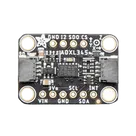
Pin Function Grouping Assistance
Thought for 1 sec
- Set VIN's Pin Type to "Power In"
- Set VIN's Section to "Power"
- Set VIN's Pin Group to "VIN"
- Set VIN's Pin Description to "Regulator input / logic level"
- Set VIN's Sub-symbol Designator Suffix to "Power"
- Set VIN's Pin Orientation to "Top"
- Set 3.3V's Pin Type to "Power Out"
- Set 3.3V's Section to "Power"
- Set 3.3V's Pin Group to "3V3"
- Set 3.3V's Pin Description to "3.3V regulator output"
- Set 3.3V's Sub-symbol Designator Suffix to "Power"
- Set 3.3V's Pin Orientation to "Right"
- Set GND's Pin Type to "Ground"
- Set GND's Section to "Ground"
- Set GND's Pin Group to "GND"
- Set GND's Pin Description to "Ground return"
- Set GND's Sub-symbol Designator Suffix to "Power"
- Set GND's Pin Orientation to "Bottom"
- Set GND's Pin Type to "Ground"
- Set GND's Section to "Ground"
- Set GND's Pin Group to "GND"
- Set GND's Pin Description to "Ground return"
- Set GND's Sub-symbol Designator Suffix to "Power"
- Set GND's Pin Orientation to "Bottom"
- Set SCL's Pin Type to "Bi-Directional"
- Set SCL's Section to "Communication"
- Set SCL's Pin Group to "I2C/SPI"
- Set SCL's Pin Description to "I2C clock / SPI SCK"
- Set SCL's Sub-symbol Designator Suffix to "Interface"
- Set SCL's Pin Orientation to "Left"
- Set SDA/SDIO's Pin Type to "Bi-Directional"
- Set SDA/SDIO's Section to "Communication"
- Set SDA/SDIO's Pin Group to "I2C/SPI"
- Set SDA/SDIO's Pin Description to "I2C data / SPI MOSI"
- Set SDA/SDIO's Sub-symbol Designator Suffix to "Interface"
- Set SDA/SDIO's Pin Orientation to "Left"
- Set SDO's Pin Type to "Bi-Directional"
- Set SDO's Section to "Communication"
- Set SDO's Pin Group to "I2C/SPI"
- Set SDO's Pin Description to "SPI MISO / I2C address"
- Set SDO's Sub-symbol Designator Suffix to "Interface"
- Set SDO's Pin Orientation to "Left"
- Set CS's Pin Type to "Input"
- Set CS's Section to "Control"
- Set CS's Pin Group to "Mode Select"
- Set CS's Pin Description to "SPI chip select / mode"
- Set CS's Sub-symbol Designator Suffix to "Interface"
- Set CS's Pin Orientation to "Left"
- Set INT1's Pin Type to "Output"
- Set INT1's Section to "Control"
- Set INT1's Pin Group to "Interrupt"
- Set INT1's Pin Description to "Interrupt output 1"
- Set INT1's Sub-symbol Designator Suffix to "Control"
- Set INT1's Pin Orientation to "Right"
- Set INT2's Pin Type to "Output"
- Set INT2's Section to "Control"
- Set INT2's Pin Group to "Interrupt"
- Set INT2's Pin Description to "Interrupt output 2"
- Set INT2's Sub-symbol Designator Suffix to "Control"
- Set INT2's Pin Orientation to "Right"
- Set MOUNTING 1's Pin Type to "Passive"
- Set MOUNTING 1's Section to "Mechanical"
- Set MOUNTING 1's Pin Group to "Mounting"
- Set MOUNTING 1's Pin Description to "Mounting hole"
- Set MOUNTING 1's Sub-symbol Designator Suffix to "Mechanical"
- Set MOUNTING 1's Pin Orientation to "Bottom"
- Set MOUNTING 2's Pin Type to "Passive"
- Set MOUNTING 2's Section to "Mechanical"
- Set MOUNTING 2's Pin Group to "Mounting"
- Set MOUNTING 2's Pin Description to "Mounting hole"
- Set MOUNTING 2's Sub-symbol Designator Suffix to "Mechanical"
- Set MOUNTING 2's Pin Orientation to "Bottom"
- Set MOUNTING 3's Pin Type to "Passive"
- Set MOUNTING 3's Section to "Mechanical"
- Set MOUNTING 3's Pin Group to "Mounting"
- Set MOUNTING 3's Pin Description to "Mounting hole"
- Set MOUNTING 3's Sub-symbol Designator Suffix to "Mechanical"
- Set MOUNTING 3's Pin Orientation to "Bottom"
- Set MOUNTING 4's Pin Type to "Passive"
- Set MOUNTING 4's Section to "Mechanical"
- Set MOUNTING 4's Pin Group to "Mounting"
- Set MOUNTING 4's Pin Description to "Mounting hole"
- Set MOUNTING 4's Sub-symbol Designator Suffix to "Mechanical"
- Set MOUNTING 4's Pin Orientation to "Bottom"