Ultrasonic Wind Sensor Design
2:17
Searching for library options.
Gathering library part options.
Searching for components.
Dispatching Library tool to find: "DB9 (DE-9) female D-sub board-mount connector with metal shield/shell ground lugs or tabs for chassis ground; through-hole right-angle style for PCB edge I/O; include mounting ears if available; suitable for RS-232; standard 2-row 5-4 pin pattern; prefer common TE/Amphenol/NorComp parts; return options from Flux library."
Dispatching Library tool to find: "DB9 (DE-9) female D-sub board-mount connector with metal shield/shell ground lugs; through-hole vertical (straight) style; with mounting ears; RS-232 compatible; standard pin numbering; provide options from library."
Creating search plan for: "DB9 (DE-9) female D-sub board-mount connector with metal shield/shell ground lugs or tabs for chassis ground; through-hole right-angle style for PCB edge I/O; include mounting ears if available; suitable for RS-232; standard 2-row 5-4 pin pattern; prefer common TE/Amphenol/NorComp parts; return options from Flux library. --- Suggested search options: facetFilters: ["part_type:Connector"] hitsPerPage: 25"
Creating search plan for: "DB9 (DE-9) female D-sub board-mount connector with metal shield/shell ground lugs; through-hole vertical (straight) style; with mounting ears; RS-232 compatible; standard pin numbering; provide options from library. --- Suggested search options: facetFilters: ["part_type:Connector"] hitsPerPage: 25"
Searching: "DB9 (DE-9) female right-angle through-hole D-sub board-mount connector with metal shield or shell grounding lugs/tabs for chassis ground; PCB edge I/O; 2-row 5-4 pin RS-232; mounting ears preferred; prefer Amphenol/TE/NorComp"
Found 15 results.
Searching: "DB9 (DE-9) female D-sub board-mount connector with metal shield/shell ground lugs or tabs for chassis ground; through-hole right-angle style for PCB edge I/O; include mounting ears if available; suitable for RS-232; standard 2-row 5-4 pin pattern; prefer common TE/Amphenol/NorComp parts; return options from Flux library. --- Suggested search options: facetFilters: ["part_type:Connector"] hitsPerPage: 25"
Searching: "Through-hole vertical DB9 (DE-9) female D-sub board-mount connector with metal shell ground/shell lugs and mounting ears, RS-232 compatible, standard pin numbering"
Found 15 results.
Searching: "DB9 (DE-9) female D-sub board-mount connector with metal shield/shell ground lugs; through-hole vertical (straight) style; with mounting ears; RS-232 compatible; standard pin numbering; provide options from library. --- Suggested search options: facetFilters: ["part_type:Connector"] hitsPerPage: 25"
Finished searching for components.
Setting up library queries.
Providing options for DB9.
Formatting output for clarity.
Table
| Part | 描述 | 链接 |
|---|---|---|
| DB9_Female_MountingHoles | 9‑Pin DE‑9F,带安装孔;常见带金属壳/屏蔽耳版本(下单前在部件页核对脚位与屏蔽耳焊盘) | DB9_Female_MountingHoles |
| A-DF 09 A/KG-T4S | 9‑Pin D‑Sub 母座,常见带金属壳;请在部件页确认屏蔽壳地耳 | A-DF 09 A/KG-T4S |
| K22X-E9S-N | 9‑Pin D‑Sub 母座,板装;检查是否含屏蔽壳焊脚 | K22X-E9S-N |
Table
| Part | 描述 | 链接 |
|---|---|---|
| DB9_Female_MountingHoles | 9‑Pin DE‑9F,带安装孔;部分版本含屏蔽焊脚 | DB9_Female_MountingHoles |
| K22X-E9S-N | 9‑Pin D‑Sub 母座 | K22X-E9S-N |
| A-DF 09 A/KG-T4S | 9‑Pin D‑Sub 母座 | A-DF 09 A/KG-T4S |
- 引脚:2=TXD、3=RXD、5=GND(板端作为DCE直通PC),其余脚不接。
- 屏蔽壳地:将金属壳/屏蔽耳焊脚接到独立网络“Chassis_GND”,再与系统地通过单点或RC/TVS耦合;避免直接把屏蔽壳与数字地大面积短接。
- 下单前在部件详情中核对:方向(直角/直立)、是否有屏蔽壳地耳焊盘、安装耳孔距与板边距离,确保与你的面板/外壳匹配。
Ready to start.
Show Plan

- What power net the decoupling capacitors are attached to. What is the stated voltage of that net.
- The voltage rating and value of the attached decoupling capacitors.
- Signal with the expression “[WARNING]” if any of the following conditions are met: no decoupling capacitors are attached; the voltage of the power net is higher than the voltage rating of the capacitor; No voltage range was stated for the capacitor. Give a separate “[WARNING]” for each condition. Signal with the expression “[OK]” if none of those conditions are met
- Express the result in a markdown-formatted table
- Decoupling capacitors are vital for stabilizing power supply voltages and minimizing voltage spikes. A common approach is to attach at least one 0.1uF ceramic capacitor close to each power pin of the microcontroller for decoupling. Additional electrolytic capacitors (e.g., 10uF) might be used near the power source for bulk decoupling.
- For ICs like LDOs (Low Drop-Out regulators), power converters, and digital ICs that you might add to your project, similar decoupling practices apply: a combination of bulk and ceramic capacitors near the power pins.
Table
| IC Designator | Power Net | Voltage of Net | Capacitor Value | Capacitor Voltage Rating | Status |
|---|---|---|---|---|---|
| U1 (STM32F103C8T6) | VDD, VDDA, VBAT | 3.3V (assumed) | 0.1uF (Ceramic), 10uF (Electrolytic) | 6.3V (assumed for both) | [WARNING] No decoupling capacitors attached |
- Each IC, including digital ICs, power converters, LDOs, etc., has decoupling capacitors attached close to its power supply pins.
- The voltage rating of the capacitors exceeds the power net voltage.
- All necessary details for the capacitors, such as their value and voltage rating, are provided.


-
Digital I/O Pins (GPIO): Most digital I/O pins on STM32 microcontrollers are configured as floating inputs after reset. For any pin configured as an input, if it's not externally driven, it's a good practice to enable either an internal pull-up or pull-down resistor to ensure it doesn't float. This can often be done through software configuration in the microcontroller's setup code. However, for critical paths or where software configuration isn't feasible early enough in the initialization process, external resistors may be necessary.
-
Analog Pins (ADC inputs): For analog pins intended for use as ADC inputs, it's generally best not to attach pull-up or pull-down resistors, as these could affect the accuracy of the analog readings. If these pins are not used, they should be left floating or, in some designs, connected to a known stable voltage through a high-value resistor to minimize noise.
-
Reset Pin (NRST): The NRST pin is usually internally pulled up, but in noisy environments or for added reliability, an external pull-up resistor might be recommended. Additionally, a capacitor to ground could help debounce the reset signal, though this needs to be carefully sized not to interfere with the programming and reset mechanisms.
-
Oscillator Pins (OSC_IN/OSC_OUT for external crystal oscillator): If an external oscillator is not used, these pins typically don't require pull-up or pull-down resistors.
-
Boot Configuration Pins (BOOT0, BOOT1): These pins determine the boot mode of the microcontroller at startup. BOOT0 is usually pulled down for the standard boot mode from the main Flash memory. If BOOT0 or other boot configuration pins are present, they should be tied to a known state according to the desired boot configuration. For BOOT0, a pull-down is commonly used unless booting from system memory or SRAM is required.
-
Communication Interface Pins (I2C, SPI, USART, etc.): For unused communication interface pins configured as inputs or not explicitly driven by an external source, pull-up or pull-down resistors can help ensure these pins don't float, potentially leading to undesired power consumption or behavior. For I2C specifically, pull-up resistors are required for SDA and SCL lines, if these pins are used.
-
Power Pins (VDD, VSS, VBAT, VDDA, VSSA): These are power supply and ground pins and do not require pull-up or pull-down resistors. They should be properly decoupled with capacitors close to the microcontroller pins.
- NRST: Consider an external pull-up if your design is subject to noise.
- BOOT0: Should be pulled low for normal operation unless you intend to use alternate boot modes.
- Digital I/O pins not used (e.g., PAx, PBx, PCx, PDx): If configured as inputs and not connected, consider setting them to a known state with pull-up or pull-down resistors.
- Analog Inputs (If any are intended for ADC use): Should generally be left floating or carefully managed if not used.
Reviews

- Wirelessly connects nets on schematic. Used to organize schematics and separate functional blocks. To wirelessly connect net portals, give them same designator. #portaljharwinbarrozo43.0M
- Wirelessly connects power nets on schematic. Identical to the net portal, but with a power symbol. Used to organize schematics and separate functional blocks. To wirelessly connect power net portals, give them the same designator. #portal #powerjharwinbarrozo11.4M
- A generic fixed resistor for rapid developing circuit topology. Save precious design time by seamlessly add more information to this part (value, footprint, etc.) as it becomes available. Standard resistor values: 1.0Ω 10Ω 100Ω 1.0kΩ 10kΩ 100kΩ 1.0MΩ 1.1Ω 11Ω 110Ω 1.1kΩ 11kΩ 110kΩ 1.1MΩ 1.2Ω 12Ω 120Ω 1.2kΩ 12kΩ 120kΩ 1.2MΩ 1.3Ω 13Ω 130Ω 1.3kΩ 13kΩ 130kΩ 1.3MΩ 1.5Ω 15Ω 150Ω 1.5kΩ 15kΩ 150kΩ 1.5MΩ 1.6Ω 16Ω 160Ω 1.6kΩ 16kΩ 160kΩ 1.6MΩ 1.8Ω 18Ω 180Ω 1.8KΩ 18kΩ 180kΩ 1.8MΩ 2.0Ω 20Ω 200Ω 2.0kΩ 20kΩ 200kΩ 2.0MΩ 2.2Ω 22Ω 220Ω 2.2kΩ 22kΩ 220kΩ 2.2MΩ 2.4Ω 24Ω 240Ω 2.4kΩ 24kΩ 240kΩ 2.4MΩ 2.7Ω 27Ω 270Ω 2.7kΩ 27kΩ 270kΩ 2.7MΩ 3.0Ω 30Ω 300Ω 3.0KΩ 30KΩ 300KΩ 3.0MΩ 3.3Ω 33Ω 330Ω 3.3kΩ 33kΩ 330kΩ 3.3MΩ 3.6Ω 36Ω 360Ω 3.6kΩ 36kΩ 360kΩ 3.6MΩ 3.9Ω 39Ω 390Ω 3.9kΩ 39kΩ 390kΩ 3.9MΩ 4.3Ω 43Ω 430Ω 4.3kΩ 43KΩ 430KΩ 4.3MΩ 4.7Ω 47Ω 470Ω 4.7kΩ 47kΩ 470kΩ 4.7MΩ 5.1Ω 51Ω 510Ω 5.1kΩ 51kΩ 510kΩ 5.1MΩ 5.6Ω 56Ω 560Ω 5.6kΩ 56kΩ 560kΩ 5.6MΩ 6.2Ω 62Ω 620Ω 6.2kΩ 62KΩ 620KΩ 6.2MΩ 6.8Ω 68Ω 680Ω 6.8kΩ 68kΩ 680kΩ 6.8MΩ 7.5Ω 75Ω 750Ω 7.5kΩ 75kΩ 750kΩ 7.5MΩ 8.2Ω 82Ω 820Ω 8.2kΩ 82kΩ 820kΩ 8.2MΩ 9.1Ω 91Ω 910Ω 9.1kΩ 91kΩ 910kΩ 9.1MΩ #generics #CommonPartsLibraryjharwinbarrozo1.5M
- A generic fixed capacitor ideal for rapid circuit topology development. You can choose between polarized and non-polarized types, its symbol and the footprint will automatically adapt based on your selection. Supported options include standard SMD sizes for ceramic capacitors (e.g., 0402, 0603, 0805), SMD sizes for aluminum electrolytic capacitors, and through-hole footprints for polarized capacitors. Save precious design time by seamlessly add more information to this part (value, footprint, etc.) as it becomes available. Standard capacitor values: 1.0pF 10pF 100pF 1000pF 0.01uF 0.1uF 1.0uF 10uF 100uF 1000uF 10,000uF 1.1pF 11pF 110pF 1100pF 1.2pF 12pF 120pF 1200pF 1.3pF 13pF 130pF 1300pF 1.5pF 15pF 150pF 1500pF 0.015uF 0.15uF 1.5uF 15uF 150uF 1500uF 1.6pF 16pF 160pF 1600pF 1.8pF 18pF 180pF 1800pF 2.0pF 20pF 200pF 2000pF 2.2pF 22pF 20pF 2200pF 0.022uF 0.22uF 2.2uF 22uF 220uF 2200uF 2.4pF 24pF 240pF 2400pF 2.7pF 27pF 270pF 2700pF 3.0pF 30pF 300pF 3000pF 3.3pF 33pF 330pF 3300pF 0.033uF 0.33uF 3.3uF 33uF 330uF 3300uF 3.6pF 36pF 360pF 3600pF 3.9pF 39pF 390pF 3900pF 4.3pF 43pF 430pF 4300pF 4.7pF 47pF 470pF 4700pF 0.047uF 0.47uF 4.7uF 47uF 470uF 4700uF 5.1pF 51pF 510pF 5100pF 5.6pF 56pF 560pF 5600pF 6.2pF 62pF 620pF 6200pF 6.8pF 68pF 680pF 6800pF 0.068uF 0.68uF 6.8uF 68uF 680uF 6800uF 7.5pF 75pF 750pF 7500pF 8.2pF 82pF 820pF 8200pF 9.1pF 91pF 910pF 9100pF #generics #CommonPartsLibraryjharwinbarrozo1.5M
- A generic fixed inductor for rapid developing circuit topology. *You can now change the footprint and 3D model at the top level anytime you want. This is the power of #genericsjharwinbarrozo15.4k
- An electrical connector acting as reusable interface to a conductor and creating a point where external circuits can be connected.Terminal
- 47 kOhms ±5% 0.125W, 1/8W Chip Resistor 0805 (2012 Metric) Automotive AEC-Q200 Thick Film #forLedBlinkjharwinbarrozo1.2M
- 10uF Capacitor Aluminum Polymer 20% 16V SMD 5x5.3mm #forLedBlink #commonpartslibrary #capacitor #aluminumpolymer #radialcanjharwinbarrozo1.2M
- Yellow 595nm LED Indication - Discrete 1.7V 1206 (3216 Metric) #forLedBlinkjharwinbarrozo1.1M


Inspect
STM32F103C8T6
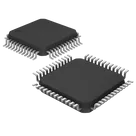
Controls
Properties
Availability & Pricing
Assets
- LQFP-48_7x7mm_P0.5mm-Footprint-S.kicad_mod
id=LQFP-48_7x7mm_P0.5mm-Footprint-S
- LQFP-48_7x7mm_P0.5mm-removebg-preview.png
id=LQFP-48_7x7mm_P0.5mm-removebg-preview

Welcome 👋
Flux accelerates your PCB design with AI.
Create your account to start using this component and bring your ideas to life.
zyra
copilot
Table