I2C Multiplexer Design Guide
0:58
Chat History
Project
Below is an outline for designing a step‐up (boost) converter using the XL6009 IC to convert a 7.4V LiPo battery supply to 12V. This process covers the key components and general wiring steps:
Schematic Design Steps
| Step | Description |
|---|---|
| 1. Component Placement | Place the XL6009 IC in your schematic. Prepare additional components for input/output filtering and the feedback network. |
| 2. Input Section | - Connect the 7.4V LiPo battery to the input (VIN) pin of the XL6009.- Add an input decoupling capacitor (typically 100µF and a 0.1µF high-frequency capacitor in parallel) to stabilize the voltage and filter noise. |
| 3. Inductor and Diode | - Select an inductor rated for the current demands of your circuit. The exact inductance value depends on switching frequency and load; common values range from 10µH to 22µH.- Connect the inductor between the switch node of the XL6009 and the anode of a Schottky diode. The Schottky diode (with a low forward drop) directs energy to the output during the charge phase. |
| 4. Output Filtering | - Place an output capacitor (typically around 100µF in parallel with a 0.1µF high-frequency capacitor) at the output to smooth the boosted voltage.- The diode’s cathode connects to this capacitor and the output node. |
| 5. Feedback Network | - Use a resistor divider from the output voltage to the feedback (FB) pin of the XL6009 to set the desired output voltage. The typical formula is: |
Vout=1.25×(1+R2R1)
| - For a 12V output, choose resistor values such that R2R1≈8.6. A common approach is to use a fixed resistor (or a trimmer) in place of R1 and a standard resistor for R2. |
| 6. Additional Considerations | - Ensure proper routing of ground connections and adequate layout practices to minimize switching noise.- Verify that all decoupling capacitors are placed close to the corresponding pins of the XL6009.- Check thermal and current specifications from the datasheet to choose components that can handle the expected load conditions. |
Block Diagram
Below is a Mermaid diagram illustrating the simplified block connections for the boost converter:
Diagram
Additional Notes
-
Feedback Resistor Calculation:
To achieve a 12V output, use the formulaVout=1.25×(1+R2R1).For example, selecting R2 = 10kΩ, then R1 should be approximately 87kΩ to yield:
1.25×(1+87/10)≈12.125 V.
You can adjust these values with standard resistor values or a trim potentiometer for fine tuning. -
Component Selection:
Make sure to reference the XL6009 datasheet for recommended values regarding the inductor, diode, and capacitor ratings given your load current and switching frequency.
This outline provides a clear design plan for a boost converter using the XL6009. Would you like guidance on adding these components to your Flux schematic next?
Select inductor based on values
Identify input capacitors
Output capacitor sizing
360 days
Ready.
U2
+5V
U4
PCIE_CLK_N
H3
R1
Resistance
330 Ω
J3
PCIE_RX_P
J4
J6
PCIE_CLK_P
D1
C2
Capacitance
0.1u F
H4
H2
+5V
H1
+3V3
J1
J2
R2
Resistance
10k Ω
Reviews

- Wirelessly connects nets on schematic. Used to organize schematics and separate functional blocks. To wirelessly connect net portals, give them same designator. #portaljharwinbarrozo43.0M
- Wirelessly connects power nets on schematic. Identical to the net portal, but with a power symbol. Used to organize schematics and separate functional blocks. To wirelessly connect power net portals, give them the same designator. #portal #powerjharwinbarrozo11.4M
- A generic fixed resistor for rapid developing circuit topology. Save precious design time by seamlessly add more information to this part (value, footprint, etc.) as it becomes available. Standard resistor values: 1.0Ω 10Ω 100Ω 1.0kΩ 10kΩ 100kΩ 1.0MΩ 1.1Ω 11Ω 110Ω 1.1kΩ 11kΩ 110kΩ 1.1MΩ 1.2Ω 12Ω 120Ω 1.2kΩ 12kΩ 120kΩ 1.2MΩ 1.3Ω 13Ω 130Ω 1.3kΩ 13kΩ 130kΩ 1.3MΩ 1.5Ω 15Ω 150Ω 1.5kΩ 15kΩ 150kΩ 1.5MΩ 1.6Ω 16Ω 160Ω 1.6kΩ 16kΩ 160kΩ 1.6MΩ 1.8Ω 18Ω 180Ω 1.8KΩ 18kΩ 180kΩ 1.8MΩ 2.0Ω 20Ω 200Ω 2.0kΩ 20kΩ 200kΩ 2.0MΩ 2.2Ω 22Ω 220Ω 2.2kΩ 22kΩ 220kΩ 2.2MΩ 2.4Ω 24Ω 240Ω 2.4kΩ 24kΩ 240kΩ 2.4MΩ 2.7Ω 27Ω 270Ω 2.7kΩ 27kΩ 270kΩ 2.7MΩ 3.0Ω 30Ω 300Ω 3.0KΩ 30KΩ 300KΩ 3.0MΩ 3.3Ω 33Ω 330Ω 3.3kΩ 33kΩ 330kΩ 3.3MΩ 3.6Ω 36Ω 360Ω 3.6kΩ 36kΩ 360kΩ 3.6MΩ 3.9Ω 39Ω 390Ω 3.9kΩ 39kΩ 390kΩ 3.9MΩ 4.3Ω 43Ω 430Ω 4.3kΩ 43KΩ 430KΩ 4.3MΩ 4.7Ω 47Ω 470Ω 4.7kΩ 47kΩ 470kΩ 4.7MΩ 5.1Ω 51Ω 510Ω 5.1kΩ 51kΩ 510kΩ 5.1MΩ 5.6Ω 56Ω 560Ω 5.6kΩ 56kΩ 560kΩ 5.6MΩ 6.2Ω 62Ω 620Ω 6.2kΩ 62KΩ 620KΩ 6.2MΩ 6.8Ω 68Ω 680Ω 6.8kΩ 68kΩ 680kΩ 6.8MΩ 7.5Ω 75Ω 750Ω 7.5kΩ 75kΩ 750kΩ 7.5MΩ 8.2Ω 82Ω 820Ω 8.2kΩ 82kΩ 820kΩ 8.2MΩ 9.1Ω 91Ω 910Ω 9.1kΩ 91kΩ 910kΩ 9.1MΩ #generics #CommonPartsLibraryjharwinbarrozo1.5M
- A generic fixed capacitor ideal for rapid circuit topology development. You can choose between polarized and non-polarized types, its symbol and the footprint will automatically adapt based on your selection. Supported options include standard SMD sizes for ceramic capacitors (e.g., 0402, 0603, 0805), SMD sizes for aluminum electrolytic capacitors, and through-hole footprints for polarized capacitors. Save precious design time by seamlessly add more information to this part (value, footprint, etc.) as it becomes available. Standard capacitor values: 1.0pF 10pF 100pF 1000pF 0.01uF 0.1uF 1.0uF 10uF 100uF 1000uF 10,000uF 1.1pF 11pF 110pF 1100pF 1.2pF 12pF 120pF 1200pF 1.3pF 13pF 130pF 1300pF 1.5pF 15pF 150pF 1500pF 0.015uF 0.15uF 1.5uF 15uF 150uF 1500uF 1.6pF 16pF 160pF 1600pF 1.8pF 18pF 180pF 1800pF 2.0pF 20pF 200pF 2000pF 2.2pF 22pF 20pF 2200pF 0.022uF 0.22uF 2.2uF 22uF 220uF 2200uF 2.4pF 24pF 240pF 2400pF 2.7pF 27pF 270pF 2700pF 3.0pF 30pF 300pF 3000pF 3.3pF 33pF 330pF 3300pF 0.033uF 0.33uF 3.3uF 33uF 330uF 3300uF 3.6pF 36pF 360pF 3600pF 3.9pF 39pF 390pF 3900pF 4.3pF 43pF 430pF 4300pF 4.7pF 47pF 470pF 4700pF 0.047uF 0.47uF 4.7uF 47uF 470uF 4700uF 5.1pF 51pF 510pF 5100pF 5.6pF 56pF 560pF 5600pF 6.2pF 62pF 620pF 6200pF 6.8pF 68pF 680pF 6800pF 0.068uF 0.68uF 6.8uF 68uF 680uF 6800uF 7.5pF 75pF 750pF 7500pF 8.2pF 82pF 820pF 8200pF 9.1pF 91pF 910pF 9100pF #generics #CommonPartsLibraryjharwinbarrozo1.5M
- A generic fixed inductor for rapid developing circuit topology. *You can now change the footprint and 3D model at the top level anytime you want. This is the power of #genericsjharwinbarrozo15.5k
- An electrical connector acting as reusable interface to a conductor and creating a point where external circuits can be connected.Terminal
- 47 kOhms ±5% 0.125W, 1/8W Chip Resistor 0805 (2012 Metric) Automotive AEC-Q200 Thick Film #forLedBlinkjharwinbarrozo1.2M
- 10uF Capacitor Aluminum Polymer 20% 16V SMD 5x5.3mm #forLedBlink #commonpartslibrary #capacitor #aluminumpolymer #radialcanjharwinbarrozo1.2M
- Yellow 595nm LED Indication - Discrete 1.7V 1206 (3216 Metric) #forLedBlinkjharwinbarrozo1.1M


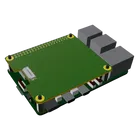
Template for Raspberry Pi 5 Model Shield. Include an official pinout so you will always know Raspberry Pi names, the alternative roles of pins, which one is SDA, or SCL, etc. On PCB you can find the 3D model of the Raspberry Pi itself along with the board outline on the silkscreen.
#RaspberryPi #Raspberry #RaspberryPi5 #raspberry #Pi #RPi #Shield #template #project #project-template
Pricing & Availability
Distributor | Qty 1 |
|---|---|
Arrow | $2.82–$4.14 |
Digi-Key | $7.16–$9.70 |
LCSC | $2.07–$2.45 |
Mouser | $7.94–$8.10 |
Verical | $5.24–$6.65 |
Assets

Raspberry Pi 5 Hat with PCIe Template-removebg-preview.png
Raspberry Pi 5 Hat with PCIe Template-removebg-previewThumbnailraspberry-pi-5-sbc-simple.step
raspberry-pi-5-3D3D Model
raspberry pi hat outline.svg
raspberry pi hat outlineDefaultControls
Welcome 👋
Flux helps you build PCBs faster with an AI teammate!
Create your account to collaborate, stay updated, fork your own version, and get instant answers from our AI agent.
gyatt