Part Metadata Review and Validation
1:24
Analyzing the schematic.
Analyzing the PCB layout.
Reviewing the bill of materials.
Searching web for: "Kingbright DC-10YWA official datasheet PDF"
Found 0 results.
Running multiple web searches.
Found 0 results.
Found 0 results.
Found 0 results.
Running multiple web searches.
Found 0 results.
Found 1 results.
Found 0 results.
Searching for a component.
Finished searching for a component.
Running multiple web searches.
Found 1 results.
Found 0 results.
Found 0 results.
Running multiple web searches.
Found 1 results.
Found 1 results.
Found 1 results.
Running multiple web searches.
Found 0 results.
Found 0 results.
Found 0 results.
Running multiple web searches.
Found 0 results.
Found 0 results.
Found 0 results.
Analyzing the PCB layout.
Reviewing the bill of materials.
Checking if I can make the changes for you.
Current part metadata
| Field | Value |
|---|---|
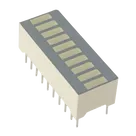
| Name | DC-10YWA |
| Manufacturer | Kingbright |
| MPN | DC-10YWA |
| Description | V.10A / IPC 7351B / 8.25 mm / Kingbright |
| Terminal count | 20 |
| Designator prefix | D |
| Part type | Not set |
| Datasheet URL | Not set |
| Symbol pins | 20 passive terminals |
| Footprint pads | 20 pads |
- The Datasheet field is currently empty.
- I searched the web for an official datasheet using the exact MPN and description-derived queries, but I did not find a verifiable official datasheet URL.
- Because I do not have a valid datasheet source, I cannot safely populate the Datasheet property yet.
- Without a datasheet, I also cannot complete the full metadata extraction or perform a reliable symbol/footprint cross-check against manufacturer dimensions and pin numbering.
- I can update the part project’s Datasheet property as soon as an official datasheet URL is available.
- If you paste the official PDF or product-page URL, I can then extract:
- electrical characteristics
- absolute maximum ratings
- recommended operating conditions
- pin descriptions
- package dimensions
- special features
- and check the symbol/footprint for manufacturing-risk mismatches
Preliminary risk check from the current project only
| Check | Status | Notes |
|---|---|---|
| Pin count consistency | Pass | Symbol shows 20 pins and footprint shows 20 pads |
| Pin naming quality | Risk | Pins appear as generic terminals with undefined names, so functional mapping is not validated |
| Package validation | Risk | No package type/code is set |
| Ordering validation | Risk | No datasheet URL, so ordering/package identity is not independently verified |
| Manufacturing validation | Incomplete | Pad count exists, but no datasheet dimensions or recommended land pattern to compare against |


Welcome 👋
Flux accelerates your PCB design with AI.
Create your account to start using this component and bring your ideas to life.
