Part Verification and Datasheet Update
1:49
Analyzing the PCB layout.
Analyzing the schematic.
Looking through a file.
Looking through a file.
Searching uploaded files.
Clarifying pin and component details.
Summarizing component specifications.
I reviewed the part metadata, current part project, and the official datasheet workflow. For part-project verification, the key checks are: confirm an existing
What I found
Part metadata
Datasheet URL, use the datasheet as the source of truth for package/pin metadata, and compare every terminal and footprint pad against the datasheet pin list .The project already has a
Datasheet URL set, so I did not need to search the web or update that property. The existing project properties show:- MPN: MP2731GQC-0000-Z
- Manufacturer: Monolithic Power Systems (MPS)
- Package: QFN
- Designator Prefix: IC
From the official datasheet, the device is:
- MP2731GQC-0000-Z
- Monolithic Power Systems, Inc.
- QFN-26 (3.5 mm x 3.5 mm) / mechanical package name 26L FCQFN (3.5 x 3.5 mm)
- 26 pins
- Description: 4.5 A, I2C-controlled switch-mode battery charger with NVDC power path and USB OTG
- Input operating range: 3.7 V to 16 V
- Sustainable voltage: 22 V
- Charge current: up to 4.5 A
- Switching frequency: 1.35 MHz
- OTG output: 4.8 V to 5.5 V
- OTG current: up to 3.0 A
- Junction temperature: -40°C to +125°C
- Package: QFN-26, 3.5 mm x 3.5 mm
The overall identity looks correct:
- MPN matches the datasheet.
- Manufacturer matches the datasheet.
- The project is clearly intended to represent the MP2731 charger PMIC.
- Many terminal names align with valid datasheet pins, such as IN, PMID, SW, BST, STAT, INT, NTC, VNTC, AGND, SYS, BATT, SDA, DISC, OTG, and ILIM.
There are major symbol/footprint consistency problems relative to the datasheet:
1. Pin count mismatch
- Datasheet: 26 pins
- Current schematic symbol: 30 terminal components
- Current footprint: 30 pads visible in the layout data
This is the biggest issue. The part project should match the datasheet pin count exactly, including any exposed pad only if the datasheet explicitly lists it as a pin . The extracted datasheet content did not identify an exposed pad pin for this package, so the current 30-pin symbol/30-pad footprint appears incorrect.
2. Extra pins that should not exist
The datasheet pin table ends at pin 26 , but the current symbol includes:
These are not present in the extracted datasheet pin list and should be flagged as likely erroneous.
3. Missing / misassigned repeated pins
The datasheet lists repeated functions at these exact pin numbers:
DPon pins 1 and 26PGNDon pins 5, 6, 7VREFon pins 13, 14SCLon pins 19, 20
In the current project:
- Pin 14 is PGND_4, but the datasheet says pin 14 should be a second VREF.
- Pins 28 and 29 are extra
PGNDentries not supported by the datasheet. - Pin 30 is an extra
SCLentry not supported by the datasheet. - The symbol uses split naming such as DP_1, DP_2, SCL_1, SCL_2, which is acceptable stylistically, but the pin numbers must still match the datasheet exactly.
The current terminals have
5. Pin types are all Pin Number and Pin Type, but I did not see meaningful Pin Description properties populated on the symbol terminals. The verification workflow expects short pin descriptions to be set from the datasheet for IC-style parts . So this is an incompleteness issue, even where pin names are otherwise correct.Unspecified
Every terminal I inspected had
Pin Type: Unspecified, including STAT, BST, IN, SYS, and others. For a part project, pin types should be assigned from the datasheet mapping rules, such as:IN-> Power InPGND,AGND-> GroundSTAT,INT-> OutputCE,OTG,DISC,ILIM,NTC-> InputSDA-> Bi-DirectionalSCL-> InputSYS, possiblyVREFdepending on intended modeling -> likely Power Out / Output context-dependent Using exact datasheet-derived pin typing is recommended for ERC quality .
The layout contains one footprint with 30 pads, mirroring the 30 terminals in the symbol. Since the official package is QFN-26 / 26L FCQFN, this strongly suggests the footprint is also mismatched to the datasheet package definition. In other words:
- Symbol pin count is wrong
- Footprint pad count is wrong
- Symbol and footprint are internally consistent with each other, but both are inconsistent with the official datasheet
- Datasheet URL: already present, no update needed
- MPN/manufacturer: correct
- Description/package family: broadly correct
- Symbol: mismatch
- Footprint: mismatch
- Pin descriptions: missing/incomplete
- Pin types: missing/incomplete
Most important mismatches
| Area | Expected from datasheet | Current project | Result |
|---|---|---|---|
| Pin count | 26 | 30 | Mismatch |
| Package name | QFN-26 / 26L FCQFN 3.5 x 3.5 mm | QFN only | Incomplete |
| Pin 14 | VREF | PGND_4 | Mismatch |
| Pins 27-30 | Do not exist | Present | Mismatch |
| Pin descriptions | Short datasheet-derived descriptions | Not populated | Missing |
| Pin types | Datasheet-mapped | All Unspecified | Missing |
If you want, I can do the next step and repair the part project by:
- correcting the terminal set to match the 26-pin datasheet,
- fixing wrong pin names/numbers,
- assigning proper pin types and short pin descriptions,
- and tightening the package metadata to QFN-26 / 26L FCQFN (3.5 x 3.5 mm).
Fix the part project
Add pin descriptions
Check footprint details
Save review notes
10 days
Ready.
Reviews

- Wirelessly connects nets on schematic. Used to organize schematics and separate functional blocks. To wirelessly connect net portals, give them same designator. #portaljharwinbarrozo43.0M
- Wirelessly connects power nets on schematic. Identical to the net portal, but with a power symbol. Used to organize schematics and separate functional blocks. To wirelessly connect power net portals, give them the same designator. #portal #powerjharwinbarrozo11.4M
- A generic fixed resistor ideal for rapid circuit topology development. Its footprint automatically adapts based on the selected package case code—supporting 0402, 0603, 0805, 1203, and many other standard SMD packages, as well as axial horizontal and vertical configurations. Save precious design time by seamlessly add more information to this part (value, footprint, etc.) as it becomes available. Standard resistor values: 1.0 ohm, 10 ohm, 100 ohm, 1.0k ohm, 10k ohm, 100k ohm, 1.0M ohm 1.1 ohm, 11 ohm, 110 ohm, 1.1k ohm, 11k ohm, 110k ohm, 1.1M ohm 1.2 ohm, 12 ohm, 120 ohm, 1.2k ohm, 12k ohm, 120k ohm, 1.2M ohm 1.3 ohm, 13 ohm, 130 ohm, 1.3k ohm, 13k ohm, 130k ohm, 1.3M ohm 1.5 ohm, 15 ohm, 150 ohm, 1.5k ohm, 15k ohm, 150k ohm, 1.5M ohm 1.6 ohm, 16 ohm, 160 ohm, 1.6k ohm, 16k ohm, 160k ohm, 1.6M ohm 1.8 ohm, 18 ohm, 180 ohm, 1.8K ohm, 18k ohm, 180k ohm, 1.8M ohm 2.0 ohm, 20 ohm, 200 ohm, 2.0k ohm, 20k ohm, 200k ohm, 2.0M ohm 2.2 ohm, 22 ohm, 220 ohm, 2.2k ohm, 22k ohm, 220k ohm, 2.2M ohm 2.4 ohm, 24 ohm, 240 ohm, 2.4k ohm, 24k ohm, 240k ohm, 2.4M ohm 2.7 ohm, 27 ohm, 270 ohm, 2.7k ohm, 27k ohm, 270k ohm, 2.7M ohm 3.0 ohm, 30 ohm, 300 ohm, 3.0K ohm, 30K ohm, 300K ohm, 3.0M ohm 3.3 ohm, 33 ohm, 330 ohm, 3.3k ohm, 33k ohm, 330k ohm, 3.3M ohm 3.6 ohm, 36 ohm, 360 ohm, 3.6k ohm, 36k ohm, 360k ohm, 3.6M ohm 3.9 ohm, 39 ohm, 390 ohm, 3.9k ohm, 39k ohm, 390k ohm, 3.9M ohm 4.3 ohm, 43 ohm, 430 ohm, 4.3k ohm, 43K ohm, 430K ohm, 4.3M ohm 4.7 ohm, 47 ohm, 470 ohm, 4.7k ohm, 47k ohm, 470k ohm, 4.7M ohm 5.1 ohm, 51 ohm, 510 ohm, 5.1k ohm, 51k ohm, 510k ohm, 5.1M ohm 5.6 ohm, 56 ohm, 560 ohm, 5.6k ohm, 56k ohm, 560k ohm, 5.6M ohm 6.2 ohm, 62 ohm, 620 ohm, 6.2k ohm, 62K ohm, 620K ohm, 6.2M ohm 6.8 ohm, 68 ohm, 680 ohm, 6.8k ohm, 68k ohm, 680k ohm, 6.8M ohm 7.5 ohm, 75 ohm, 750 ohm, 7.5k ohm, 75k ohm, 750k ohm, 7.5M ohm 8.2 ohm, 82 ohm, 820 ohm, 8.2k ohm, 82k ohm, 820k ohm, 8.2M ohm 9.1 ohm, 91 ohm, 910 ohm, 9.1k ohm, 91k ohm, 910k ohm, 9.1M ohm #generics #CommonPartsLibraryjharwinbarrozo1.5M
- A generic fixed capacitor ideal for rapid circuit topology development. You can choose between polarized and non-polarized types, its symbol and the footprint will automatically adapt based on your selection. Supported options include standard SMD sizes for ceramic capacitors (e.g., 0402, 0603, 0805), SMD sizes for aluminum electrolytic capacitors, and through-hole footprints for polarized capacitors. Save precious design time by seamlessly add more information to this part (value, footprint, etc.) as it becomes available. Standard capacitor values: 1.0pF, 10pF, 100pF, 1000pF, 0.01uF, 0.1uF, 1.0uF, 10uF, 100uF, 1000uF, 10000uF 1.1pF, 11pF, 110pF, 1100pF 1.2pF, 12pF, 120pF, 1200pF 1.3pF, 13pF, 130pF, 1300pF 1.5pF, 15pF, 150pF, 1500pF, 0.015uF, 0.15uF, 1.5uF, 15uF, 150uF, 1500uF 1.6pF, 16pF, 160pF, 1600pF 1.8pF, 18pF, 180pF, 1800pF 2.0pF, 20pF, 200pF, 2000pF 2.2pF, 22pF, 220pF, 2200pF, 0.022uF, 0.22uF, 2.2uF, 22uF, 220uF, 2200uF 2.4pF, 24pF, 240pF, 2400pF 2.7pF, 27pF, 270pF, 2700pF 3.0pF, 30pF, 300pF, 3000pF 3.3pF, 33pF, 330pF, 3300pF, 0.033uF, 0.33uF, 3.3uF, 33uF, 330uF, 3300uF 3.6pF, 36pF, 360pF, 3600pF 3.9pF, 39pF, 390pF, 3900pF 4.3pF, 43pF, 430pF, 4300pF 4.7pF, 47pF, 470pF, 4700pF, 0.047uF, 0.47uF, 4.7uF, 47uF, 470uF, 4700uF 5.1pF, 51pF, 510pF, 5100pF 5.6pF, 56pF, 560pF, 5600pF 6.2pF, 62pF, 620pF, 6200pF 6.8pF, 68pF, 680pF, 6800pF, 0.068uF, 0.68uF, 6.8uF, 68uF, 680uF, 6800uF 7.5pF, 75pF, 750pF, 7500pF 8.2pF, 82pF, 820pF, 8200pF 9.1pF, 91pF, 910pF, 9100pF #generics #CommonPartsLibraryjharwinbarrozo1.5M
- A generic fixed inductor suitable for rapid circuit topology development. The footprint automatically adapts based on the selected package, supporting standard SMD sizes (e.g., 0402, 0603, 0805) as well as well-known inductor packages such as SDR1806, PA4320, SRN6028, and SRR1260. Standard inductor values: 1.0 nH, 10 nH, 100 nH, 1.0 µH, 10 µH, 100 µH, 1.0 mH 1.2 nH, 12 nH, 120 nH, 1.2 µH, 12 µH, 120 µH, 1.2 mH 1.5 nH, 15 nH, 150 nH, 1.5 µH, 15 µH, 150 µH, 1.5 mH 1.8 nH, 18 nH, 180 nH, 1.8 µH, 18 µH, 180 µH, 1.8 mH 2.2 nH, 22 nH, 220 nH, 2.2 µH, 22 µH, 220 µH, 2.2 mH 2.7 nH, 27 nH, 270 nH, 2.7 µH, 27 µH, 270 µH, 2.7 mH 3.3 nH, 33 nH, 330 nH, 3.3 µH, 33 µH, 330 µH, 3.3 mH 3.9 nH, 39 nH, 390 nH, 3.9 µH, 39 µH, 390 µH, 3.9 mH 4.7 nH, 47 nH, 470 nH, 4.7 µH, 47 µH, 470 µH, 4.7 mH 5.6 nH, 56 nH, 560 nH, 5.6 µH, 56 µH, 560 µH, 5.6 mH 6.8 nH, 68 nH, 680 nH, 6.8 µH, 68 µH, 680 µH, 6.8 mH 8.2 nH, 82 nH, 820 nH, 8.2 µH, 82 µH, 820 µH, 8.2 mH #generics #CommonPartsLibraryjharwinbarrozo15.7k
- An electrical connector acting as reusable interface to a conductor and creating a point where external circuits can be connected.Terminal
- 47 kOhms ±5% 0.125W, 1/8W Chip Resistor 0805 (2012 Metric) Automotive AEC-Q200 Thick Film #forLedBlinkjharwinbarrozo1.2M
- 10uF Capacitor Aluminum Polymer 20% 16V SMD 5x5.3mm #forLedBlink #commonpartslibrary #capacitor #aluminumpolymer #radialcanjharwinbarrozo1.2M
- Yellow 595nm LED Indication - Discrete 1.7V 1206 (3216 Metric) #forLedBlinkjharwinbarrozo1.1M


MP2731GQC-0000-Z
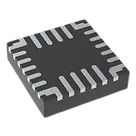
PDA's, Portable Audio/Video, Smartphones PMIC Charger IC Lithium Ion/Polymer 26-QFN (3.5x3.5) #CommonPartsLibrary #IntegratedCircuit #PowerManagement #Battery-charger
Properties
MP2731GQC-0000-Z
Monolithic Power Systems (MPS)
Integrated Circuits
IC
QFN
Pricing & Availability
See prices from popular manufacturers for your project.
Controls
Welcome 👋
Flux accelerates your PCB design with AI.
Create your account to start using this component and bring your ideas to life.