Chat
Welcome to Flux
Treat Flux like your intern. Tell it what you'd like to build and it'll get to work. You can also ask it questions, brainstorm ideas, and teach it your preferences. Learn More
Explain project
Write a project description
Find schematic issues
Create a test plan
Simulate a circuit
Prepare for Manufacturing
Component Selection Workflow
New Subsystem Wizard
Operating conditions
Part Specifications
Verify Part Details
Recommend similar parts
Ready.
can you explain each pins

2y
Certainly! The PIC16F84A-04E/P is a versatile and widely used microcontroller from Microchip Technology, equipped with a range of pins that serve various functions. Here's a brief explanation of each pin based on the project description:
-
VSS (Pin 5): This is the ground pin of the microcontroller. All the voltages are measured with respect to this ground.
-
RA3 (Pin 2): This is a bidirectional I/O pin in the Port A group. Can be used as a general-purpose input or output pin.
-
OSC1/CLKIN (Pin 16): Input pin for the oscillator. This is where the external clock source is connected to provide the necessary clock signals for the microcontroller operation.
-
MCLR(Pin 4): Master Clear (Reset) input. Applying a low signal to this pin resets the microcontroller. It's typically connected to a reset circuit. -
RB6 (Pin 12) and RB7 (Pin 13): These are bidirectional I/O pins in the Port B group. They can also serve special functions, like programming and debugging the microcontroller in certain modes.
-
RB4 (Pin 10), RB3 (Pin 9), RB2 (Pin 8), RB1 (Pin 7), and RB0/INT (Pin 6): These are general-purpose bidirectional I/O pins in the Port B group. RB0/INT can also serve as an external interrupt input.
-
RA2 (Pin 1), RA1 (Pin 18), and RA0 (Pin 17): These pins are part of Port A and are bidirectional I/O pins. They can be used as general-purpose input or output pins.
-
TOCKI/RA4 (Pin 3): This is another bidirectional I/O pin in Port A, which can also serve as an input for the Timer0 external clock input.
-
VDD (Pin 14): This is the positive power supply pin. It's where you connect the positive terminal of your power source (typically +5V).
-
OSC2/CLKOUT (Pin 15): This is an output pin from the oscillator. If using an external clock, it can output the oscillator signal.
-
RA0 (Pin 17), RA1 (Pin 18): Repeated for clarity, as mentioned above, they are general-purpose bidirectional pins in Port A.
This microcontroller is versatile due to its mix of general-purpose I/O, power pins, and specialized pins for oscillator input/output and reset functions. Each pin can be configured for different roles based on the needs of your project through the firmware written and uploaded to the PIC16F84A.
2y

Para conectar un display de siete segmentos de ánodo común al microcontrolador PIC16F84A-04E/P en Flux, sigue estos pasos generales. Entiendo que buscas cómo realizar las conexiones a nivel de esquemático, así que vamos a definir una conexión básica. Asumiré que dispones de resistencias limitadoras de corriente para cada segmento y usaré algunos pines digitales disponibles del PIC16F84A para controlar los segmentos del display.
Aquí hay una conexión ejemplo usando pines generales del PIC16F84A. Asegúrate de conectar cada segmento del display a través de una resistencia adecuada (por ejemplo, 330Ω) para limitar la corriente a través de los LEDs del display:
- Segmento A del display a RB0 (Pin 6) a través de una resistencia.
- Segmento B del display a RB1 (Pin 7) a través de una resistencia.
- Segmento C del display a RB2 (Pin 8) a través de una resistencia.
- Segmento D del display a RB3 (Pin 9) a través de una resistencia.
- Segmento E del display a RB4 (Pin 10) a través de una resistencia.
- Segmento F del display a RB5 (Pin 11) a través de una resistencia.
- Segmento G del display a RB6 (Pin 12) a través de una resistencia.
El ánodo común del display debería estar conectado al positivo de tu fuente de alimentación (por ejemplo, 5V), ya que es un display de ánodo común.
Conexiones
- Conectar RB0:1 a Segmento A a través de una resistencia.
- Conectar RB1:1 a Segmento B a través de una resistencia.
- Conectar RB2:1 a Segmento C a través de una resistencia.
- Conectar RB3:1 a Segmento D a través de una resistencia.
- Conectar RB4:1 a Segmento E a través de una resistencia.
- Conectar RB5:1 a Segmento F a través de una resistencia.
- Conectar RB6:1 a Segmento G a través de una resistencia.
- Ánodo común del display conectado a VDD.
- No te olvides de las resistencias limitadoras de corriente para proteger los LEDs del display.
- Asegúrate de configurar los pines RB0 a RB6 como salidas en tu código.
Esta explicación asume una configuración básica. Dependiendo de tu proyecto, es posible que necesites realizar algunos ajustes o configuraciones adicionales, especialmente en el código que controla estos pines para mostrar los números o caracteres deseados en el display.
2y
Para integrar un display de siete segmentos de ánodo común con el microcontrolador PIC16F84A-04E/P de manera efectiva, debes asegurarte de realizar las conexiones correctamente mediante resistencias de limitación de corriente y programar el PIC para controlar los segmentos del display. Aquí, profundizaré en los pasos específicos y te mostraré cómo asignar correctamente los pines del PIC16F84A a cada segmento del display de siete segmentos.
Conexiones Específicas
-
Conectar VDD a Ánodo Común:
- Conecta el ánodo común del display de siete segmentos a VDD (típicamente 5V).
-
Conectar Segmentos a Pines del PIC mediante Resistencias:
- Asegúrate de insertar una resistencia (entre 220Ω a 330Ω) en serie con cada segmento para limitar la corriente. Una resistencia demasiado baja puede dañar los LEDs del display, y una resistencia demasiado alta puede hacer que los LEDs brillen muy débilmente.
-
Asignaciones de Pines del PIC16F84A:
- Para simplificar, usaré los pines del Puerto B del PIC16F84A para controlar los segmentos del display de siete segmentos, asumiendo que RB0 a RB6 están disponibles para este propósito.
-
Conexiones Detalladas:
- Segmento A (Display): Conectar a RB0 (Pin 6) del PIC mediante una resistencia.
- Segmento B (Display): Conectar a RB1 (Pin 7) del PIC mediante una resistencia.
- Segmento C (Display): Conectar a RB2 (Pin 8) del PIC mediante una resistencia.
- Segmento D (Display): Conectar a RB3 (Pin 9) del PIC mediante una resistencia.
- Segmento E (Display): Conectar a RB4 (Pin 10) del PIC mediante una resistencia.
- Segmento F (Display): Conectar a RB5 (Pin 11) del PIC mediante una resistencia.
- Segmento G (Display): Conectar a RB6 (Pin 12) del PIC mediante una resistencia.
- DP (punto decimal, si se usa): Conectar a RB7 (Pin 13) del PIC mediante una resistencia, si deseas controlarlo.
-
Configura los Pines como Salidas: En tu programa, asegúrate de configurar los pines RB0 a RB6 como salidas. Esto se puede hacer configurando los bits respectivos en el registro TRISB del PIC a 0.
-
Control de Segmentos: Para representar un número o carácter en el display, debes encender o apagar los segmentos correspondientes. Esto se logra escribiendo valores adecuados en los pines RB0 a RB6. Por ejemplo, para mostrar el número "3", necesitas encender los segmentos A, B, C, D y G.
-
Ejemplo de Código: Aquí te dejo un pseudocódigo muy básico para configurar todos los pines del puerto B como salidas y encender algunos segmentos como ejemplo:
Pseudo
TRISB = 0x00; // Configura el puerto B como salida PORTB = 0b00100110; // Ejemplo para encender los segmentos A, D, y G
Dependiendo de tu proyecto, es posible que necesites utilizar multiplexación o un controlador externo si manejas múltiples display de siete segmentos o si los recursos del microcontrolador son limitados para la tarea que deseas realizar. La programación específica y la lógica para representar números y caracteres dependen del mapeo de segmentos que elijas y deben ser desarrolladas de acuerdo con los requisitos de tu proyecto.
2y
Someone is typing...
4
VSS
RA3
OSC1/CLKIN
~MCLR~
RB6
RB4
RB3
RA2
RB2
TOCKI/RA4
RB7
INT/RB0
RB5
VDD
OSC2/CLKOUT
RA0
RB1
RA1
Reviews

- Wirelessly connects nets on schematic. Used to organize schematics and separate functional blocks. To wirelessly connect net portals, give them same designator. #portaljharwinbarrozo43.0M
- Wirelessly connects power nets on schematic. Identical to the net portal, but with a power symbol. Used to organize schematics and separate functional blocks. To wirelessly connect power net portals, give them the same designator. #portal #powerjharwinbarrozo11.4M
- A generic fixed resistor for rapid developing circuit topology. Save precious design time by seamlessly add more information to this part (value, footprint, etc.) as it becomes available. Standard resistor values: 1.0Ω 10Ω 100Ω 1.0kΩ 10kΩ 100kΩ 1.0MΩ 1.1Ω 11Ω 110Ω 1.1kΩ 11kΩ 110kΩ 1.1MΩ 1.2Ω 12Ω 120Ω 1.2kΩ 12kΩ 120kΩ 1.2MΩ 1.3Ω 13Ω 130Ω 1.3kΩ 13kΩ 130kΩ 1.3MΩ 1.5Ω 15Ω 150Ω 1.5kΩ 15kΩ 150kΩ 1.5MΩ 1.6Ω 16Ω 160Ω 1.6kΩ 16kΩ 160kΩ 1.6MΩ 1.8Ω 18Ω 180Ω 1.8KΩ 18kΩ 180kΩ 1.8MΩ 2.0Ω 20Ω 200Ω 2.0kΩ 20kΩ 200kΩ 2.0MΩ 2.2Ω 22Ω 220Ω 2.2kΩ 22kΩ 220kΩ 2.2MΩ 2.4Ω 24Ω 240Ω 2.4kΩ 24kΩ 240kΩ 2.4MΩ 2.7Ω 27Ω 270Ω 2.7kΩ 27kΩ 270kΩ 2.7MΩ 3.0Ω 30Ω 300Ω 3.0KΩ 30KΩ 300KΩ 3.0MΩ 3.3Ω 33Ω 330Ω 3.3kΩ 33kΩ 330kΩ 3.3MΩ 3.6Ω 36Ω 360Ω 3.6kΩ 36kΩ 360kΩ 3.6MΩ 3.9Ω 39Ω 390Ω 3.9kΩ 39kΩ 390kΩ 3.9MΩ 4.3Ω 43Ω 430Ω 4.3kΩ 43KΩ 430KΩ 4.3MΩ 4.7Ω 47Ω 470Ω 4.7kΩ 47kΩ 470kΩ 4.7MΩ 5.1Ω 51Ω 510Ω 5.1kΩ 51kΩ 510kΩ 5.1MΩ 5.6Ω 56Ω 560Ω 5.6kΩ 56kΩ 560kΩ 5.6MΩ 6.2Ω 62Ω 620Ω 6.2kΩ 62KΩ 620KΩ 6.2MΩ 6.8Ω 68Ω 680Ω 6.8kΩ 68kΩ 680kΩ 6.8MΩ 7.5Ω 75Ω 750Ω 7.5kΩ 75kΩ 750kΩ 7.5MΩ 8.2Ω 82Ω 820Ω 8.2kΩ 82kΩ 820kΩ 8.2MΩ 9.1Ω 91Ω 910Ω 9.1kΩ 91kΩ 910kΩ 9.1MΩ #generics #CommonPartsLibraryjharwinbarrozo1.5M
- A generic fixed capacitor ideal for rapid circuit topology development. You can choose between polarized and non-polarized types, its symbol and the footprint will automatically adapt based on your selection. Supported options include standard SMD sizes for ceramic capacitors (e.g., 0402, 0603, 0805), SMD sizes for aluminum electrolytic capacitors, and through-hole footprints for polarized capacitors. Save precious design time by seamlessly add more information to this part (value, footprint, etc.) as it becomes available. Standard capacitor values: 1.0pF 10pF 100pF 1000pF 0.01uF 0.1uF 1.0uF 10uF 100uF 1000uF 10,000uF 1.1pF 11pF 110pF 1100pF 1.2pF 12pF 120pF 1200pF 1.3pF 13pF 130pF 1300pF 1.5pF 15pF 150pF 1500pF 0.015uF 0.15uF 1.5uF 15uF 150uF 1500uF 1.6pF 16pF 160pF 1600pF 1.8pF 18pF 180pF 1800pF 2.0pF 20pF 200pF 2000pF 2.2pF 22pF 20pF 2200pF 0.022uF 0.22uF 2.2uF 22uF 220uF 2200uF 2.4pF 24pF 240pF 2400pF 2.7pF 27pF 270pF 2700pF 3.0pF 30pF 300pF 3000pF 3.3pF 33pF 330pF 3300pF 0.033uF 0.33uF 3.3uF 33uF 330uF 3300uF 3.6pF 36pF 360pF 3600pF 3.9pF 39pF 390pF 3900pF 4.3pF 43pF 430pF 4300pF 4.7pF 47pF 470pF 4700pF 0.047uF 0.47uF 4.7uF 47uF 470uF 4700uF 5.1pF 51pF 510pF 5100pF 5.6pF 56pF 560pF 5600pF 6.2pF 62pF 620pF 6200pF 6.8pF 68pF 680pF 6800pF 0.068uF 0.68uF 6.8uF 68uF 680uF 6800uF 7.5pF 75pF 750pF 7500pF 8.2pF 82pF 820pF 8200pF 9.1pF 91pF 910pF 9100pF #generics #CommonPartsLibraryjharwinbarrozo1.5M
- A generic fixed inductor for rapid developing circuit topology. *You can now change the footprint and 3D model at the top level anytime you want. This is the power of #genericsjharwinbarrozo15.5k
- An electrical connector acting as reusable interface to a conductor and creating a point where external circuits can be connected.Terminal
- 47 kOhms ±5% 0.125W, 1/8W Chip Resistor 0805 (2012 Metric) Automotive AEC-Q200 Thick Film #forLedBlinkjharwinbarrozo1.2M
- 10uF Capacitor Aluminum Polymer 20% 16V SMD 5x5.3mm #forLedBlink #commonpartslibrary #capacitor #aluminumpolymer #radialcanjharwinbarrozo1.2M
- Yellow 595nm LED Indication - Discrete 1.7V 1206 (3216 Metric) #forLedBlinkjharwinbarrozo1.1M


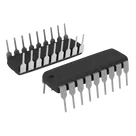
PIC series Microcontroller IC 8-Bit 4MHz 1.75KB (1K x 14) FLASH 18-PDIP
#Microcontroller #PIC16
#commonpartslibrary
Pricing & Availability
Distributor | Qty 1 |
|---|
Assets
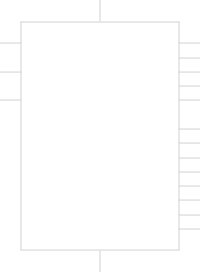
PIC16F84A-XXP
defaultDefaultDIP-18_W7.62mm.step
3D3D Modelkicad_mod
DIP-18_W7.62mm.kicad_mod
Footprint_V5Footprint
DIP-18_W7.62mm.png
DIP-18_W7.62mmThumbnailControls
Welcome 👋
Flux accelerates your PCB design with AI.
Create your account to start using this component and bring your ideas to life.
dubans
dubans
dubans
copilot
dubans
copilot
- Conexiones del Display al PIC:
- Segmento 'A' conectado a RB0 (P:INT/RB0:6)
- Segmento 'B' conectado a RB1 (P:RB1:7)
- Segmento 'C' conectado a RB2 (P:RB2:8)
- Segmento 'D' conectado a RB3 (P:RB3:9)
- Segmento 'E' conectado a RB4 (P:RB4:10)
- Segmento 'F' conectado a RB5 (P:RB5:11)
- Segmento 'G' conectado a RB6 (P:RB6:12)
- Cátodo común del display conectado a VSS (GND)
Código de muestra para el PIC16F84Arubendariof866
copilot