Nim Game Hardware Design
1:06
Addressing Flux help request.
Consulting Flux help tool.
Reading docs about How can I tell if my current Flux project view is read-only versus editable? What UI indicators show view-only mode, and how do I switch to an editable copy (fork/duplicate, open in editor, or request access) if I only have view permissions?.
Using help tool for Flux.
This is the most relevant entry I found related to the topic:
“Managing Project Access
For Individual Projects
To manage access to an individual project:
- Click the share button in the toolbar
- Configure anonymous access (public/private)
- Add specific users and assign permission levels
- Review current access in the sharing panel
Learn more about sharing”
89 days

0:52
Mapping NUCLEO Terminals.
Selecting Resistor Values.
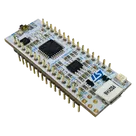
Goal: create the Nim schematic on your NUCLEO-G031K8 with 12 LEDs (GPIO sink at 3.3 V) and 6 switches to GND (internal pull-ups).
Plan:
- Add 12 LEDs + 12 series resistors, and 6 momentary switches.
- Wire: LED anodes to 3V3; LED cathodes via resistors to D2–D13. Switches from A0–A5 to GND_1/GND_2.
- Label by row/color; add notes for sink-drive and using internal pull-ups.
- Run ERC and tidy designators.
Please click Start on the plan bar to execute. If Start is still disabled, confirm the project is editable (not read-only) and that you’re in the editor for this project, not a published part preview.
Plan
- Develop a Nim game schematic on the NUCLEO-G031K8 board. The design uses a 3.3V LED supply with GPIO-sink drive for 12 LEDs (3 blue, 4 red, 5 green) each with its own series resistor, and 6 momentary pushbuttons connected to ground using MCU internal pull-ups. LEDs are to be mapped to digital pins D2–D13 and pushbuttons to analog pins A0–A5. The schematic must clearly label rows and signals and pass ERC.
#Implementation plan
-
Add Components and Create Groups
- Add the NUCLEO-G031K8 board to the project schematic.
- Add 12 LED components (grouped as 3 blue, 4 red, and 5 green) and label each LED with its color and row number.
- For each LED, add an associated series resistor to limit current so that the total LED current remains under 75 mA.
- Add 6 momentary pushbutton components and label them corresponding to rows/switches.
-
Map Components to MCU Pins
- Connect LED cathodes (through the series resistors) to digital pins D2 through D13 to facilitate GPIO-sink drive.
- Connect the anodes of all LEDs to the 3.3V supply.
- Connect each momentary switch from analog pins A0 through A5 to GND, noting that the MCU will activate internal pull-ups via firmware.
-
Label and Group Signals
- Clearly label rows for the LED groups and accompanying switches on the schematic.
- Add labels to individual signals (e.g., D2 to D13, A0 to A5) for clarity.
-
Finalize and Verify Schematic
- Run ERC to ensure that all connections are correctly made and meet the project requirements.
- Review the schematic for clean organization and proper component grouping, ensuring all notes on internal pull-ups and sink drive are documented.
#Success criteria
- The schematic includes all 12 LEDs each with a series resistor, properly connected to the 3.3V supply and digital pins D2–D13.
- Six momentary pushbuttons are connected to analog pins A0–A5 and correctly tied to ground with a note for MCU internal pull-ups.
- All rows and signals are clearly labeled and the ERC passes without errors.
Pick LED current
Choose resistor footprint
Select pushbutton part
Clarify pin mapping
Flux schematic labeling help
89 days


Welcome 👋
Flux accelerates your PCB design with AI.
Create your account to start using this component and bring your ideas to life.
