Component Pin Classification
Thought for 19 sec
Yes — you should keep the antenna area clear.
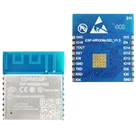
For a PCB antenna module like ESP-WROOM-02D, the practical rule is to reserve a dedicated antenna keep-out region and, ideally, place that antenna section at the board edge with some overhang. The placement guidance in the retrieved Flux docs explicitly says WiFi/BT modules with PCB antennas need an edge-placement hint so the antenna can extend past the board boundary, otherwise the module gets clamped inside the board and antenna performance is degraded .
Short answer
- Yes, keep clearance around the antenna area
- Yes, avoid copper in that zone
- Yes, avoid placing other components there
- Best practice: put the antenna end at the PCB edge, or slightly overhanging it
For the antenna keep-out area, you generally want to keep it free of:
- copper pours
- traces
- vias
- ground plane
- metal shields
- tall or dense components nearby
The placement guidance doesn’t spell out every forbidden object individually, but it is clear that the antenna region must be treated as a protected overhang/keep-out area for RF performance .
For your module
Using the datasheet-derived antenna zone you asked about earlier, the safe planning number is:
- Keep-out rectangle: 18 mm wide × 6 mm deep
So yes, you should preserve that 18 mm × 6 mm region around the antenna end as a clearance zone.
Practical recommendation
- If possible, place the module so the antenna end sits on the board edge
- Keep the 6 mm antenna zone free of copper and components
- Do not run traces or pours under that antenna section
- Do not place the antenna facing inward toward the rest of the layout if you can avoid it
If you want, I can help you turn that into:
- an exact layout rule / keep-out definition, or
- a placement constraint for this project.
Define antenna keepout
Add placement constraint
Check layout issues
To get started, talk to Flux or create a New Document.

Welcome 👋
Flux accelerates your PCB design with AI.
Create your account to start using this component and bring your ideas to life.