Exporting 3D Model Guide

How do I export 3d model of part?
365 days

0:29

Here’s how to export a 3D model (STL) of your board in Flux:
  1. Switch to the PCB editor and enter 3D view (via the view toggle in the top-right).
  2. Click the File menu in the upper-left.
  3. Select Export → 3D Model.
  4. Choose .stl as the file format and save.
For full details, see the “Additional File Exports” section of the Gerber Exports docs:
https://docs.flux.ai/flux/reference/gerber-export
Component's 3D model
Menu option grayed
Orientation adjustment query
Customization of export
365 days

To get started, talk to Flux or create a New Document.

Documents

    Documents are markdown text files which describe project goals, capture details, or even simulation outputs.

    Assets

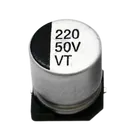
    RVT1H221M1010 220UF 50V.png

    RVT1H221M1010 220UF 50V.png

    RVT1H221M1010 220UF 50VThumbnail
    step

    RVT1H221M1010 220UF 50V/RVT1H221M1010 220UF 50V.3dshapes/CAP-SMD_BD10.0-L10.3-W10.3-LS11.3-FD.step

    RVT1H221M1010 220UF 50V/RVT1H221M1010 220UF 50V Model3D Model
    RVT1H221M1010220UF50V Symbol.svg

    RVT1H221M1010220UF50V Symbol.svg

    RVT1H221M1010220UF50V SymbolDefault
    kicad_mod

    RVT1H221M1010 220UF 50V/RVT1H221M1010 220UF 50V.pretty/CAP-SMD_BD10.0-L10.3-W10.3-LS11.3-FD.kicad_mod

    RVT1H221M1010 220UF 50V/RVT1H221M1010 220UF 50V FootprintFootprint

    RVT1H221M1010 220UF 50V

    RVT1H221M1010 220UF 50V thumbnail
    220uF 50V 230mA@120Hz ±20% SMD,D10xL10.2mm Aluminum Electrolytic Capacitors - SMD RVT1H221M1010 220UF 50V CAP-SMD_BD10.0-L10.3-W10.3-LS11.3-FD LCSC Part Number: C970698 JLCPCB Part Class: Extended Part Manufactured by DMBJ(振宝佳)

    Properties

    DMBJ(振宝佳)

    U

    RVT1H221M1010 220UF 50V

    C970698

    CAP-SMD_BD10.0-L10.3-W10.3-LS11.3-FD

    Aluminum Electrolytic Capacitors - SMD

    Extended Part

    220u

    F

    50

    V

    ±20

    %

    Aluminum Electrolytic

    Pricing & Availability

    See prices from popular manufacturers for your project.

    Controls