Part Information Review and Datasheet Update

Review all available part information (MPN, package, pin count, description, properties). If no datasheet URL is already set, search the web for the official datasheet and update the part's Datasheet property with the URL. Then cross-check the schematic symbol, footprint, and pin descriptions against the datasheet. Summarize key specs and flag any mismatches.
Thought for 10 sec
I can’t perform the requested part review right now because AI execution features are unavailable due to no available ACUs, so I’m unable to inspect the project, search datasheets, update properties, or cross-check symbol/footprint data in this session.
What remains to be done once ACUs are available:
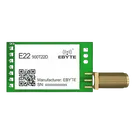
- Review the E22-900T22D part metadata: MPN, package, pin count, description, and properties.
- Locate the official manufacturer datasheet if the Datasheet property is missing.
- Update the part’s Datasheet property with the official URL.
- Cross-check schematic symbol pins, footprint pad count/order, and pin descriptions against the datasheet.
- Summarize key electrical/mechanical specs and flag any symbol/footprint/property mismatches.
Retry later
Manual check first
Inspect part properties
Verification checklist
To get started, talk to Flux or create a New Document.

Welcome 👋
Flux accelerates your PCB design with AI.
Create your account to start using this component and bring your ideas to life.