Part Information Review and Updates
Thought for 3 mins 28 sec
Review complete
Key specs from the datasheet
BQ24074RGTR summary
Symbol and pin cross-check
Pin-count check
Pin-type mismatches and issues
Flagged items
Probably acceptable
Pin description audit
Possible concern
I added the official TI datasheet URL to the project:
Datasheet URL=https://www.ti.com/lit/ds/symlink/bq24074.pdf
I checked the part project against the datasheet using the datasheet as the source of truth and counted the exposed pad as part of the package review, which is the correct validation approach for part projects
Key part information
Project vs datasheet
Table
| Field | Current project | Datasheet check | Status |
|---|---|---|---|
| MPN | BQ24074RGTR | Matches TI orderable part | OK |
| Manufacturer | Texas Instruments | Matches datasheet | OK |
| Description | Charger IC Lithium Ion 16-VQFN (3x3) | Functionally correct, but could be more specific | OK |
| Part type | Integrated Circuit | Correct, more specifically a 1-cell linear charger with power path | OK |
| Designator prefix | U | Correct for IC | OK |
| Datasheet URL | Missing before review | Official TI PDF found and added | Fixed |
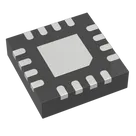
| Package text | 16-VQFN (3x3) in description | Datasheet shows VQFN (RGT), 16 pins, 3.0 mm x 3.0 mm, exposed thermal pad | Mostly OK |
Table
| Spec | Value |
|---|---|
| Function | 1-cell Li-Ion linear charger with dynamic power-path management |
| Charge current | Up to 1.5 A |
| Battery regulation voltage | 4.2 V |
| OUT regulation | 4.4 V nominal |
| Operating input range for BQ24074 | 4.35 V to 10.2 V |
| Input abs survival | Up to 26 V without damage, operation suspended |
| USB modes | 100 mA, 500 mA, or resistor-programmed input current limit |
| ILIM programmable range | Up to 1.5 A |
| Temperature | Junction operating range -40 C to 125 C |
| Thermal regulation | 125 C |
| Thermal shutdown | 155 C |
| Package | 16-pin VQFN (RGT) with exposed thermal pad |
- Datasheet package: 16 named pins + exposed thermal pad
- Current project terminals: 17
- Current footprint electrical pads visible: 17
That matches the expected electrical pin count from the datasheet. The skill guidance also explicitly requires exposed pads to be counted in the pin audit
Pin name / function review
Table
| Datasheet pin | Project terminal | Review |
|---|---|---|
| TS | TS | OK |
| BAT | BAT_2 | Electrically plausible, but naming differs from datasheet |
| BAT | BAT_3 | Electrically plausible, but naming differs from datasheet |
| CE | ~CE | Active-low semantics shown in symbol, but name differs from datasheet |
| EN2 | EN2 | OK |
| EN1 | EN1 | OK |
| PGOOD | ~PGOOD | Active-low semantics shown, but datasheet names it PGOOD |
| VSS | VSS | Name OK |
| CHG | ~CHG | Active-low semantics shown, but datasheet names it CHG |
| OUT | OUT_10 | Electrically plausible, but naming differs from datasheet |
| OUT | OUT_11 | Electrically plausible, but naming differs from datasheet |
| ILIM | ILIM | OK |
| IN | IN | OK |
| TMR | TMR | OK |
| ITERM | ITERM | OK |
| ISET | ISET | OK |
| Exposed thermal pad | EXP | Present, good |
Table
Table
| Terminal | Current pin type | Notes |
|---|---|---|
| ~CE | Input | Correct direction |
| EN1 | Input | Correct |
| EN2 | Input | Correct |
| ILIM | Input | Correct |
| TMR | Input | Correct |
| ITERM | Input | Correct |
| ISET | Bi-Directional | Reasonable, since it programs charge current and monitors current |
| ~PGOOD | Output | Correct as status output |
| ~CHG | Output | Correct as status output |
| BAT_2 | Bi-Directional | Reasonable for battery connection/sense |
| BAT_3 | Bi-Directional | Reasonable for battery connection/sense |
| TS | Input | Correct |
I did not find any visible
Pin Description properties on the terminal components.That means the symbol is currently missing short per-pin descriptions, which the part-project sync guidance recommends populating for clarity and ERC quality
Footprint cross-check
What looks correct
Table
| Item | Review |
|---|---|
| Package family | Asset name QFN50P300X300X100-17N.kicad_mod is consistent with 0.50 mm pitch, 3.0 mm x 3.0 mm, 1.0 mm height, 17 electrical pads |
| Electrical pad count | Layout shows 17 named electrical pads, matching 16 leads + exposed pad |
| Exposed pad presence | EXP exists, consistent with datasheet thermal pad requirement |
| Thermal-pad requirement | Datasheet says exposed pad is internally connected to VSS and must be tied to the same potential as VSS |
- The layout metadata also shows 5 additional mount-pad entries numbered
18to22. These do not appear to correspond to datasheet electrical pins. - They may be footprint-internal mechanical/helper objects rather than real package pins, but based on the available layout data I can only flag them for review.
Table
| Priority | Issue |
|---|---|
| High | Change VSS pin type from Power In to Ground |
| High | Change EXP pin type from Power In to Ground |
| Medium | Change IN from Input to Power In |
| Medium | Change OUT_10 and OUT_11 from Output to Power Out |
| Medium | Add Pin Description properties to all terminals |
| Low | Normalize symbol labels if you want exact datasheet naming, for example ~CE, ~PGOOD, ~CHG, BAT_2, BAT_3, OUT_10, OUT_11 |
If you want, I can make those symbol-property fixes next.
Fix all mismatches
Check decoupling issues
Document part audit
Thought for 1 sec
- Set Datasheet URL to "https://www.ti.com/lit/ds/symlink/bq24074.pdf"