Part Review and Datasheet Update

Review all available part information (MPN, package, pin count, description, properties). If no datasheet URL is already set, search the web for the official datasheet and update the part's Datasheet property with the URL. Then cross-check the schematic symbol, footprint, and pin descriptions against the datasheet. Summarize key specs and flag any mismatches.
Thought for 1 sec
I can’t run the requested review or update the Datasheet property right now because AI execution is unavailable due to no available ACUs.
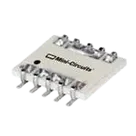
Current project context: BDCA-10-25+ appears to be an RF directional coupler described as Cellular/PCN/PCS, 800 MHz–2.5 GHz, 10.1 ±2 dB coupling, 50 W, 10-SMD flat leads, with 11 pads.
Still to do once ACUs are available:
- Inspect the part metadata: MPN, package, pin count, description, and properties.
- Check whether the Datasheet property is already populated.
- If missing, find the official manufacturer datasheet URL and update the part.
- Cross-check schematic symbol pins, footprint pads, and pin descriptions against the datasheet.
- Summarize key electrical/mechanical specs and flag mismatches.
Rerun part review
Find datasheet URL
Check pad mapping
List property cleanup
To get started, talk to Flux or create a New Document.