Part Review and Datasheet Update
4:35
Searching for datasheet details.
Checking the bill of materials.
Analyzing the PCB layout.
Analyzing the schematic.
Identifying terminal pins.
Searching the project.
Researching 3 web sources.
Searching properties.
Interpreting blank entries.
Searching 2 domains.
Found 1 results.
Found 1 results.
Found 1 results.
Clarifying property requirements.
Search complete — 29 results across 2 domains.
Researching 2 web sources.
Found 1 results.
Found 1 results.
Looking for "Identify the product, list all interface pin names and functions, give supply voltage, logic output voltage, measurement range, accuracy statements, and any mechanical dimensions or board size mentioned." in thermocouple.pdf
Looking for "Extract the breakout board pin descriptions, note the exact pin labels shown on the board, identify any shield or mounting pad descriptions, and mention board dimensions if provided." in connecting-the-max31855-thermocouple-amplifier-breakout-to-an-electric-imp.pdf
Extracting MAX31855 specs.
Searching the project.
Analyzing the PCB layout.
Identifying project components.
Searching 4 domains.
Looking for "Extract the exact device name, package, pin count, key electrical specs, thermocouple type support, supply range, operating temperature range, interface type, and any accuracy/resolution data." in MAX31855.pdf
Looking for "Give the IC pin table with pin numbers, pin names, and functions for the MAX31855 chip." in MAX31855.pdf
Inspecting asset details.
Searching 3 domains.
Searching component metadata.
Searching 3 domains.
Searching for datasheet.
Searching properties.
Assessing project data.
Search complete — 122 results across 5 domains.
Existing project properties
| Property | Current value | Status |
|---|---|---|
| Manufacturer Part Number | 269 | Present |
| Manufacturer Name | Adafruit | Present |
| Designator Prefix | U | Present |
| Datasheet URL | set to official MAX31855 PDF | Updated |
Device / board summary
| Item | Value |
|---|---|
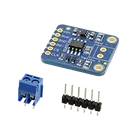
| Core IC | MAX31855 |
| Function | Cold-junction compensated thermocouple-to-digital converter |
| Interface | Read-only SPI-compatible |
| Resolution | 0.25 °C thermocouple reading |
| Supported thermocouple types | K, J, N, T, S, R, E |
| IC supply range | 3.0 V to 3.6 V |
| IC operating temperature | -40 °C to +125 °C |
| Typical K-type accuracy | ±2 °C from -200 °C to +700 °C |
| K-type measurement range | up to -200 °C to +1350 °C for the K variant |
| Conversion time | about 70 ms to 100 ms |
Breakout interface notes
Symbol vs datasheet / board docs
| Check | Result | Notes |
|---|---|---|
| Host-side SPI pins present | Mostly yes | VIN, 3VO, GND, CLK, DO, ~CS match the breakout interface |
| Thermocouple connection pins in symbol | Mismatch | The breakout board also has the thermocouple terminal connection, but the schematic symbol only shows 6 pins |
| Symbol pin count vs footprint pad count | Mismatch | Symbol has 6 terminals; footprint has 8 pads total |
| Pin descriptions populated | Mismatch | No terminal has a readable pin description property yet |
| Pin numbers present | Yes | 1 to 6 assigned on current symbol |
- Main pads:
VIN,3VO,GND,CLK,DO,~CS - Extra pads:
SH1,SH2
Current terminal audit
Flagged issues
| Area | Finding |
|---|---|
| MPN | 269 is an Adafruit product number, not the IC MPN |
| Package | No package/case code is set |
| Description | Current description is not usable as a part summary |
| Datasheet type | Current datasheet is for the IC, not a full board mechanical datasheet |
| Part identity | Project appears to mix breakout-board identity with chip datasheet metadata |
- Keep MPN as 269
- Keep manufacturer as Adafruit
- Keep the breakout footprint
- Add the 2 thermocouple terminals to the schematic symbol
- Use board-oriented descriptions for pins and part summary
- Change MPN to the exact MAX31855 variant
- Change manufacturer to Maxim/Analog Devices
- Use the 8-pin SO package
- Replace the breakout footprint
- Replace symbol pins with IC pins: GND, T-, T+, VCC, SCK, CS, SO, DNC
Main mismatches flagged
| Priority | Issue |
|---|---|
| High | Symbol has 6 pins, but the current footprint has 8 pads |
| High | GND is typed as Power In instead of Ground |
| High | Symbol likely omits the thermocouple terminal connections |
| Medium | Pin descriptions are missing |
| Medium | Part metadata mixes breakout-board product data with bare-chip datasheet data |
| Low | 3VO needs a clearer description because it behaves as a 3.3 V board rail, not just a generic input |
Set Datasheet URL to "https://cdn-shop.adafruit.com..."
Set Datasheet URL to "https://cdn-shop.adafruit.com/datasheets/MAX31855.pdf"
To get started, talk to Flux or create a New Document.

Welcome 👋
Flux accelerates your PCB design with AI.
Create your account to start using this component and bring your ideas to life.
