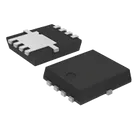
Part Review and Data Validation
Thought for 8 mins 9 sec
I reviewed the current part project and compared it against the official ST listing/datasheet URL already present in the project.
Summary
The project already has the official datasheet URL set to ST’s PDF, so there’s no missing Datasheet property to fill in. For part-project audits like this, the key checks are that the datasheet URL is canonical, project property names match Flux’s exact default labels, and the terminal count matches the datasheet exactly, including any exposed pads
What looks correct
Project metadata
Table
| Field | Current value | Assessment |
|---|---|---|
| Manufacturer Part Number | STL11N3LLH6 | Looks correct |
| Manufacturer Name | STMicroelectronics | Looks correct |
| Part Type | Transistors | Broadly correct, though MOSFET would be more specific if you want tighter classification |
| Designator Prefix | Q | Correct for a transistor |
| Datasheet URL | Official ST PDF | Correct / no update needed |
| Description | “N-channel 30 V, 6 m typ., 11 A STripFET H6 Power MOSFET in a PowerFLAT 3.3x3.3 package” | Consistent with ST headline specs |
- Type: N-channel STripFET H6 power MOSFET
- VDS: 30 V
- RDS(on): 6 mΩ typ.
- ID: 11 A
- Package: PowerFLAT 3.3 x 3.3
Table
- The symbol currently exposes 5 terminals: three source pins, one gate, one drain.
- All five terminals have Pin Type = Unspecified.
- I do not see pin descriptions populated for these terminals.
- For part verification, Flux guidance is to match the datasheet exactly and not leave pin metadata vague when the datasheet defines it
The footprint contains:
Likely mismatch
- The schematic symbol models 5 terminals, but the footprint appears to implement 8 copper pads.
- That is a possible pin-count mismatch.
- Flux’s part-sync guidance is explicit that the terminal count must match the datasheet exactly, including exposed/thermal pads
Because the datasheet text extraction available here did not expose the package figure’s pin legend cleanly, I can’t state with full confidence whether pads 6/7/8 are electrically duplicated source/drain lands or a separate exposed-pad convention. But as it stands, the project should be treated as needs verification.
Flagged issues
Table
| Issue | Severity | Notes |
|---|---|---|
| All terminal pin types are Unspecified | Medium | Reduces symbol quality/ERC usefulness |
| Terminal pin descriptions are missing | Medium | Should be short functional labels |
| Symbol shows 5 terminals while footprint shows 8 pads | High | Possible datasheet/footprint mismatch |
| Part Type is generic (Transistors) | Low | More specific MOSFET may be better |
| Package code property is not explicitly present as a dedicated property | Low | Could add PowerFLAT 3.3 x 3.3 / canonical case code |
- Set project-level properties more explicitly:
- Part Type → MOSFET
- Package or Case Code → PowerFLAT 3.3 x 3.3
- Set terminal metadata on S_1, S_2, S_3, G, and D
- Verify whether footprint pads 6/7/8 need matching symbol terminals or whether the footprint should be replaced with one whose electrical pad model matches the symbol
I can apply the project property cleanup next. For the symbol/terminal and footprint-side fixes, I’d want to handle those as follow-up edits after we confirm how ST defines pads 6/7/8 in this package.