Chat

Welcome to Flux

Treat Flux like your intern. Tell it what you'd like to build and it'll get to work. You can also ask it questions, brainstorm ideas, and teach it your preferences. Learn More

Explain this part
Write a part description
Describe each pin
Operating conditions
Electrical max ratings
Part Specifications
Application circuits
Verify Part Details
Recommend similar parts
Check availability & lifecycle
how do I use Flux?

@copilot how do I use Flux?
2y
Using Flux, the browser-based electronics CAD program for designing electrical schematics and laying out PCBs, involves several steps and resources to get you started efficiently.
  1. Start Your First Project: The quickest way to dive into Flux and begin a project is by starting a new file. You might want to sketch a simple circuit to get familiar with the interface.
  2. Explore the Interface: Familiarize yourself with the different panels and tools available in Flux. The main areas include the component library, the schematic editor, and the PCB layout editor.
  3. Add Components: You can add components to your schematic by searching in the component library and dragging them onto the canvas.
  4. Connect Components: Once you've placed your components, you can connect them by drawing wires. Make sure to pay attention to the connection points on each component.
  5. PCB Layout: After completing the schematic, you can switch to the PCB layout editor to design the physical board. Here, you'll place components and route traces between their pins according to your schematic.
  6. Documentation and Tutorials: Flux offers a range of resources to help you along the way, including detailed documentation, in-depth tutorials, and video example projects.
    • Help and Tutorials: Look into the provided help and tutorials for guidance on using Flux. These resources provide a good starting point for new users[1].
    • YouTube Videos: YouTube is a great place to find video tutorials, crash courses, and recorded events to help you use Flux[2].
    • Slack Community: If you encounter any issues or have questions, the Slack community is a great place to ask for help directly from the Flux team and other users[3].
  7. Act on Your Schematic: When you receive specific connection suggestions from support or tutorials, you can directly implement them in your schematic with the help of Flux's "Take Action" button[4].
By following these steps and utilizing the resources available, you'll be well on your way to mastering Flux for your electronic design projects. If you have any specific questions or need further assistance with a particular feature, feel free to ask!
2y
Someone is typing...
2
B
C
E

No files yet

Documents

    Documents are markdown text files which describe project goals, capture details, or even simulation outputs.

    Assets

    SOT-23.step

    SOT-23.step

    3D3D Model
    svg

    BC817-16W-7.svg

    BC817-16W-7Default
    image-removebg-preview.png

    image-removebg-preview.png

    image-removebg-previewThumbnail
    kicad_mod

    SOT-23.kicad_mod

    Footprint_V5Footprint

    MMBT2222ALT3G

    MMBT2222ALT3G thumbnail
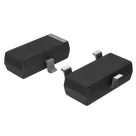
    Bipolar (BJT) Transistor NPN 40V 600 mA 300MHz 300 mW Surface Mount SOT-23-3 (TO-236) The MMBT2222ALT3G is a NPN general-purpose bipolar junction transistor (BJT) manufactured by onsemi, designed in a SOT-23 surface-mount package. It is the SMD version of the well-known 2N2222A transistor family, used for switching and signal amplification in compact electronic circuits.
    It is widely used in industrial, automotive (AEC-Q101 qualified variants), and general embedded systems due to its reliability, small size, and good electrical performance. Key Features NPN General-Purpose Transistor Suitable for switching and low-power amplification Collector-Emitter Voltage (Vceo) Up to 40 V Collector Current Up to 600 mA Power Dissipation Around 225–300 mW (depending on package conditions) High Frequency Performance Transition frequency up to ~300 MHz DC Current Gain (hFE) Typically ~100 at moderate currents Low Saturation Voltage Efficient switching performance for digital circuits SOT-23 Surface-Mount Package Compact footprint for modern PCB designs Wide Temperature Range Typically -55°C to +150°C RoHS / Lead-Free Compliant Environmentally compliant manufacturing Typical Applications LED switching circuits Relay driver stages MCU signal interfacing (Arduino, ESP32, etc.) Small motor drivers General signal amplification Automotive and industrial control circuits Important Note MMBT2222ALT3G = SMD version (SOT-23) Equivalent to 2N2222A (TO-92 through-hole version) in function, but not in physical package. 2N2222A SOT-23 #commonpartslibrary #transistor #bjt
    Properties

    Transistor

    onsemi

    MMBT2222ALT3G

    Q

    Pricing & Availability

    DPN

    Stock

    Qty 1

    3

    34K–110K

    $0.0116–$0.1372

    3

    0

    $0.00

    1

    7.2K

    $0.0451

    1

    0

    $0.16

    20

    0

    $0.00

    Controls