Importing to KiCad

import to kicad
It looks like there isn’t Flux documentation for exporting a project directly to KiCad (.kicad_sch/.kicad_pcb). This likely means Flux does not currently support exporting native KiCad project files.
If you need more details or want to request this feature, these resources may help:
Export options for KiCad
Manufacturing export steps
KiCad library import
Schematic import into Flux
Find KiCad migration guide
16
0
13
5
4
G2
3.3V_1
6
11
17
18
14
8
12
7
23
15
21
1
G1
2
ON/OFF
VBAT
20
9
22
VIN
PROGRAM
G3
19
3.3V_2
3
10

No files yet

Documents

    Documents are markdown text files which describe project goals, capture details, or even simulation outputs.

    Assets

    kicad_mod

    MODULE_DEV-15583-Footprint-S.kicad_mod

    Footprint-SFootprint
    DEV-15583.step

    DEV-15583.step

    3D3D Model
    Teensy 4.0 removebg-preview.png

    Teensy 4.0 removebg-preview.png

    Teensy 4.0 removebg-previewThumbnail

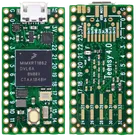
    Teensy 4.0

    Teensy 4.0 thumbnail
    RT1062 Teensy 4.0 i.MX ARM® Cortex®-M7 MPU Embedded Evaluation Board #teensy #teensy4 #teensy4.0 #teensy-4.0

    Properties

    Evaluation Platform

    SparkFun Electronics

    DEV-15583

    TEENSY

    Parametric

    Pricing & Availability

    DPN

    Stock

    Qty 1

    1

    0

    $20.94

    1

    0

    $0.00

    1

    0

    $32.3928

    1

    248

    $23.80

    2

    38–99

    $29.0506–$37.0389

    Controls