Chat

Welcome to Flux

Treat Flux like your intern. Tell it what you'd like to build and it'll get to work. You can also ask it questions, brainstorm ideas, and teach it your preferences. Learn More

Explain project
Write a project description
Find schematic issues
Create a test plan
Simulate a circuit
Prepare for Manufacturing
Component Selection Workflow
New Subsystem Wizard

Ready.


To get started, talk to Flux or create a New Document.

Documents

    Documents are markdown text files which describe project goals, capture details, or even simulation outputs.

    Assets

    step

    Kailh LP Choc PC Keycap.step

    Kailh LP Choc PC Keycap3D Model
    image.png

    image.png

    imageThumbnail
    stp

    RB-67-0-CEMENT.stp

    RB-67-0-CEMENT
    Raspberry-Pi logo.svg

    Raspberry-Pi logo.svg

    Raspberry-Pi logoDefault

    Pico Macro Keyboard

    Pico Macro Keyboard thumbnail
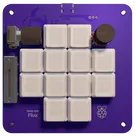
    The Pico Macro Keyboard is a compact and powerful macro pad built using the latest Raspberry Pi Pico 2. Inspired by the Figma Creator Micro, this keyboard is designed for customizable control and enhanced productivity. It features mechanical switches with per-key RGB lighting, along with two rotary encoders for added functionality. With a modular 4-layer PCB and fully customizable keymaps, it seamlessly integrates with any software, making it perfect for designers, gamers, and power users alike.

    Pricing & Availability

    Distributor

    Qty 1

    Arrow

    $3.25

    Digi-Key

    $7.98–$9.49

    LCSC

    $7.88–$8.01

    Mouser

    $9.41

    Verical

    $6.96–$7.25

    Controls