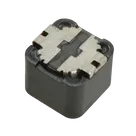
vasy_skral / L 1260 Inductor (12.00 x 12.00mm)

Loaded

5

Files

Schematic

PCB

Log InSign Up

Inductor Alternative Sourcing

flux

3:47

Accessing knowledge base.

Searching for a component.

Searching.

Finished searching for a component.

Searching for a component.

Searching library for: "33µH 3A 12x12mm inductor"

Creating search plan for: "33µH 3A 12x12mm inductor"

Searching.

Searching.

Searching.

Searching.

Found 68 results.

Searching: "33µH 3A 12x12mm inductor"

Finished searching for a component.

Searching for a component.

Searching library for: "Coilcraft 33uH"

Creating search plan for: "Coilcraft 33uH"

Searching.

Searching.

Searching.

Found 50 results.

Searching: "Coilcraft 33uH"

Finished searching for a component.

Based on Flux’s knowledge‐base guidance (“When selecting replacement parts, prioritize drop-in options…”), here’s a drop-in 33 µH variant with a ready-to-use SPICE model in Flux:

Table


PartInductanceRated Current (I max)DCR (max)FootprintMountSimulation SupportTrade-offs
DO3316P-333MLD33 µH2.1 A100 mΩIND-SMD_L12.5-W12.5Surface MountIncludes SPICE symbol & netlist in Flux library• 30% lower current rating vs. SRR1260A-330M (3 A)• ~1.7× higher DCR (→ more I²R loss)• Smaller core loss at high frequency
Trade-offs:
  • I max derated per knowledge-base: DO3316P’s 2.1 A rating still meets typical 60%-saturation rule for ≤1.3 A continuous.
  • DCR is higher, so expect ~2× more copper losses.
  • Footprint matches 12 × 12 mm, so it’s a mechanical drop-in.
  • SPICE model is supplied out-of-the-box, so you can run PCB-level power-rail simulations immediately.
Attach SPICE model
Add part to schematic
Higher current option
Verify saturation current
Calculate copper loss
274 days

​
Sign up to send

To get started, talk to Flux or create a New Document.

Reviews

Documents

    Documents are markdown text files which describe project goals, capture details, or even simulation outputs.

    Assets

    kicad_mod

    L_Bourns_SRR1260-Footprint-S.kicad_mod

    L_Bourns_SRR1260-Footprint-S2Footprint
    step

    L_Bourns_SRR1260-3D.step

    3D3D Model
    SRR1210-removebg-preview.png

    SRR1210-removebg-preview.png

    SRR1210-removebg-previewThumbnail
    air-core-inductor

    air-core-inductor

    air-core-inductorDefault

    L 1260 Inductor (12.00 x 12.00mm)

    L 1260 Inductor (12.00 x 12.00mm) thumbnail
    Wirewound Inductor size 12.00mm x 12.00mm Bourns SRR1260 #CommonPartsLibrary #Inductor #FixedInductor #SimplifiedFootprint #SRR1260

    Properties

    H

    Bourns Inc.

    bourns.com/docs/Product-Datasheets/SRR1210.pdf

    L

    creativecommons.org/licenses/by/4.0/

    Inductor

    Pricing & Availability

    Distributor

    Qty 1

    Controls

    Welcome 👋

    Flux accelerates your PCB design with AI.

    Create your account to start using this component and bring your ideas to life.

        Introducing AI Placement!
        AI Placement Demo

        AI-Powered Component Placement

        Let AI place your components intelligently. AI Placement analyzes your schematic and positions components for optimal routing, signal integrity, and board density.

        From Schematic to Layout in Seconds

        Skip the tedious manual placement. AI Placement generates a starting layout you can refine, saving hours of repetitive work on every new design.

        Works With Auto-Layout

        Pair AI Placement with Auto-Layout for a complete AI-driven PCB design flow — from component placement through trace routing, all with one click.

        Try it