ulasyalin / Seeed Studio XIAO nRF52840

Loaded

0

0

Files

Schematic

PCB

Log InSign Up

Chat

Welcome to Flux

Treat Flux like your intern. Tell it what you'd like to build and it'll get to work. You can also ask it questions, brainstorm ideas, and teach it your preferences. Learn More

Explain this part
Write a part description
Describe each pin
Operating conditions
Electrical max ratings
Part Specifications
Application circuits
Verify Part Details
Recommend similar parts
Check availability & lifecycle

​
Sign up to send

To get started, talk to Flux or create a New Document.

Reviews

Documents

    Documents are markdown text files which describe project goals, capture details, or even simulation outputs.

    Assets

    nRF52840.svg

    nRF52840.svg

    nRF52840Default
    ver-2023102316562.png

    ver-2023102316562.png

    2023102316562Thumbnail
    kicad_mod

    XIAO-nRF52840-SMD.kicad_mod

    XIAO-nRF52840-SMDFootprint
    step

    XIAO-nRF52840 V1.step

    XIAO-nRF52840 V13D Model

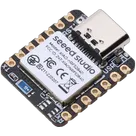
    Seeed Studio XIAO nRF52840

    Seeed Studio XIAO nRF52840 thumbnail
    XIAO nRF52840 Breakout with Centered Accelerometer, Precision Mounting Holes, and Additional Battery Connector

    Properties

    17.8

    mm

    102010448

    [0 mm, 0 mm]

    20.95

    mm

    Diagram


    nRF52840 MCU Accelerometer Battery Connector Mounting Holes

    [-0.05 mm, -0.075 mm]

    Microcontroller

    Seeed Studio

    seeedstudio.com/Seeed-XIAO-BLE-nRF52840-p-5201.html

    files.seeedstudio.com/wiki/XIAO-BLE/nRF52840_PS_v1.5.pdf

    U

    Pricing & Availability

    Distributor

    Qty 1

    Arrow

    $0.10

    Digi-Key

    $2.03

    LCSC

    $0.03

    Mouser

    $0.10

    Verical

    $0.05–$4.14

    Controls

    Welcome 👋

    Flux helps you build PCBs faster with an AI teammate!

    Create your account to collaborate, stay updated, fork your own version, and get instant answers from our AI agent.

        Introducing AI Placement!
        AI Placement Demo

        AI-Powered Component Placement

        Let AI place your components intelligently. AI Placement analyzes your schematic and positions components for optimal routing, signal integrity, and board density.

        From Schematic to Layout in Seconds

        Skip the tedious manual placement. AI Placement generates a starting layout you can refine, saving hours of repetitive work on every new design.

        Works With Auto-Layout

        Pair AI Placement with Auto-Layout for a complete AI-driven PCB design flow — from component placement through trace routing, all with one click.

        Try it