PCB Prototype Design Inquiry

1:35

Accessing knowledge base.

Running design review.

Organizing review tasks.

Resolving power connection issues.

Explaining power isolation issues.

Summarizing design and electrical checks.

Preparing final review summary.

요청하신 현재 PCB 점검 결과를 요약했습니다.
요약
  • Design Rule Checks: 1개 리뷰, 오류 41건
    • Manufacturer Part Number: 커넥터/소켓 등 41개 부품에 MPN 미지정 오류.
      • 영향: 제조·조달 단계에서 실제 부품 선정이 필요합니다.
      • 해결: 각 커넥터에 실제 MPN을 지정하거나, 지금은 자리표시자라면 나중에 지정할 계획으로 유지해도 됩니다.
  • Electrical Rule Checks: 1개 리뷰, 오류 2건
    • Missing Power: IC1 (TPS61088) 전원 관련 핀에 전원이 공급되지 않음으로 표시 2건.
      • 원인/의도: 현재 부스트 IC를 “무연결 placeholder”로 두었기 때문에 정상적인 경고입니다.
      • 해결: 실제 사용 시 VIN/VCC/GND 및 필수 수동부품(인덕터, 입출력 캐패시터 등)을 연결하면 해소됩니다. 지금 상태를 유지하려면 해당 핀(또는 컴포넌트)에 ERC 예외를 부여해 경고를 숨길 수 있습니다.
메모
  • Flux는 DRC/ERC가 실시간으로 동작합니다. 자리표시자(placeholder) 위주의 설계에서는 전원 미연결, MPN 미지정 경고가 흔히 발생합니다. 의도된 상태라면 문제는 아니며, 생산 준비 단계에서 정리하면 됩니다.
원하시면
  • 커넥터류에 실제 MPN을 일괄 지정
  • IC1의 특정 핀에 ERC 예외 적용 둘 중 원하는 작업을 알려주세요. 제가 바로 적용해 드릴 수 있습니다.
89 days
pin socket의 경우 어떻게 MPN을 지정하나요?
89 days

1:11

Answering about MPN for pin sockets.

Instructing on MPN assignment.

Exploring MPN assignment in Flux.

Navigating tool priorities for Flux.

Reading docs about How to assign a Manufacturer Part Number (MPN) to a component in Flux, especially a generic 'Pin Socket' connector. Steps to edit part properties in the Inspector, replace a generic part with a library part that has an MPN, and confirm in the BOM. Also how to add custom properties like Manufacturer and MPN if fields are missing. Include UI locations: right panel Inspector, Parts Library replace, and BOM view..

Choosing the right tool for Flux operations.

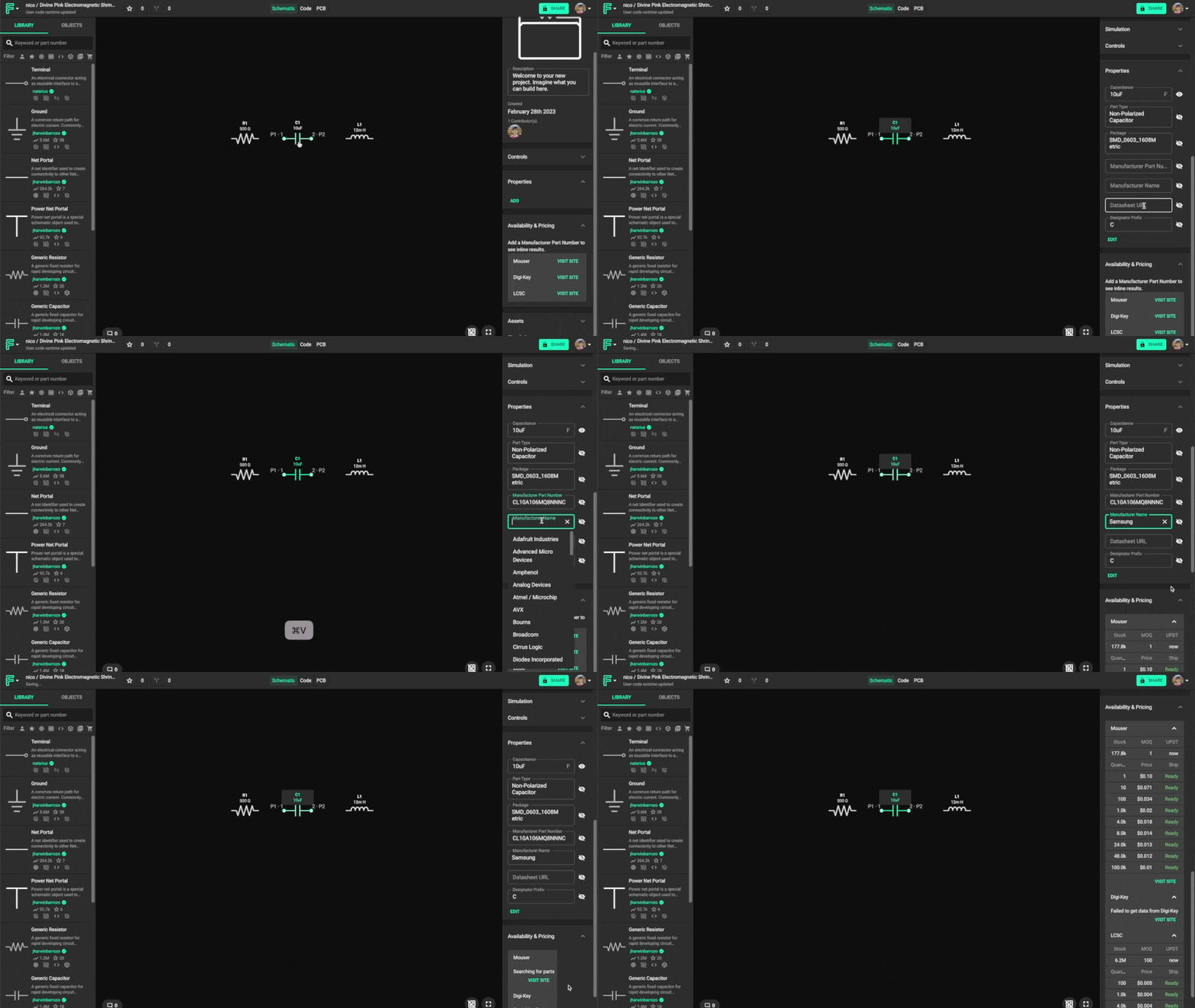
Flux 문서에 따르면 다음과 같습니다:
"Changing the Manufacturer Part Number
The last step in fully defining a generic component is adding a manufacturer part number. To change the manufacturer part number:
  1. Click on the component you want to modify to select it.
  2. Locate the Properties panel in the component's inspector on the right side.
  3. Find and edit the Manufacturer Part Number property.
  4. Optionally, modify the Manufacturer Name property.
  5. Right below the Properties panel you'll see the Pricing & Availability panel, which contains up-to-date info for the MPN you just added."
Image

Image

예시 MPN 요청
현재 부품에 MPN 입력
BOM 반영 확인
풋프린트 조건 전달
제조사 고정
89 days

To get started, talk to Flux or create a New Document.

Documents

    Documents are markdown text files which describe project goals, capture details, or even simulation outputs.

    Assets

    Assets are files uploaded to this project which can be used in various ways.

    Common Red Hoverboard thumbnail
    USB-Powered Seeed Studio XIAO nRF54L15 Module as Electrically Isolated Placeholder from TPS61088 Boost Converter Section

    Properties

    Diagram


    "Seeed Studio XIAO nRF54L15\nPowered via USB" "TPS61088 Placeholder\nElectrically Isolated"

    Diagram


    "XIAO Module\nPowered via USB" "TPS61088 Placeholder\nElectrically Isolated"

    Pricing & Availability

    Distributor

    Qty 1

    Arrow

    $3.63–$3.78

    Digi-Key

    $2.10

    LCSC

    $1.63

    Mouser

    $16.72

    Controls