skynnyuan / ZH63582

Loaded

0

2

Files

Schematic

PCB

Log InSign Up

更改组件名称指导

skynnyuan

skynnyuan

更改U1为ZH63582。我想确认新型号是否符合设计要求,请查找对应库件。
349 days

flux

1:29

我在 Flux 库中搜索了 “ZH63582”,未能找到现成的封装或符号来替换为 [U1]。
此外,目前您的原理图中还没有添加任何“U”前缀的芯片元件(只有各类端子)。
下一步,您可以:
1. 提供 ZH63582 的资料/数据手册,我可以帮您根据 Datasheet 创建定制元件(符号 + 封装)。
2. 或者您也可以 先将标准 QFN-24 符号添加到原理图,然后我协助您修改其属性为定制的 ZH63582。
请告诉我您的选择,或直接上传/提供该芯片的数据手册链接。
349 days
skynnyuan

skynnyuan

I don't have the ZH63582 datasheet. Please assist me in placing a generic QFN-24 chip and guide me to update its properties later for a custom ZH63582 part.
349 days

flux

3:23

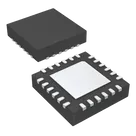
我可以在原理图中为您添加一个通用的 QFN-24 封装芯片(4×4mm,0.5mm 引脚间距)并将其命名为 U1。
请点击“执行”按钮来完成此操作。
完成后,您就可以在元件属性面板中更新该器件的厂商料号(MPN)为 ZH63582,以及填写其他定制信息。
349 days
skynnyuan

skynnyuan

ZH63582
349 days

flux

2:23

我已准备好在原理图中添加一个通用的 QFN-24 封装芯片(4×4mm、0.5mm 间距)作为 U1。您只需点击操作按钮。完成后,您可以在属性面板中将其 MPN 更新为 ZH63582。
349 days

​
Sign up to send

To get started, talk to Flux or create a New Document.

Reviews

Documents

    Documents are markdown text files which describe project goals, capture details, or even simulation outputs.

    Assets

    step

    QFN24-4*4-0.5mm-3D.step

    3D3D Model
    QFN-24-1EP_4x4mm_P0.5mm_EP2.6x2.6mm-removebg-preview.png

    QFN-24-1EP_4x4mm_P0.5mm_EP2.6x2.6mm-removebg-preview.png

    QFN-24-1EP_4x4mm_P0.5mm_EP2.6x2.6mm-removebg-previewThumbnail
    24Pins_EP

    24Pins_EP

    defaultDefault
    kicad_mod

    ZH63582

    Footprint-sFootprint

    ZH63582

    ZH63582 thumbnail
    FOC驱动器芯片

    Properties

    Integrated Circuit

    英能科技

    ZH63582

    U

    creativecommons.org/licenses/by/4.0/

    Pricing & Availability

    Distributor

    Qty 1

    Controls

    Welcome 👋

    Flux accelerates your PCB design with AI.

    Create your account to start using this component and bring your ideas to life.

        Introducing AI Placement!
        AI Placement Demo

        AI-Powered Component Placement

        Let AI place your components intelligently. AI Placement analyzes your schematic and positions components for optimal routing, signal integrity, and board density.

        From Schematic to Layout in Seconds

        Skip the tedious manual placement. AI Placement generates a starting layout you can refine, saving hours of repetitive work on every new design.

        Works With Auto-Layout

        Pair AI Placement with Auto-Layout for a complete AI-driven PCB design flow — from component placement through trace routing, all with one click.

        Try it