Adicionar Módulo MAX98357A
0:52
Reading docs about How do I find my own project in Flux, distinguish my account from the project owner, and open the 3D view or project list? I need step-by-step UI guidance..
Reading docs about How do I view a project's 3D model in Flux and where do I find my own projects or profile page? I need exact documentation wording for finding projects and viewing 3D..
Reading docs about Flux profile page projects grid search project cards find my own projects and identify project names. I need documentation text about where my projects are shown..
Considering project access steps.
Clarifying project instructions.
Ваш проект
| Что | Значение |
|---|---|
| Название | Arduino Nano Servo Carrier |
| Ссылка | Открыть проект |
| Описание | Cross-board carrier PCB for an Arduino Nano mounted underneath, with a 30V-to-5V converter module, OLED display, screw terminal input, servo headers, pushbutton, and mechanical access for USB and reset. |
- Нажмите на ссылку “Открыть проект” выше.
- Убедитесь, что открыто именно имя проекта Arduino Nano Servo Carrier.
- Перейдите в режим PCB.
- Внизу слева нажмите переключатель
3D/2D.
Your profile page displays all your projects, organized in a grid layout with thumbnails for easy visual recognition. Each project card shows:Project name
Last modified date
Visibility status (public or private)
Thumbnail preview of the designEfficiently find specific projects using the built-in filtering and search capabilities:Filter by status: View all projects, only public projects, or only private projects
Filter by type: Filter by schematic-only, PCB-only, or complete projects
Search: Use the search bar to find projects by name or description
- есть ли там реально PCB,
- есть ли 3D-модель,
- и присутствуют ли идеальный диод и предохранитель на 3 А.
- The breakout board shall prioritize easy bench use, quick signal identification, and low-friction assembly.
- The board shall support straightforward manual probing without requiring users to cross-reference external pinout documentation during normal use.
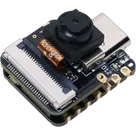
- Every XIAO ESP32S3 Sense header pin brought out to the breakout shall be clearly labeled on the board.
- Labels shall be placed so they remain understandable during assembly and while probing a populated board.
- Labeling shall be consistent across both sides/rows of headers and use the module’s intended signal naming convention.
- Pin labels shall be legible at breakout-board scale and arranged to minimize ambiguity.
- The board shall provide clear orientation cues so users can quickly identify header order, board direction, and module alignment.
- The labeling scheme shall reduce the risk of mirrored interpretation or accidental off-by-one probing/assembly errors.
- The board shall make it easy for a user to solder headers correctly on the first attempt.
- The breakout shall visually distinguish power-related pins from general I/O where practical.
- The finished board shall be understandable by a new user without relying on tribal knowledge or hidden assumptions.
- The breakout board pin labels, schematic naming, and any accompanying project documentation shall use the same naming scheme.
- The revised plan shall treat labeling clarity as a primary product requirement, not a cosmetic afterthought.
- Final header arrangement selection
- Detailed silkscreen artwork decisions
- Footprint-level implementation choices
- Routing, placement, or manufacturing optimization
- Optional feature additions beyond labeling/usability clarification


Welcome 👋
Flux accelerates your PCB design with AI.
Create your account to start using this component and bring your ideas to life.