Treat Flux like your intern. Tell it what you'd like to build and it'll get to work. You can also ask it questions, brainstorm ideas, and teach it your preferences. Learn More
Building a cheap drone flight controller, especially for a quadcopter with 4 motors, requires careful selection of components to balance cost and performance. Given your reference to the STM32F405RGT6TR microcontroller (MCU) in the project description, I'll assume you're considering this or similar MCUs for the heart of your flight controller. This choice is excellent due to its processing power, and availability of necessary peripherals. Here's a basic component list and some recommendations for a minimal yet functional flight controller:
Microcontroller
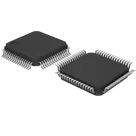
STM32F405RGT6TR: You're already considering this MCU, which is a solid choice due to its ARM® Cortex®-M4 core, 168MHz frequency, and extensive I/O capabilities suitable for interfacing with motor controllers, sensors, and communication modules.
Sensors
For stable flight, at least two sensors are crucial: a gyroscope (for rotational movement measurement) and an accelerometer (for measuring acceleration and inclination). Many chips come as combined IMU (Inertial Measurement Unit) sensors which include both.
MPU-6050: This is a cost-effective, widely used 6-axis gyro and accelerometer module. It interfaces through I²C, which is supported by the STM32F405.
Motor Drivers/ESCs (Electronic Speed Controllers)
You'll need ESCs to control the speed of each motor based on PWM (Pulse Width Modulation) signals from the MCU. There are specific ESCs for drones that come with firmware that might include features like OneShot42/125, DShot, etc.
Generic BLHeli_S ESCs (15-30A): These ESCs are inexpensive and support a wide range of communication protocols. They are suitable for small to medium-sized drones.
Motors
Choose brushless DC motors for your drone for efficiency and durability.
Generic 2204-2300KV Brushless Motors: These motors are typical for small to medium-sized quadcopters and are quite affordable.
Power Supply
LiPo Battery (3S or 4S): The battery choice depends on your motors and ESCs. A 1500mAh 3S ($11.1$V) or 4S ($14.8$V) LiPo battery is a common choice for small to medium drones.
Communication (Optional)
To add control or telemetry:
NRF24L01+ Module for basic remote control. Cheap and effective for short-range communication.
ESP8266 Module: Allows Wi-Fi communication, which you can use for telemetry or even controlling the drone via a smartphone or web interface.
Connections Suggestions:
Connect MPU-6050 SDA/SCL to STM32F405RGT6TR appropriate I²C pins (For simplicity, assuming I²C1, connect MPU-6050:SDA to STM32F405:PB7 (I2C1_SDA), MPU-6050:SCL to STM32F405:PB6 (I2C1_SCL)).
Connect Motor ESC signal lines to PWM-capable pins on the STM32F405RGT6TR (e.g., ESC1:Signal to STM32F405:PA0, ESC2:Signal to STM32F405:PA1, ESC3:Signal to STM32F405:PA2, ESC4:Signal to STM32F405:PA3).
Software
Betaflight/Cleanflight: If you're building a racing drone or something similar, using an existing open-source flight controller firmware like Betaflight or Cleanflight can speed up your development significantly. You'd need to make sure your MCU and peripheral choices are compatible.
This setup provides a good starting point for a budget-friendly drone capable of stable flight, with potential for further expansion and enhancement based on specific needs or goals. Adjustments may be needed based on the exact requirements, size, and weight of the drone you're aiming to build.
2y
Someone is typing...
2
No files yet
Reviews
Documents
Documents are markdown text files which describe project goals, capture details, or even simulation outputs.
lukica
copilot
- STM32F405RGT6TR: You're already considering this MCU, which is a solid choice due to its ARM® Cortex®-M4 core, 168MHz frequency, and extensive I/O capabilities suitable for interfacing with motor controllers, sensors, and communication modules.
Sensors- MPU-6050: This is a cost-effective, widely used 6-axis gyro and accelerometer module. It interfaces through I²C, which is supported by the STM32F405.
Motor Drivers/ESCs (Electronic Speed Controllers)- Generic BLHeli_S ESCs (15-30A): These ESCs are inexpensive and support a wide range of communication protocols. They are suitable for small to medium-sized drones.
Motors- Generic 2204-2300KV Brushless Motors: These motors are typical for small to medium-sized quadcopters and are quite affordable.
Power Supply- LiPo Battery (3S or 4S): The battery choice depends on your motors and ESCs. A 1500mAh 3S ($11.1$V) or 4S ($14.8$V) LiPo battery is a common choice for small to medium drones.
Communication (Optional)- NRF24L01+ Module for basic remote control. Cheap and effective for short-range communication.
- ESP8266 Module: Allows Wi-Fi communication, which you can use for telemetry or even controlling the drone via a smartphone or web interface.
Connections Suggestions:- Connect MPU-6050 SDA/SCL to STM32F405RGT6TR appropriate I²C pins (For simplicity, assuming I²C1, connect MPU-6050:SDA to STM32F405:PB7 (I2C1_SDA), MPU-6050:SCL to STM32F405:PB6 (I2C1_SCL)).
- Connect Motor ESC signal lines to PWM-capable pins on the STM32F405RGT6TR (e.g., ESC1:Signal to STM32F405:PA0, ESC2:Signal to STM32F405:PA1, ESC3:Signal to STM32F405:PA2, ESC4:Signal to STM32F405:PA3).
Software