Chat
Thought for 8 mins 55 sec
Below is a clear, design-focused explanation of this project, what it represents in Flux, how the signals are organized, and how you can build on it effectively.
Image
Project overview and purpose
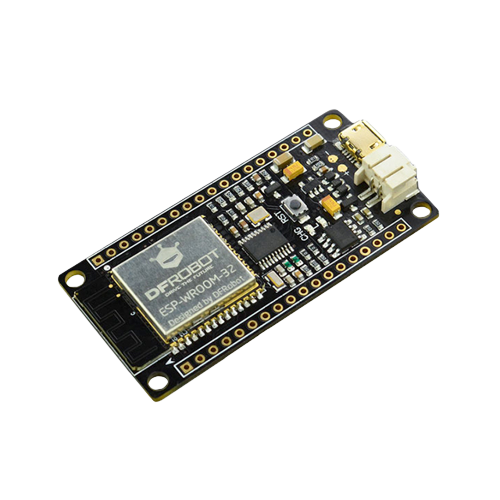
- What this is: A schematic shell exposing the I/O and power rails of the DFRobot FireBeetle ESP32 board DFR0478 as a set of labeled terminals. It is intended to be the anchor in a larger design (carriers, shields, or sensor/actuator add-ons).
- Board intent (from datasheet):
- Working voltage: 3.3 V
- Input voltage: 3.3 V to 5 V
- Power options: USB or 3.7 V external LiPo; “both USB and external DC can charge the Lipo battery directly”
- Deep-sleep current: 10 µA
- Average working current: 80 mA
- MCU module: dual-core ESP32-class (Tensilica LX6), 240 MHz, 520 KB SRAM, 16 Mbit Flash
- Wireless: Wi‑Fi 802.11 b/g/n; Bluetooth v4.2 BR/EDR/BLE
- Interfaces supported (default Arduino mapping): Digital I/O: 10; Analog inputs: 5; SPI: 1; I2C: 1; I2S: 1
- LED_BUILTIN: D9
- Dimensions: 24 × 53 mm; mounting holes inner dia 3.1 mm / outer dia 6 mm
- Development support: Arduino, ESP-IDF, MicroPython; “one-key downloading”
- Source: “FireBeetle ESP32 IOT Microcontroller (Supports Wi‑Fi & Bluetooth) SKU: DFR0478” Datasheet/PDF
What’s in this Flux project now
- This schematic exposes the FireBeetle’s connections purely as terminals (no nets have been defined yet). You can think of it as a breakout/reference symbol to hook up your external circuitry.
- You’ll connect your peripherals to these terminals and then add nets and any needed passives on your schematic.
Core interfaces exposed in the schematic
- Power rails:
- I2C:
- SPI:
- UART:
- I2S/audio and related clock/data lines (as labeled here):
- Analog-labeled inputs:
- Control and utility:
How these pieces interact (step by step)
- Powering the board
- Feed VCC from USB (~5 V) or a 3.7 V LiPo (per datasheet: “supports USB charging” and “both USB and external DC can charge the Lipo battery directly”), and use 3V3 as the regulated logic rail. Tie grounds to GND.
- Datasheet details to consider in your system design:
- Working voltage: 3.3 V
- Input voltage: 3.3 V to 5 V
- Average working current: 80 mA
- Max discharge current (battery path): 600 mA
- Max charge current: 500 mA
- Programming and development
- The board supports “one-key downloading” and works with Arduino, ESP-IDF, and MicroPython (datasheet). This allows straightforward firmware iteration over USB.
- Peripherals and signals
- I2C peripherals connect to SDA/IO21 and SCL/IO22.
- SPI peripherals connect to MOSI/IO23, MISO/IO19, SCK/IO18 and a chosen CS on one of the linked GPIOs.
- UART devices use IO1/TXD and IO3/RXD.
- Audio/I2S or clocked interfaces can use the labeled clock/data lines as appropriate to your firmware configuration.
Key technologies and dependencies
- Wireless (datasheet): Wi‑Fi 802.11 b/g/n; Bluetooth v4.2 BR/EDR/BLE.
- Development environments (datasheet): Arduino, ESP-IDF, MicroPython; “one-key downloading” convenience.
- Timing references (datasheet): On-board 40 MHz and 32.768 kHz crystals.
Design choices, trade-offs, and optimizations
- Dual power input (USB vs LiPo): Flexibility for mobile or tethered applications. Trade-off is managing battery charging currents (datasheet lists maximum charge current 500 mA) and ensuring your system’s peak draw ≤ the “support maximum discharge current” (600 mA) spec.
- 3.3 V logic rail: Clear logic-level boundary for peripherals; requires level translation when interfacing to 5 V-only devices.
- Low-power capabilities: The datasheet cites deep-sleep current of 10 µA; leveraging deep sleep yields excellent battery life, at the cost of wake-up latency and need for careful peripheral state management.
- Compact footprint: At 24 × 53 mm, the board integrates radio + charging + MCU in a small area; thermal and connector real estate on add-on boards should be planned accordingly.
Current project status (in Flux) and challenges
- Schematic status: No nets have been defined yet; all pins are currently standalone terminals for DFR0478.
- Next tasks you’ll likely tackle:
- Define power nets and distribution (decide whether your add-on uses VCC directly or the regulated 3V3).
- Wire your peripherals to the appropriate terminals and name nets for clarity.
- Add required passives for bus integrity (see below).
- Use the canonical Ground symbol for ground connections (best practice to improve readability and copper fills).
Performance considerations (system-level, based on datasheet)
- Power budget: Size upstream supplies and traces for at least the datasheet’s average current (80 mA) plus peripheral loads; if running from battery, be mindful of the board’s “support maximum discharge current” (600 mA) and “support maximum charge current” (500 mA).
- RF co-existence: The board integrates Wi‑Fi/BLE; keep noisy high-current switching or long-antenna cables isolated on your carrier where possible, and avoid routing aggressive clocks immediately adjacent to antenna keep-out on the physical board (applies during layout of your add-on).
Real-world applications this supports well
- Battery-powered IoT nodes with Wi‑Fi/BLE.
- Sensor/actuator control with I2C/SPI/UART add-ons.
- Audio streaming/processing demos via I2S as supported in your firmware stack.
- Rapid prototyping in Arduino/MicroPython with ultra-low-power standby modes.
Areas for improvement and future enhancements
- Power decoupling on your add-ons:
- Per best-practice guidance, include a parallel combination of a 100nF Capacitor, a 1uF Capacitor, and a 10uF Capacitor near each device’s supply pins to cover both high- and low-frequency transients.
- When selecting capacitors, ensure they operate at no more than 60% of their maximum rated voltage.
- I2C bus robustness:
- Add pull-ups (e.g., 4.7k Resistor) to SDA/IO21 and SCL/IO22 on the 3.3 V rail (if not already present in your stack).
- ESD/Transient protection for field wiring:
- Clear net naming and documentation:
- Name nets to match firmware roles (e.g., “IMU_SDA”, “IMU_SCL”, “FLASH_CS”) and tag voltage domains.
- Schematic readability:
- Replace the terminal-based ground with the canonical Ground symbol throughout for clarity and better PCB copper handling.
Scalability ideas
- Standardized headers: Add consistent pin headers for I2C, SPI, UART, power breakout to scale to multiple peripherals easily.
- Modular add-ons: Split sensors/actuators into reusable modules; maintain consistent net names and interface pin orders.
- Power domain planning: If peripherals draw bursts beyond the FireBeetle’s discharge support, consider local regulators and bulk storage on add-on boards sized to your transient load.
Design and implementation steps you can follow next
- Power architecture:
- Buses and peripherals:
- Grounding:
- Use Ground symbols for all returns; plan for a continuous ground reference on the PCB.
- Firmware alignment:
- Map nets to the terminal labels you connect so your code’s pin configuration and the schematic remain consistent.
If you want, I can:
- List and group all terminals you plan to use and propose exact net names.
- Suggest a minimal passive set (decoupling and pull-ups) tailored to your specific peripherals.
- Help wire this schematic step-by-step so it’s ready for PCB layout.

axl2023
copilot
axl2023
copilot
- Módulo nRF24L01: Este módulo proporcionará la funcionalidad inalámbrica para enviar y recibir comandos a distancia.
- Driver de motor: Un módulo controlador de motor (como el L298N o el TB6612FNG) es necesario para interactuar con el motor DC, ya que el ESP32 por sí solo no puede proporcionar la corriente o voltaje necesario para la mayoría de los motores DC.
- Motor DC: El componente que quieres controlar.
Conexiones para nRF24L01- Connect P:MOSI/IO23 to nRF24L01:MOSI
- Connect P:MISO/IO19 to nRF24L01:MISO
- Connect P:SCK/IO18 to nRF24L01:SCK
- Connect P:IO5/D8 to nRF24L01:CSN
- Connect P:IO2/D9 to nRF24L01:CE
- Además, asegúrate de conectar GND a GND y VCC (del nRF24L01) a 3V3 en el FireBeetle ESP32.
Conexiones del Driver de Motor y Motor DC- Conectar el VCC y GND del driver de motor a una fuente de alimentación adecuada que coincida con las especificaciones de tu motor DC.
- Conectar los terminales del motor DC a las salidas del módulo de control de motor.
- Conectar los pines de control del módulo de control de motor a pines GPIO disponibles en el FireBeetle ESP32. Por ejemplo, si usas un L298N, puedes usar los pines IO0 y IO4 (pines GPIO digitales) para controlar la dirección y velocidad (a través de PWM).
SoftwareRF24. Para el FireBeetle ESP32, usarás el IDE de Arduino o un entorno similar para programarlo. Aquí hay un esquema básico de lo que necesitarás en tu código: