UID Retrieval Assistance
Thought for 24 sec
The most relevant entry I found says this is usually a permissions issue: the part can be published, but still not searchable/usable by you unless the project’s sharing permissions allow it.
Understanding Permissions
Publishing a component to the library doesn't automatically make it publicly accessible to all users. Only people specified in your project's permissions can find and use your component in the library.
This permission-based approach gives you control over who can access your components:Private components: Set permissions to limit access to just yourself or your team
Public components: Set permissions to "Everyone" to make your component available to the entire Flux communityBy default, a project's permissions are set to Private, meaning only you can access it.
To manage permissions:Click on the "Share" button in the menu of your project
Adjust the permissions as needed
Publish the changes for the new permissions to take effect in the libraryRemember that a change to your permissions is a change to your project, and must be published again to be reflected in the library.
So the exact steps are:
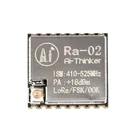
- Open the Ra-02 part project (the project that represents Ra-02).
- Click Share.
- Set permissions so you (or Everyone) has access.
- Publish to library again so the permission change takes effect.
- Go back to your project and search/add it from the library.
If you’re not the owner of that Ra-02 part project, you won’t be able to do steps 2-4 yourself; you’ll need the owner to grant you access (or make it public) and re-publish.
Show all schematic parts
Check ERC/DRC issues
Search Ra-02 library
How to use inspector
Name
Pin #
Type
Current
Max Current
Part Type
Terminal Order
GND
1
Ground
0.1A
0.1A
Terminal
GND
2
Ground
0.1A
0.1A
Terminal
3.3V
3
Power In
0.1A
0.1A
Terminal
RESET
4
Input
0.02A
0.02A
Terminal
DIO0
5
Ground
0.02A
0.02A
Terminal
DIO1
6
Ground
0.02A
0.02A
Terminal
DIO2
7
Ground
0.02A
0.02A
Terminal
DIO3
8
Ground
0.02A
0.02A
Terminal
GND
9
Ground
0.1A
0.1A
Terminal
DIO4
10
Ground
0.02A
0.02A
Terminal
DIO5
11
Ground
0.02A
0.02A
Terminal
SCK
12
Input
0.02A
0.02A
Terminal
MISO
13
Bi-Directional
0.02A
0.02A
Terminal
MOSI
14
Input
0.02A
0.02A
Terminal
NSS
15
Input
0.02A
0.02A
Terminal
GND
16
Ground
0.1A
0.1A
Terminal
Ai-Thinker-Ra-02
vasyl
vasyl
Image