Connecting Circuit Components
0:28
Chat History
Project
Help
下面是与“如何检查 PCB 布局布线问题”相关的 Flux 官方文档,按相关性排序:
-
PCB Design Rule Checks (DRC) in Flux — Understanding DRC in Flux
- 描述 Flux 持续后台运行 DRC 的方式,包括检查间距、线宽、孔径、丝印重叠等。
- 链接:https://docs.flux.ai/flux/tutorials/pcb-design-review#understanding-drc-in-flux
-
PCB Design Rule Checks (DRC) in Flux — Best Practices for DRC
- 指导如何设置制造商约束、及时修复违规、查看所有警告并进行最终检查。
- 链接:https://docs.flux.ai/flux/tutorials/pcb-design-review#best-practices-for-drc
-
Getting Started in Flux: PCB Layout and Routing Guide — Troubleshooting Common Issues
- 包含布线常见问题及解决方法,如无法改变线宽、差分对路由、via 放置等。
- 链接:https://docs.flux.ai/flux/Introduction/getting-started-in-flux--pcb-layout-and-routing
-
The Flux PCB Editor: Layout Design and Routing — Troubleshooting Common Issues
- 针对 DRC 违规和部件放置、路由困难的常见场景及解决建议。
- 链接:https://docs.flux.ai/flux/reference/reference-pcb-editor#troubleshooting-common-issues
您可以点击相应链接了解详细步骤和操作。如需进一步帮助,请告诉我!
292 days

0:37
Chat History
Project
Review (ERC/DRC)
Smart Via
微信图片_20250609110800.png
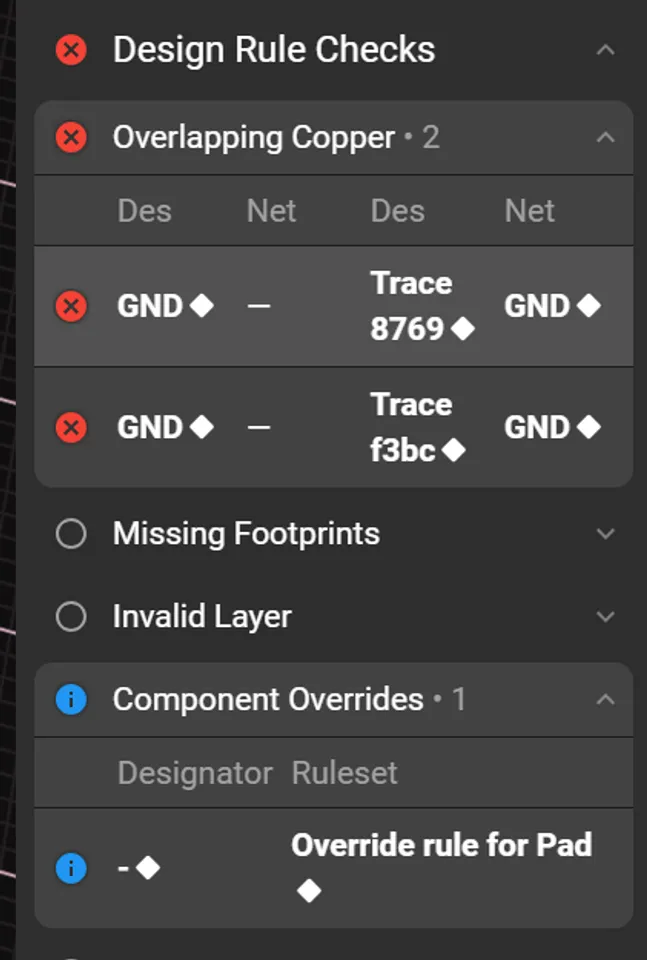
下面的错误属于 “Overlapping Copper” 违规,意思是在同一个 GND 网线上,有两段布线彼此重叠,导致多余的铜箔相撞/短接。
原因:
- Trace 8769 与 Trace f3bc 都连到 GND,但是它们在布局上互相覆盖或紧贴。
- Flux 的 DRC 视为潜在短路或制造问题,故报错提醒。
如何修复:
- 切换到 PCB 视图,打开 DRC 面板定位到这两个违规项。
- 在 2D 视图中放大查看重叠区域,选中其中一条多余的轨迹段。
- 按
Delete键或右键 → “删除” 将重叠的那一段铜线移除。 - 如果确实需要两条并行走线,请保持它们之间至少等于规则中指定的最小间距。
- 重新运行 DRC(Flux 会自动触发)确认 Overlapping Copper 警告已消失。
完成上述操作后,GND 网的重复/重叠铜箔就会被清理干净,DRC 错误亦可解除。
高亮重叠区域
修改最小间距
刷新并查看DRC
并行走线间距
292 days
Ready.
H3
H4
R1
Resistance
1000 Ω
PowerNet2
PowerNet1
R2
Resistance
1000 Ω
LED2
LED1
Reviews

Welcome to your new project. Imagine what you can build here.
Properties
Properties describe core aspects of the project.
Pricing & Availability
Distributor | Qty 1 |
|---|
Assets
No assets added.
Controls
Welcome 👋
Flux helps you build PCBs faster with an AI teammate!
Create your account to collaborate, stay updated, fork your own version, and get instant answers from our AI agent.