Troubleshooting Trace Routing
Thought for 39 sec
Flux routing only starts from a pad trace handle (the small white dot). If you are clicking elsewhere, it will look like you “can’t run traces”.
This is what the Flux documentation says about starting a trace (verbatim):
How to Start a TraceTo begin creating a trace:
- Hover your cursor over the pad where you want to start routing.
- A small white dot will appear on the pad—this is the trace handle.
- Click the white dot to begin routing your trace.
- Move your cursor to define the path. Click to add waypoints, and double-click to finish the trace.
Note: you can press the letter "F" at any time to change the direction of the trace angle (elbow).
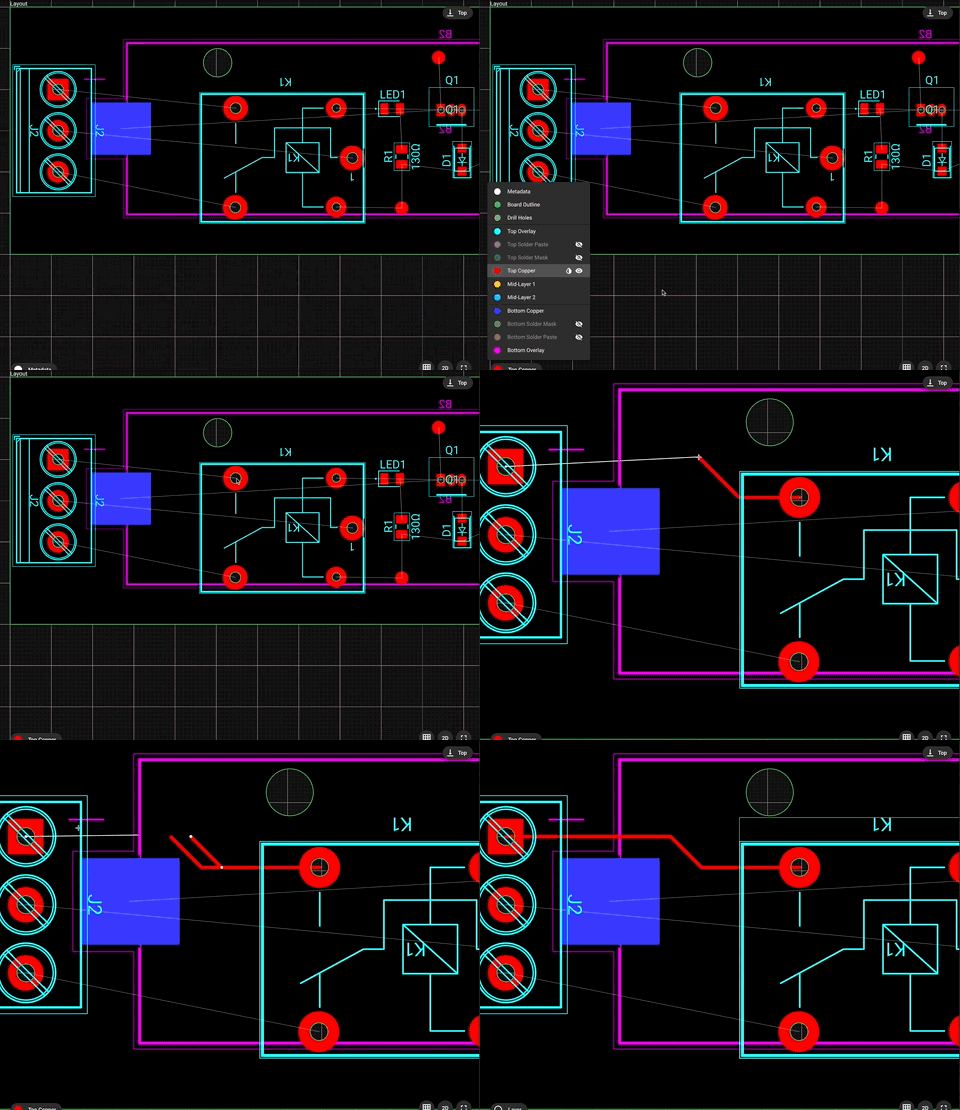
Image
If you are clicking the white dot on a pad and nothing happens, tell me what you click (pad, via, trace end, etc.) and whether you see the white dot appear when hovering.
Check DRC airwires
Inspect net routing
Find missing footprints
Locate specific part

Welcome 👋
Flux helps you build PCBs faster with an AI teammate!
Create your account to collaborate, stay updated, fork your own version, and get instant answers from our AI agent.